AltStable Sync -- Forever Edition
- By
Save and load UI setups, action bars, keybindings, and macros across your World of Warcraft Forever characters.
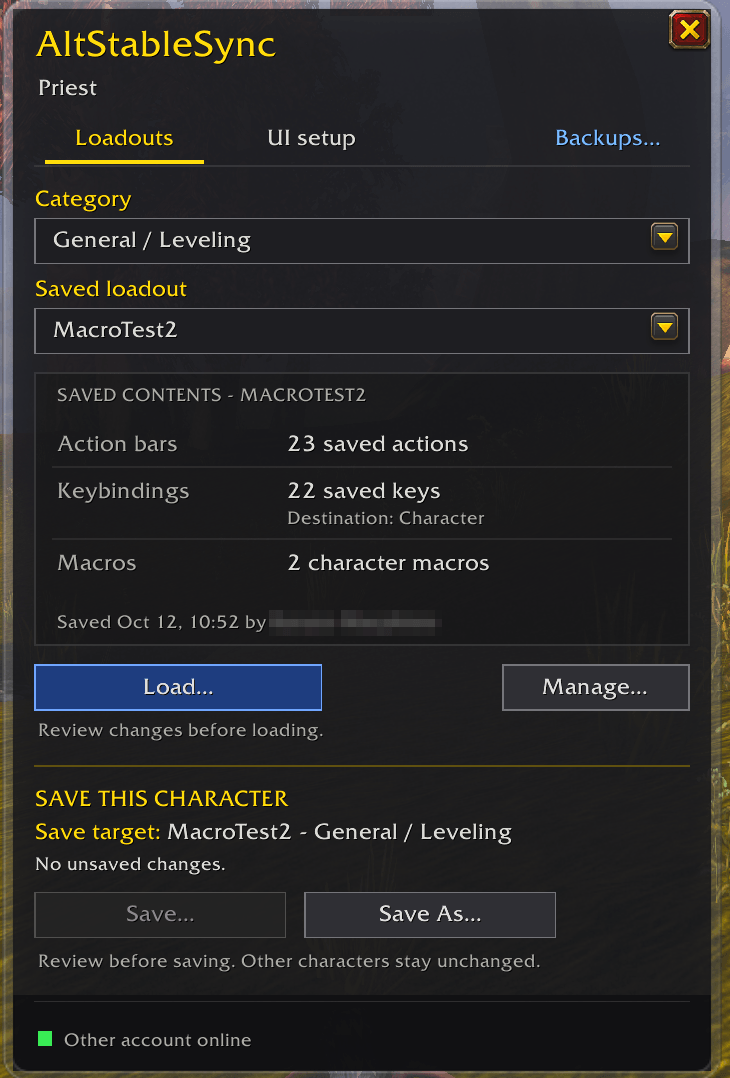
panel.png
Description
AltStable Sync (Forever Edition)
Choose a saved setup, preview it, and load it. Save only when you want to.
You spend an evening getting a character's action bars, keybindings and macros just right. Then you log in an alt of the same class and it all starts from nothing. AltStable Sync saves that setup as a loadout, and loads it on any character of that class: after showing you exactly what will change, and after taking a backup.
Nothing touches your character on its own. Not at login, not when you change zones, not when something arrives from your other account: your bars, keys and macros change only when you confirm a Load or a Restore in its preview. A saved loadout changes when you save it, or when your other account saves a newer version of it (see below).
What a loadout holds
- Your action bars: every bar, including the stance and form pages (druid forms, warrior stances, rogue stealth). Spells, items and macros.
- Spell ranks done right. A spell on its top rank loads as the highest rank the character knows. A rank you chose on purpose stays that rank.
- Your pet bar, one per pet family: your bear's bar isn't your cat's.
- Your keybindings for those bars, written to the character's own keybindings.
- Your character macros, created or updated to match. Account macros are never changed.
Loading
Load… shows the plan first, bar by bar: what goes where, which slots empty, which keys move, which macros are created or updated. Then:
- A backup is taken first, every time.
- Each change is checked after it's made.
- What this character can't use yet stays empty. A level 12 alt loading your level 60 setup gets what it knows. The rest of the slots stay free and fill in on a later load, once it learns those spells.
- Combat stops it. A load interrupted by combat stops cleanly. Undo it from the window, or load again.
- Account keybindings? If the character uses your account keybindings, the load first offers to give it its own copy, as a separate step with its own button.
Saving
The lower half of the window is Save this character:
- Save… updates the loadout this character last loaded: the save target, named in the window. Browsing other loadouts never changes it. The review shows every slot and key that changes before anything is saved.
- Save As… makes a new loadout, in a category you pick: one per specialization of your class, plus General / Leveling.
- Saving from a lower-level alt keeps what it can't see. Spells the alt doesn't know yet stay in the loadout instead of being erased.
Other characters keep their own setup until they load the new version.
Backups
Every load and restore takes a backup first. Backups… lists the last 10 for the character, plus its very first. Restore… puts the bars and keys back as they were in the backup, and the character macros the load changed. Macros the load created stay. Anything it can't put back (an item no longer in your bags, a macro you've deleted since) is listed in the preview first, and left as it is. Back up now (or /altsync backup) saves your setup whenever you like: before you try something, or right after a button moved by mistake. It holds every bar, the keys on your main action bar and pet bar (on character keybindings), and your pet's bar if one is out, and it never touches your bars. Slots it can't put back exactly (a flyout, a companion) are listed and left out. Restoring it leaves keys you bind later, and never recreates or edits a macro: a macro slot comes back only if that macro is unchanged. Your pet's bar comes back with that pet out, without autocast. With 10 backups already, it shows which one it would drop first. If nothing changed since your last one, it says so and takes nothing.
Your other WoW account
The included AltStableSync Link addon shares your saved loadouts with your other WoW account on the same Battle.net account, while both are online. They appear in its list, and nothing is loaded on any character until you load it there. When you save a loadout on one account, the other account's copy is updated to that version automatically; its characters keep their bars until they load it.
If both accounts changed the same loadout, you get both versions, never a merge. Pick one with Manage… > Resolve…. /altsync link off turns sharing off.
Getting started
- Click the minimap button (or its entry in the minimap's addon list), press your key binding (Key Bindings > AltStableSync), or type /altsync to open the window. Right-click the button for your backups.
- On a character whose bars you like: Save As…, give it a name and a category, review, save.
- On another character of that class: pick it under Saved loadout, Load…, review, load.
Commands: /altsync, /altsync minimap, /altsync saveas, /altsync save, /altsync list, /altsync load, /altsync backups, /altsync backup, /altsync restore, /altsync rename, /altsync delete, /altsync conflicts, /altsync link, /altsync status
Good to know
- Loadouts are per class. A Priest's loadouts are for priests.
- Out of combat only. Loading, saving and restoring wait for combat to end.
- Racial abilities aren't swapped between races. A slot holding another race's racial is left for you to fill.
- UI setups are coming. The UI setup tab (your Edit Mode layout and UI settings) says so until it's ready.
Found a bug? Have an idea?
AltStable Sync is made and tested by one person, so your reports are how problems on other classes and setups get found: open an issue on GitHub. A Lua error helps the most (turn them on with /console scriptErrors 1, or use BugSack), with the output of /altsync status. Ideas are welcome too.
A companion to AltStable, the alt overview, by the same author. Each works without the other. Source and licence: github.com/Spotnick2/AltStableSync (MIT; embedded libraries keep their own licences).
AltStable Sync -- Forever Edition Team