GuildHelper (Guild-GroupFinder, Share/Trade Profession/Items, Guild-Invites, ...)
- By
GuildHelper gives your guild its own window with a dashboard, an extended member list, a guild group finder, guild members on the world map, and quick guild invites from chat.
GuildHelper gives your guild its own window with a dashboard, an extended member list, a guild group finder, guild members on the world map, and quick guild invites from chat.
Many features share data between guild members who also use GuildHelper (item level, professions, specs, main character). Members without the addon are still listed with all data the game provides.
Features
Dashboard
- Message of the day and guild information.
- Guild statistics: members online / total, members with GuildHelper, average item level of online members.
- "Who is where": online members grouped by zone. Click a name to open the member in the member list.
- Guild news.
- "My guild card": your rank, your public note and, with the right to see it, your officer note.
- Guild professions: how many members have each profession and the best skill level.
Members
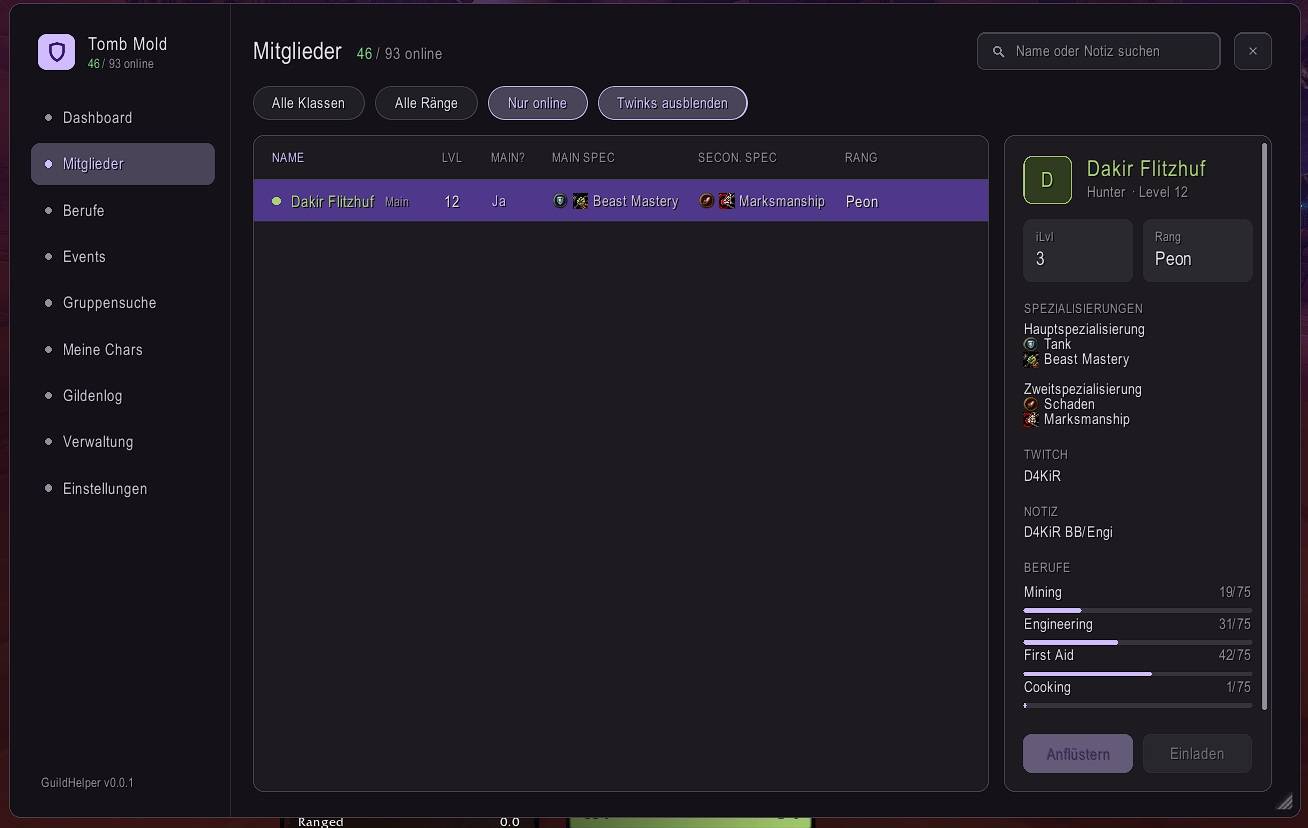
- Searchable and sortable member list with level, main and secondary spec, zone, rank, item level, last seen, public note and officer note.
- Filters for class, rank, online only and hide alts. The filters are remembered.
- Main and alt detection: from the main character set in GuildHelper, or from guild notes that contain another member's name.
- Detail panel with notes, specs, professions, alts or main, and buttons to whisper or invite the member.
- The columns adapt to the window size.
Group finder
- Live: post a group for a dungeon or raid. The open tank, healer and damage slots are calculated from your current group and update automatically. The post closes when the group is full.
- Planned: schedule a group up to two weeks ahead with day, time and slot counts. Planned groups stay visible to the guild while you are offline.
- Guild members apply with their role directly from the list.
- Optional note for every group.
World map
- Shows guild members who use GuildHelper on the world map.
- Members on a flight are shown with their faction icon.
- Tooltip with name, level, rank and flight status.
- Optional level and name labels on the pins.
Guild invites from chat
- The word
ginvin chat becomes a clickable link: left or right click invites the sender to your guild. - Optional keyword: when someone writes
ginv <your word>, a popup asks whether you want to invite them.
Character
- Choose your main character once per account and guild. All your alts are then linked to it automatically.
- Set role and spec for your main and secondary spec.
- Optional Twitch name, shown in your member details.
Designs and languages
- Four designs, switchable live: Material Dark (default), Material Light, Obsidian, and Forever (native WoW window style).
- Choose the addon language independently from the game language.
- Resizable window: drag the grip in the bottom-right corner to resize, Shift+drag to scale, right-click to reset.
Usage
Enter /guildhelper or /guhe in chat, or left-click the minimap button, to open the window. Right-click the minimap button to hide it.
Language, design, world map options, guild invite options and your character settings are on the Settings page of the window.
Notes
- Addons cannot change guild notes or the message of the day. The edit links in GuildHelper open the Blizzard guild window, where you can change them yourself.
- Item level, professions, specs and main characters are only shown for members who also use GuildHelper.
GuildHelper (Guild-GroupFinder, Share/Trade Profession/Items, Guild-Invites, ...) Team
Owner