Guild Finder Forever - Guild Recruitment & LFG
- By
In-game marketplace for WoW Forever: post looking-for-guild and recruiting ads, browse and filter both sides.
Description
Guild Finder Forever



The guild finder that World of Warcraft Forever doesn't have.
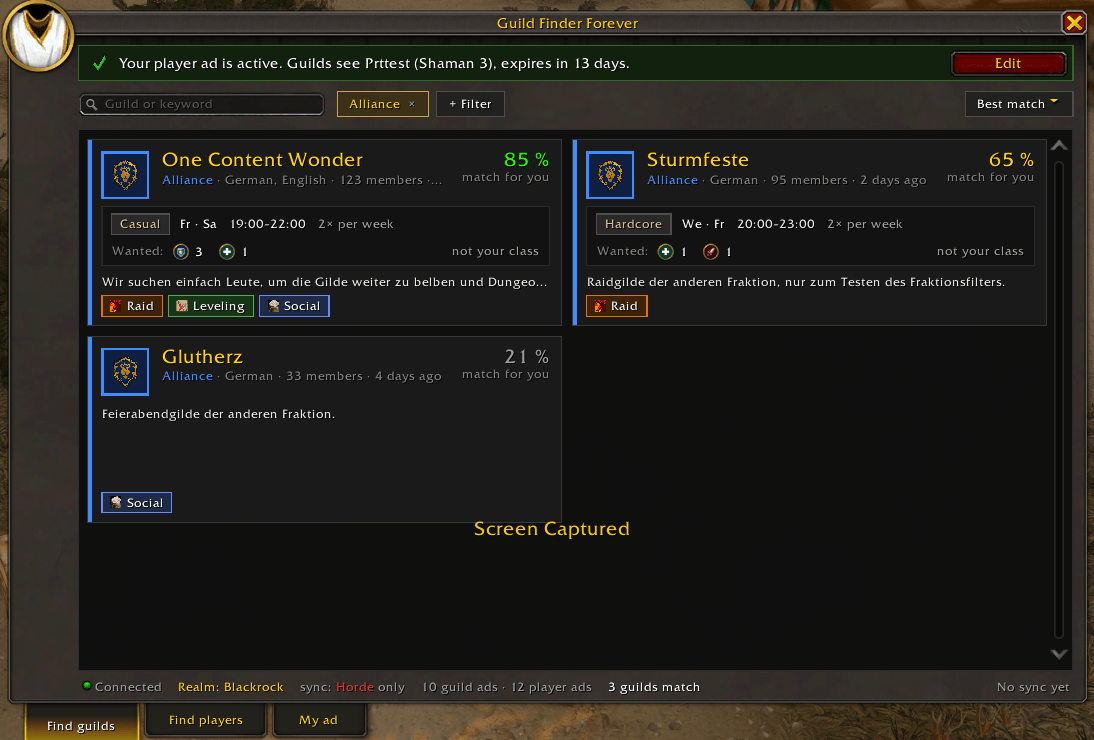
Players post a "looking for guild" ad, guilds post a recruiting ad, and both sides browse each other in game. There's no website and no external tool: ads go from player to player over a hidden addon channel. Guild Finder only knows what other players running it share, so the lists grow with every player and guild that posts an ad. Tell your guild and friends!
Supported versions
| Client | Interface |
|---|---|
| WoW: Forever | 16001 |
| Retail | 120000 – 120105 (Midnight, for testing until Forever launches) |
On retail, ads only reach your own realm and its connected realms. Classic Era and other clients are not supported.
Installation
- Install it with the CurseForge or Wago app, or download the zip from GitHub releases.
- Manual install: extract
GuildFinderForeverintoWorld of Warcraft/<client>/Interface/AddOns/(currently_classic_beta_for the Forever beta). - Log in. A short welcome explains how it works, and
/gffopens the window.
What changed: CHANGELOG.md
Features
- Find guilds: guild cards sorted by how well a guild fits your own ad (goals, roles, wanted classes, language). Filters for faction, language, goals, raid style, "wants my class" and, on Forever, "same ruleset".
- Raid details: raid style, raid days and time, raids per week and the wanted classes per role, plus whether your class fits.
- Find players: a compact, sortable list with role, level and class filters.
- My ad: a player ad per character or a guild ad per guild (by members who may invite), done in under a minute with a live preview. Ads are renewed on login and expire after 14 days without one.
- One-click contact: whisper the poster; the addon checks via
/whowhether they are online and in that guild. Hide and Block remove ads from your results. - Notifications: optional chat notice when a new matching ad arrives.
- 7 languages: English, Deutsch, Français, Español, Italiano, Русский, Português.
- Open it with
/gff, the minimap button or the addon compartment.
Commands
| Command | |
|---------|-|
| /gff | Open/close the window |
| /gff ad | Open "My ad" |
| /gff settings | Settings (minimap button, chat notice for new matching ads) |
| /gff sync | Ask other players for missing ads |
| /gff status | Cache and network status |
| /gff blocked, /gff unblock <name> | List / unblock blocked characters and guilds |
| /gff debug [on|off] | Show sync traffic in chat |
Support
- Few ads? Ads only come from players running the addon;
/gff syncasks others for ads you're missing. - The other faction isn't reached live: the addon channel is separate per faction.
- Nothing is sent during raid encounters; messages go out afterwards.
- Bugs and ideas: GitHub issues
- If you like the addon, star it on GitHub or leave a tip on Streamlabs.
Developed with the help of AI (Claude by Anthropic). Every change is reviewed by a professional software developer before it is merged.
Guild Finder Forever - Guild Recruitment & LFG Team

Owner