Guild Economy
- By
Trade without the Auction House. Monitor guild and trade channels for WTS/WTB offers with profession integration. Get alerts when players need items you can craft.
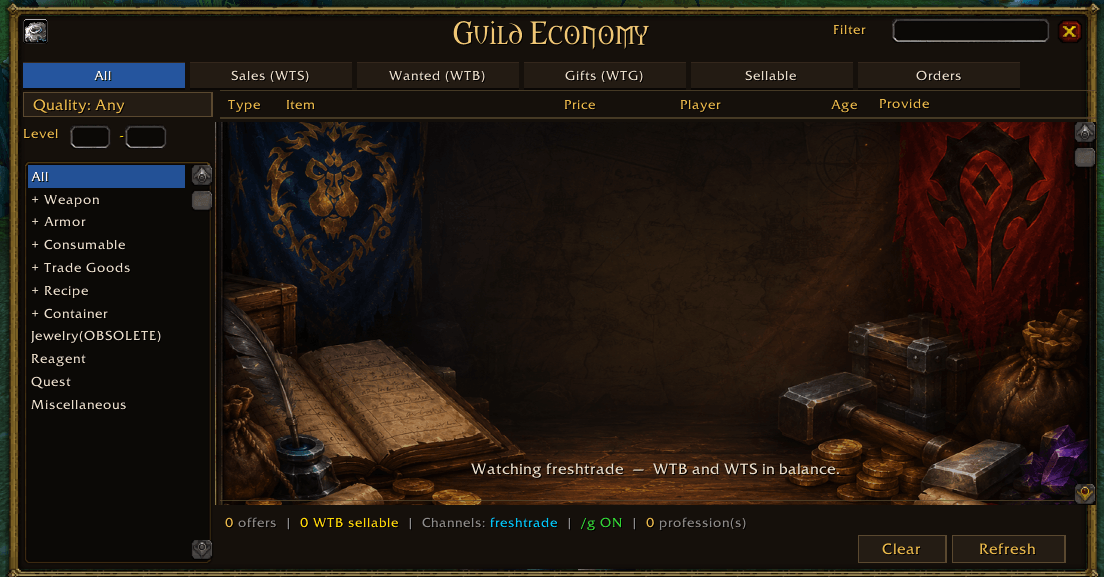
New template .
Description
TradeScanner brings player-to-player commerce back to life when the Auction House isn't available.
Monitor guild chat, trade channels, and guild confederations to discover live WTS/WTB offers, craft requests, and trading opportunities. Whether you're playing on a Fresh server, a guild-economy challenge, or a private server, TradeScanner helps buyers and crafters find each other.
Smart Craft Detection
Guild Economy ships with a built-in database of over 1,100 craftable items and 130+ enchants across 10 professions. Open your profession windows to automatically learn your character's recipes and unlock personalized alerts.
When someone posts a request for an item you can craft:
• Gold-highlighted matching offers • Sound alerts and minimap notifications • Dedicated "Sellable" tab with real-time counters • One-click whisper to contact the buyer
Trade Network & Guild Confederations
Supports GreenWall and guild confederations.
Craft orders can be synchronized across connected guilds, allowing crafters and customers to find each other even across multiple guild communities. Trade offers remain local to your guild while crafting requests can be shared federation-wide.
Order Validation & Delivery Tracking
Once a craft order is accepted, a Validate button appears for the crafter and the buyer. Click it when the goods change hands and the order is removed for everyone in the network — no more stale orders lingering on every member's panel.
Even better, validation can be automatic: if the buyer also runs the addon, completing the trade auto-validates the order. Hand over the full amount and the order disappears; hand over part of it and the remaining quantity updates everywhere so everyone sees exactly what's left to deliver. Buyers without the addon are covered too — the crafter simply clicks Validate.
Sell Directly From Your Bags
Need to sell something?
Alt + Right-Click bag items to stack them in a mail-style composer, set a price and quantity per item, then post the whole batch at once. The trade-channel message is automatically split to stay under the chat character limit, and selling an item also flags it as sellable so matching requests light up. Listings are instantly shared with other TradeScanner users.
GuildFoundMarket Integration
Does your community also run the GuildFoundMarket addon? Guild Economy now pulls those live player listings straight into your trading window. Open the Sales (WTS) or All tab and the marketplace is scanned in the background — every online seller's current offers appear as normal WTS rows, fully searchable, filterable, and sortable right alongside your chat offers. Market listings are tagged with a green [M] marker so you always know the source.
It activates automatically whenever GuildFoundMarket is installed (nothing to configure), refreshes when you open the tab, and can be switched off anytime from the Settings panel. Your local marketplace data is never re-broadcast — Guild Economy simply reads what the GFM network already serves.
Auction-House-Style Browse
Find what you want fast with a familiar AH-like interface:
• Category sidebar (item class → subclass → armor slot) • Quality and required-level filters • Sortable columns (Type / Item / Price / Player / Age) • Name search
Organized Trading Interface
Browse opportunities through six dedicated tabs:
• All • Sales (WTS) • Wanted (WTB) • Gifts (WTG — free giveaways) • Sellable (requests you can fulfill) • Orders (craft requests, with online crafters on top)
Smart deduplication keeps the list clean by tracking a single active offer per player and item.
Additional Features
• GuildFoundMarket integration — live marketplace listings merged into your WTS/All tabs • Multi-channel monitoring (watch as many trade channels as you like) + guild chat • Settings panel (gear button) for channels, toggles, and your sellable list • New-version alert when a guildmate runs a newer build • English and French keyword support (WTS, WTB, WTG, VDS, ACH, CHERCHE, B>, and more) • International price parsing (1.5g, 1,5g, 1.50g) • Guild profession directory (/ts profs) • Cross-guild profession sharing over GreenWall • Persistent message history and debug tools • Trade-window order validation with partial-delivery tracking • Addon-to-addon synchronization network • Fully configurable channels, keywords, and notifications
Commands
Use /ts help to see the complete command list.
Popular commands:
• /ts profs — guild profession registry • /ts confed — confederation management • /ts help — command reference
Perfect for:
• Season of Discovery Fresh realms • Guild economy challenges • Auction House restricted servers • Community-driven economies
The Guild Economy Team