promotional bannermobile promotional banner

Crafting Order - Classic

Share your recipes with everyone you meet: players on your realm see what you can craft and send you orders.
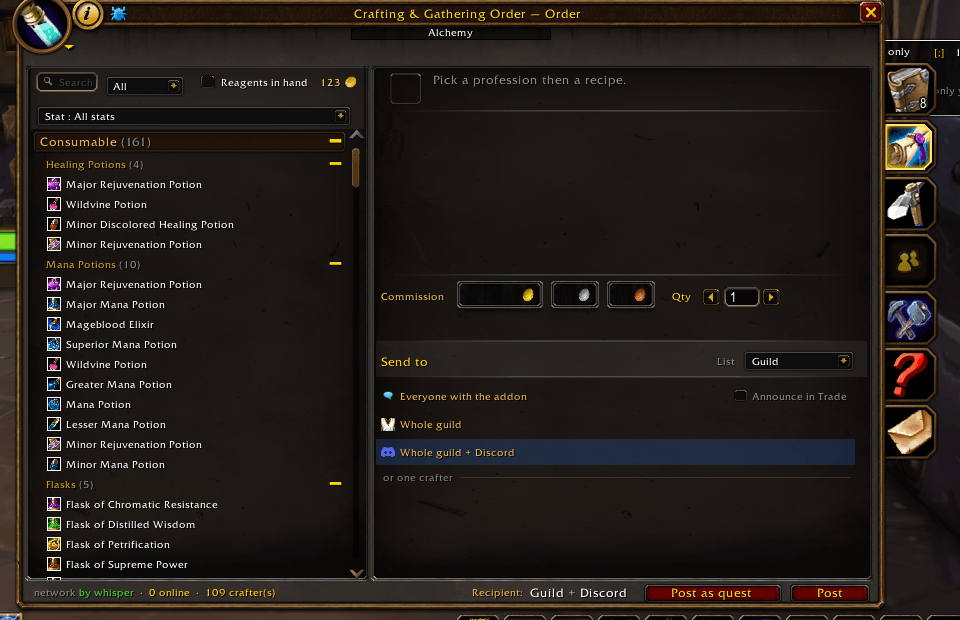
Search by int/str/end etc..

Search by int/str/end etc..

Order your item from your Friend/Guildmate or random people

Order your item from your Friend/Guildmate or random people

Here you got all Artisan of the server, Guild, friend , or just the one you met in Orgrimmar

Here you got all Artisan of the server, Guild, friend , or just the one you met in Orgrimmar

2 addon i like have a UI implémentation Missing trade skill list & lazyGold

2 addon i like have a UI implémentation Missing trade skill list & lazyGold

myArtisan.png

myArtisan.png

profession.png

profession.png

See what your friend need to gain profession skill point.

See what your friend need to gain profession skill point.

Description

Classic gives you no way to find out who can craft what. You can't inspect a stranger and see they're a Jewelcrafter, there's no realm-wide list of professions, and the game forgets a friend's skills the second they log off. So you spam /trade and hope someone answers.

Crafting & Gathering Order fills that hole. Every profession, skill level and recipe you know travels with you over a hidden realm channel, and everyone else running the addon does the same. Look someone up in the Artisans directory and you see what they can actually make, their skill level, whether they're online, and how you know them, then order straight from them, whether it's a guildmate or a stranger you've never spoken to.

It's also a work-order board for crafting and gathering. No shared guild, no auction house, no server. Post what you want made or gathered and everyone on your realm running the addon sees it and can answer, even people you've never met, as long as they've got the addon too.

What it does

  • See what anyone running the addon can craft, their skill level and their recipe list, in the Artisans directory. The game never shows you this; the addon carries it for you.
  • Share your own professions, skills and known recipes the same way, automatically. No setup, no signup; playing is enough.
  • Post craft and gather orders from the addon window, or straight from chat with /co post.
  • Send an order to everyone, your guild, your friends, or one named player. A named order gets pushed to that person the moment they log in.
  • Get a toast, a chat line and a sound when an order is meant for you. /co notify sets how much of that you want.
  • Pick a crafter and the recipe list narrows to what they can actually make, so you never send someone a request they can't fill.
  • Filter recipes down to what you can make right now with the reagents already in your bags.
  • Order from your friends and guildmates without opening the board.
  • See recipe cooldowns on other artisans, so you know whether their Transmute is ready or still ticking.
  • Group your alts under one identity, so an order for your offline alchemist reaches whatever character you're playing.
  • Check every profession on your whole account at once in the My Artisans tab.
  • Season of Discovery recipes are built in, on SoD realms only, so seasonal crafts show up on the board like any other.
  • Keep the board clean: mute a spammer (with a reason, or just for an hour), or trust a busy friend so they're never auto-muted.
  • Recipes sorted into real categories instead of one flat "Consumable" pile, everywhere they show up.
  • If you run Lazy Gold, every recipe shows what it'd earn you, and you can sort the list by profit.
  • If you run MissingTradeSkillsList, flip the recipe list to show what you haven't learned yet, in red, and click one to see where it drops.
  • The window uses the game's own frame style, not a custom skin, so it reads as part of the interface.
  • Click the bag icon on any artisan in the directory to see exactly what materials they need to keep leveling, worked out locally from what the addon already knows about them.
  • Get a heads-up when you're running an old version, read off the versions other players around you are on, with a dot on the minimap that clears once you update (new in 1.27).
  • Ready for patch 1.15.9 and the modern interface it brings to Era, Season of Discovery and Hardcore.

Order straight from a name, friend or stranger

Mouse over any addon user in the world, a guildmate or a complete stranger you just ran past, and their professions and skill levels show up under the game's own tooltip. Hold Shift and it lists their recipes by name. Right-click them and you get an Order entry for each profession they craft, each one opening the Order tab already set to it, so you can order from someone you've never spoken to without adding them to anything first.

The Friends list and Guild panel get the same treatment as built-in shortcuts. Hover a friend and the summary sits next to their tooltip, Battle.net friends included, not just friends added by character name. Click a guildmate and it sits under their detail with an Order button right there, so it works even when they're offline.

The directory fills itself in as you cross paths with other users. When it's looking empty, the Refresh button calls out on the channel and everyone online answers.

Sending an order where it belongs

Post to the whole realm, or keep it to your guild, your friends, or a single player. A realm-wide order goes out over the shared channel, not just to people you've already crossed paths with, so it reaches strangers running the addon too. Cancel it and the cancellation travels the same way, so it doesn't sit open on a stranger's board for hours. You'll only get a toast for professions you actually have, so someone else's Blacksmithing order won't ping your Enchanter. Scoped orders only reach people who qualify. Open ones re-broadcast every couple of hours and expire on their own, so the board doesn't rot with dead requests. Only the player who posted an order can put it on the realm channel under their name, so nobody can post in your name.

Gather orders handle stacks properly. Ask by the unit or by the stack, and you always see the real total, so it reads 3 stacks (60) instead of a cryptic 3 st.

Delivery that counts

An order isn't done the second a crafter clicks Deliver. It goes to Delivered, and the buyer confirms they got it, either automatically when the item lands in their bags or with a Received button. A crafter's delivered-count only ticks up on that confirmation, so it tracks goods that actually changed hands rather than clicks.

Hand off from the trade and mail windows

Open a trade or start a letter and a small panel shows the orders between you and that player. In the mail composer, Fill from order sets the recipient, subject, body and cash-on-delivery, and attaches the crafted item from your bags. You still read it over and hit Send yourself. At the trade window each side sees their half: the crafter what to collect, the buyer what to pay and a button to confirm. The panel sticks around after the trade closes so whoever's left can finish up.

Shared recipe cooldowns

Cast a Transmute and everyone running the addon sees it on your artisan tooltip, either "Transmute: ready" or "Transmute: in 14h". No more asking around the realm to find out whose Arcanite transmute is up. It reads your own cooldowns straight from the game and shares them the way it already shares your skill levels; a small built-in table knows which recipes actually sit on a timer.

One player, all your characters

Turn on /co alts (or tick the box in the My Artisans tab) and pick a main. Your characters get linked as one player, checked from both ends so nobody can pass themselves off as someone else's alt. Someone orders from your alchemist while you're on your warrior, and the order still finds you, with a note that it's for your alt. You can accept it from whichever character you're on, and the delivery follows once you hop over.

The My Artisans tab gathers every profession on your account for the realm into one place, as if a single character knew them all. Skill levels, known recipes grouped by category the way the profession window does it, active cooldowns pinned at the top, and which of your characters holds each recipe.

Click an alt's profession from the minimap menu for a read-only look: recipes it knows, the reagents each one needs, and its skill level. No craft button, since you're not logged in as that character, and no bag counts, just what's needed.

Partners, loot alerts and gifts

Loot a recipe, formula, schematic or pattern and the addon tells you what it teaches, whether you already know it, and which of your partners don't. Mark someone a partner with a right-click, then offer them a spare plan with /co gift. It drafts a friendly whisper; it never sends on its own.

Catching requests from non-users

When someone without the addon posts a request in /trade or /guild, it lands in an Incoming tab in the profession window so it doesn't slip past you, but only when you actually know the recipe, so a cut you can't do won't ping you. Accept it, then reply to them in chat yourself. These captured requests clear themselves after half an hour, the way a shout in /trade really works, so yesterday's leftovers don't sit on your board pretending someone's still waiting. Sales (WTS) and crafters advertising their services (LFW) get filtered out. /co scan turns the scanner on and off.

Keeping the board clean

Mute anyone whose orders you'd rather not see: /co mute <name>, optionally with a reason and a duration, so /co mute Bob 1h spammer mutes Bob for an hour and then forgets about it on its own. /co mute on its own lists who you've muted, why, and how long is left. There's also automatic help — the addon watches for the same player flooding orders and offers to mute them (or does it for you, your call), and it can ignore very-low-level posters that look like bots. Someone legitimate who just posts a lot? /co trust <name> and they're never auto-muted. It's all yours alone; muting never touches anyone else's game.

The profession window (optional)

There's an optional three-column profession window: a searchable, difficulty-colored recipe list, reagents with have/need counts and Create / Create All, and the live orders for that profession right alongside. One click swaps to the Blizzard window and back. Enchanting works too, which takes a little doing in Classic since its craft function is protected.

The recipe list is sorted the way you'd actually look for things. Vanilla dumps every potion you know under one "Consumable" heading in no particular order; here they're split into healing potions, mana potions, elixirs of strength, flasks, transmutes and so on, each run from the highest rank down. A potion that restores both health and mana sits under both headings. The same grouping carries over to the Order tab, the My Artisans tab, and the gathering professions, where ores, herbs, leathers and fish get the same treatment.

If you've got Lazy Gold installed, the addon reads its prices. Each recipe picks up a small coin next to it showing what crafting it would earn, a silver coin for small change up through gold coins and then stars once you're past a thousand gold a craft. A recipe that loses money shows nothing, since the point is to spot what pays. Click the gold coin above the list and it re-sorts by profit, highest first, with the categories dropped so you get one straight ranking. The "123" button next to it swaps the coin picture for the exact figure in gold, silver and copper. The Order tab carries both buttons, and every incoming order there tells you what the goods sell for at auction against what the reagents you'd supply would cost, so you can see whether the commission is worth taking.

In the Artisans directory each profession shows as its icon rather than its name. A crafter sitting on a genuinely profitable plan gets a gold border on that profession, and hovering it names the plan and the gold. Click the icon and you land in the Order tab aimed at that crafter and that profession, their recipe list already narrowed to what they can make. My Artisans works the same way for your own characters and adds an "All realm crafts" view that merges every profession on the account into one profit-ranked list, so a glance tells you which alt is sitting on money. Cooking and Fishing are in there too, along with the essences, dusts and shards an enchanter pulls from disenchanting.

If you run MissingTradeSkillsList, a button above the list folds in the recipes you haven't learned, drawn in red beside the ones you have. Click one and the middle panel tells you where it comes from, the vendor, drop or quest, with the NPC and its coordinates. It only ever points you at NPCs your own faction can talk to; loot drops and neutral vendors show for everyone.

Season of Discovery

On a Season of Discovery realm, the 304 seasonal recipes are in the catalogue too — Leatherworking, Blacksmithing, Tailoring, Enchanting, Engineering, Alchemy and the rest — so a seasonal craft posts, shows its reagents, and gets matched to crafters like any classic recipe. On a regular Era realm none of this loads and nothing changes; the recipes your friends have already shared with you stay exactly as they were.

Confederations (GreenWall)

If you run GreenWall for a cross-guild confederation, the Artisans directory grows a Confederation section listing addon users from your sister guilds, picked up passively from the guild-chat bridge with no extra traffic. /co gwroster shows what it found.

Bilingual and standalone

English, French, German and Spanish are all built in, and item and recipe names come out in your client's language. The addon stands on its own (it embeds the shared CraftLink library) and runs happily next to Guild Economy.

Commands

/co help lists them all. The ones you'll reach for: /co opens the board, /co profwindow toggles the custom profession window, /co notify sets notifications, /co scan toggles the chat scanner, /co gift offers a looted plan to a partner, /co refresh re-polls the directory, /co alts groups your characters (off by default), /co mute and /co trust handle noisy or trusted players.

Made with Season of Discovery and Fresh realms in mind, guild-economy challenges, and servers where the auction house isn't the answer.

The Crafting Order - Classic Team

profile avatar
Owner
  • 1
    Followers
  • 2
    Projects
  • 1.3K
    Downloads

More from wafhien

  • Guild Economy project image

    Guild Economy

    Trade without the Auction House. Monitor guild and trade channels for WTS/WTB offers with profession integration. Get alerts when players need items you can craft.

    • 306
    • July 1, 2026
  • Guild Economy project image

    Guild Economy

    Trade without the Auction House. Monitor guild and trade channels for WTS/WTB offers with profession integration. Get alerts when players need items you can craft.

    • 306
    • July 1, 2026