GoldFromWorldQuest
- By
Every world quest that pays gold, for every character of your warband, in one table: what is done, what is left and how much gold is still collectable.
icon-worldmap.png
window.png
Description
GoldFromWorldQuest answers one question: how much gold is still waiting for me in world quests, and on which character?
The planner
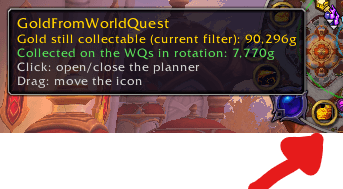
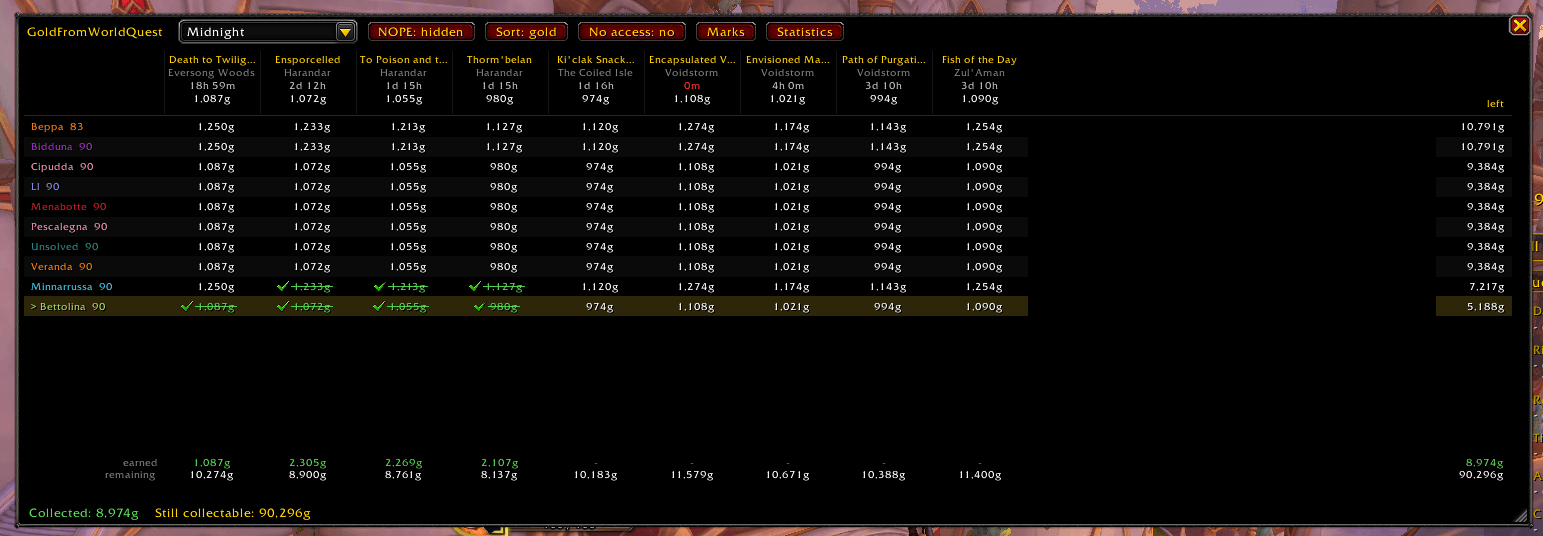
Open it from the minimap button or with /goldquests. It is a table:
- one row per character of your warband, one column per active world quest that pays gold;
- each cell says whether that character has done it, still has it to do (with the gold it pays), or probably cannot take it (expansion not unlocked);
- at the bottom of each column, the gold earned and the gold still remaining on that quest; at the end of each row, what that character can still collect;
- on top, the gold still collectable across the whole warband, and how much you already collected on the quests in rotation.
Hover a column for the details: base gold, War Mode bonus, time left. Click it to put a pin on the map. The row of the character you are playing is highlighted. Rows can be sorted by gold or by name, and filtered by expansion.
The addon learns continents and characters by itself as you play: log in once with each character and walk through the zones.
Marks: Effortless and NOPE
Right-click a quest to mark it:
- Effortless: done without a fight, quick gold. Effortless columns are highlighted in light blue and the totals tell you how much of the gold is "easy". Eight Midnight world quests come already marked (Papers, Please!, Trial of Flight, Defying Gravity...): remove the mark if you disagree, it will not come back.
- NOPE: a quest you do not want to do. It stays out of the collectable gold and is hidden from the table (a filter shows it again).
Marks stay when a world quest comes back into rotation. /goldquests marks opens the full list.
History and statistics
Every turn-in is recorded, and so is every gold world quest that expires with no character taking it. The Statistics window shows, for the last 7 days, 30 days or all time: gold earned and average per quest, the extra gold from War Mode, the gold left to expire, the best characters, the most rewarding world quests and the busiest zones.
Commands
| Command | What it does |
|---|---|
/goldquests |
Opens or closes the planner |
/goldquests stats |
Statistics window |
/goldquests marks |
List of Effortless / NOPE marks |
/goldquests history [days] |
Short summary of the history in chat |
/goldquests scan |
Scans the world quests again now |
/goldquests chars |
Characters the addon knows |
/goldquests forget Name-Realm |
Removes a character |
/goldquests reset |
Puts the minimap button back in its default position |
/goldquests options |
Opens the options |
Options
In Options > AddOns > [Bettolina] GoldFromWorldQuest:
- Language / Lingua: the addon's interface in English (default) or Italian.
- Record diagnostic data: off by default. Only useful if you report a problem and are asked for it.
English game client only, like the rest of the suite.
Lightweight
No libraries, no dependencies. The scan runs when you log in, change zone or turn in a quest, not on a timer.
Part of the Bettolina suite
GoldFromWorldQuest is one of a small set of independent addons by Dockinoke, all with the Bettolina_ folder prefix. Each one stands alone: install only the ones you want. Its companion for the whole gold picture is GoldBalance.
Feedback and bug reports: please use the comments on this page.
GoldFromWorldQuest Team