Glint - Cursor Trail, Ring & Click Effects
- By
Highlight your mouse pointer: a cursor ring and glow, 21 animated mouse trails (sparkle, fire, rainbow...), click effects, shake to find the cursor, 17 themes, class color and shareable profiles. Light, made for WoW Forever.

preview-arcane.gif

preview-class.gif
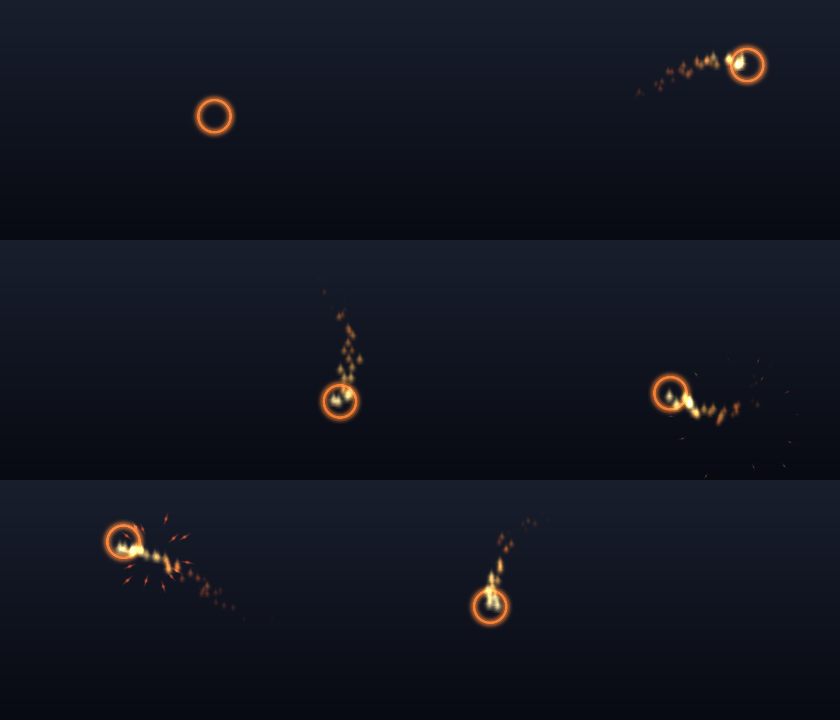
preview-fire.gif

preview-frost.gif
Description
Glint: cursor trail, ring and click effects
Never lose your mouse cursor again. Glint puts a glowing ring around your cursor, leaves an animated trail behind it, marks your clicks and finds your pointer when you shake the mouse. Pick one of 17 themes in one click, or build your own look and share it with friends.
Made for WoW Forever.
Find your cursor, instantly
- A ring around the cursor: 18 shapes (rings, rune circle, halo, crosshair, reticle, star, heart, hexagon and more), any size, colour and opacity. It can spin, pulse, change colour in combat, and follow the cursor instantly, smoothly or on a spring.
- Shake to find: wiggle the mouse and the ring swells up with a sonar ping, even when the effects are hidden.
- Camera drags handled: while you hold a mouse button to turn the camera, Glint hides the effects and marks where the cursor will come back.
- A dot on the cursor's tip for pixel-precise aiming, if you want it.
21 animated trails
Ribbon, Comet, Sparkles, Stardust, Rainbow, Fire, Embers, Frost, Snow, Shadow, Fel, Holy Light, Arcane runes, Leaves, Bubbles, Hearts, Lightning, Pixels, Confetti, Twinkle, Double helix and Ghost. Each one has its own colours, or uses yours, your class colour or a rainbow. Set the size, length, density and opacity.
Click effects
Ripple, Shockwave, Burst, Stars, Sparkle, Confetti and Hearts, with a colour for each mouse button. Dragging the camera never fires an effect, and clicks on the game world only do when you want them to.
17 one-click themes
Arcane, Fire, Frost, Fel, Holy Light, Shadow, Nature, Rainbow, Starfall, Winter, Love, Storm, Retro, Comet, Class Colours, Hunter's Mark and Minimal. Each sets a ring, a trail and a click effect that go together; fine-tune anything afterwards.
Share your look
Profiles per character, or one for all of them. Press "Make my text" and send the short code to a friend: they paste it, press Import, and get your exact cursor.
Shows when you want it
Always, only in combat, only out of combat, or only in dungeons and raids. Hold Shift, Ctrl or Alt to show it anyway. Fade the ring when the mouse rests. Calm mode tones down flashes and colour cycling.
Light and smooth
Glint reuses a fixed pool of particles, only updates what moves, caps the work per frame, and does nothing at all while turned off. Pick Low, Medium or High quality for the number of particles.
How to use it
Install it and move your mouse. Type /glint (or click Glint in the AddOns menu) to open its window: the cursor itself is the live preview while you change things, and the window opens in combat too.
/glint: options/glint toggle: effects on or off/glint theme fire: apply a theme by name/glint reset: reset this profile
After installing or updating, restart the game completely once: Glint ships its own textures, and a /reload does not load new image files.
Credits and license
All of Glint's art is drawn by its own code. Glint is free software under the GNU GPL v3. English and Spanish.
Glint - Cursor Trail, Ring & Click Effects Team