Glass Action Bars
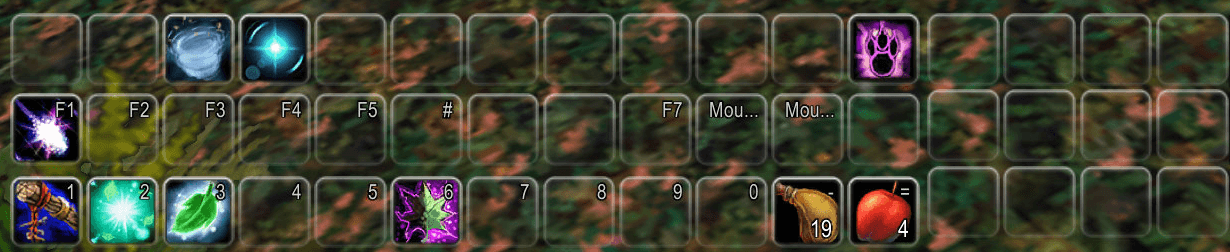
The liquid-glass look of the Glass addons for World of Warcraft: Forever's own action bars. It keeps Blizzard's bars, so paging, key bindings, Edit Mode and cooldowns work exactly as they always do; only the look changes.
Install
Install with the CurseForge app, or unzip the download into the Interface\AddOns folder inside
your Forever game folder. Then /reload, or start the game. There is nothing to set up.
What it does
Glass on every bar: the main bar, the seven extra bars, the stance bar and the pet bar. Each button gets a thin glass rim, lit from the top, and a clear glass body. A slot with an action gets the full rim and an empty one a quieter one; pressing a button lights its rim. The main bar's frame art and dividers fade away, and so do the gryphons unless you keep them.
Blizzard's bars, not a replacement. Paging, stances and forms, key bindings, Edit Mode layouts, cooldowns, range and proc glows all stay the game's own, in and out of combat.
The bag bar and the micro menu match. The backpack, bag slots, reagent bag and key ring get the same glass (a slot with a bag gets the full rim, an empty one the quieter one). The micro menu sits on a subtle glass panel instead of Blizzard's dark one, and its buttons keep their own icons and states.
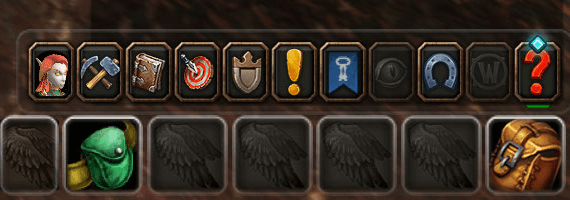
Three looks, switched live: clear, smoked and class colour glass.
Commands
| Command | What it does |
|---|---|
/gab help |
List the commands |
/gab theme clear / smoked / class |
The glass |
/gab hotkeys on / off |
Key bindings on the buttons |
/gab macros on / off |
Macro names on the buttons |
/gab gryphons on / off |
The main bar's end caps |
/gab skin on / off |
Glass, or Blizzard's own art (after a /reload) |
/gab tune |
The glass's numbers (rim, empty slots, inner line, haze, body), live |
/gab options |
Open the options page |
/gab version |
The addon's version and the client build |
The same settings are on the options page (Esc > Options > AddOns > Glass Action Bars).
Coming next
Smart bars docked to the end of a bar: a Utility bar with your Hearthstone and professions, and an API so other addons (Apotheca, 123, Portal Roulette) can dock their bars and buttons there.
Reporting a problem
Open an issue on GitHub with what you did,
what you expected and what happened instead, plus the line from /gab version.
Lua errors are hidden by default on this client. If something seems broken, type
/console scriptErrors 1 and do it again; the error text is the most useful thing you can send.
Licence
Glass Action Bars is MIT, see LICENSE, which also ships inside the addon. The bundled LibGlass-1.0 is MIT too, under its own licence.
Source and issues: github.com/Spotnick2/GlassActionBars.
Glass Action Bars Team