GearUpgradeCheck
- By
It provides information on your current gear and how many upgrades you have available to spend and what items are probably the best to upgrade.
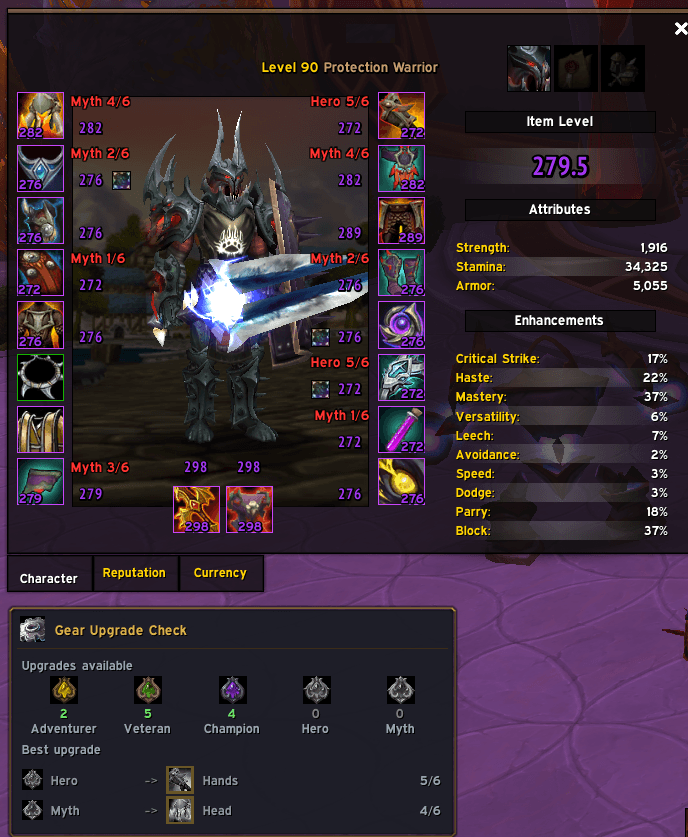
image1.png
Description
Gear Upgrade Check
See your gear's upgrade progress and crest situation at a glance, right on the character screen.
Gear Upgrade Check reads each equipped item's upgrade track and level, colors it by whether you can afford to upgrade it, and tells you where your crests are best spent — without opening the upgrade vendor.
Features
- On the character screen — every equipped slot shows its upgrade track and level (e.g.
Champion 5/8) right next to the item, so you never have to hover each piece. - Crest-aware colors — green when you have enough crests to upgrade the item, red when you don't, greyed out when it's fully upgraded.
- Summary panel under the character window listing how many upgrades each crest tier can currently afford.
- Best-upgrade recommendations — a per-tier list (lowest to highest) telling you exactly which slot to pour each crest into.
- Minimap button + settings window to customize the display.
- Works in any language — tracks, crests, and achievements are matched by the game's own text, not hardcoded English.
Getting started
- Install via the CurseForge app, or drop the
GearUpgradeCheckfolder intoWorld of Warcraft\_retail_\Interface\AddOns. - Log in (or
/reload) and open your character sheet — the overlays appear automatically. - Click the minimap button to open the settings.
How the priority works
Crests are tier-specific, so the addon answers the real question: for the crests of each tier, which slot should they go into?
For each tier it picks the slot with the highest priority score, breaking ties by whichever item is furthest along its track so it finishes sooner. Scores default to each slot's relative stat budget (a higher-budget slot buys more stats per crest), with weapons weighted up — and every score is editable.
Settings
Open the config window from the minimap button:
- Text position — place the slot text at the top, middle, or bottom of the icon.
- Show slot text / Show summary bar — toggle either display element.
- Hide fully upgraded — hide text on maxed slots so only upgradeable gear stands out.
- Priority scores — edit the weight for each slot bucket: Main Hand, Off Hand, Head/Chest/Legs, Shoulder/Hands/Waist/Feet, Trinkets, and minor slots. Main Hand and Off Hand are separate, so shields and caster off-hands can be weighted on their own.
Settings are saved between sessions.
Crests, tracks, and discounts
- Each item's track maps to its matching crest (e.g. a Champion-track item uses the Champion crest).
- An upgrade step costs 20 crests, dropping to 10 automatically for any track whose "of the Dawn" achievement you've earned.
Notes
- Crests are character-specific, so the counts reflect the character you're on.
- Trinkets use a single flat weight — their real value is item-specific and can't be judged by item level alone, so tune the Trinkets score to taste.
Feedback
Found a bug or have a suggestion? Leave a comment on the CurseForge page.
— Baskie
The GearUpgradeCheck Team