promotional bannermobile promotional banner

GearMatic

Per-spec upgrade scoring from the Icy Veins guides on tooltips, loot, and bags. Knows the Icy Veins best-in-slot list and marks your real BiS pieces with a skull in bags, on your character sheet, and on loot rolls. Gear Map, Auto Equip, Repair, Junk Sell.
Screenshot_2026-05-08_at_9.27.16 PM.jpg

Screenshot_2026-05-08_at_9.27.16 PM.jpg

Screenshot_2026-05-08_at_9.38.08 PM.jpg

Screenshot_2026-05-08_at_9.38.08 PM.jpg

Screenshot_2026-05-08_at_9.40.00 PM.jpg

Screenshot_2026-05-08_at_9.40.00 PM.jpg

Screenshot_2026-05-08_at_9.39.29 PM.jpg

Screenshot_2026-05-08_at_9.39.29 PM.jpg

Description

GearMatic


Join Discord Donate via PayPal Buy Me A Coffee


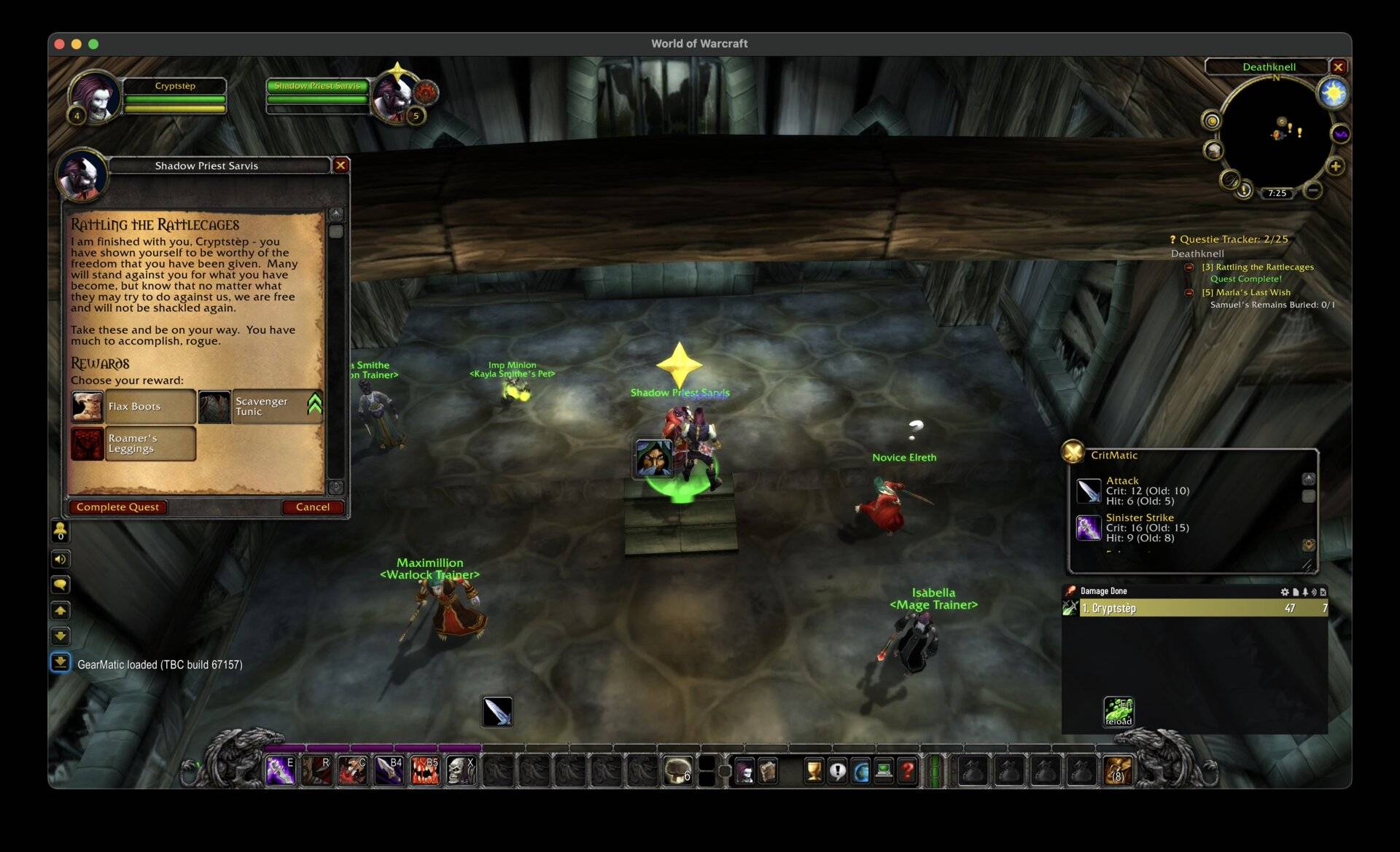
GearMatic is a cross-character equipped-gear and upgrade tracker for World of Warcraft. It scores every piece of loot you see (in tooltips, on quest rewards, in the loot window, in your bags) against the best-in-slot piece you currently have equipped.

Out of the box it uses smart, per-spec stat guidance from the Icy Veins class guides, your spec's stat caps, haste breakpoints, and heavy main-stat and item-level weighting, for every class, spec, and role, including healers and tanks. You are scored the moment you log in, no setup required. Prefer your own numbers? Paste Pawn-format weights you can copy from wowsims.github.io or Raidbots, or pull them straight from the Pawn addon, and flip the in-game option to use them instead. Either way, every drop, every quest reward, and every vendor item gets a clear "+12% upgrade" / "-3% downgrade" marker.

GearMatic goes one step past stat scoring. It also knows the Icy Veins best-in-slot list for your spec, and marks the real best-in-slot item for each slot as your best choice, even when its raw stats look lower, because a true best-in-slot pick accounts for set bonuses, trinket effects, and crafted gear that a stat score alone cannot judge. A skull icon flags your best-in-slot pieces in three places: on the item in your bags, on your character sheet for a piece you already wear, and on the group-loot roll window the moment a best-in-slot item is up for roll. This works on Retail, Mists of Pandaria, Burning Crusade, and Classic Era including Season of Discovery and Hardcore.

Built for Classic (Vanilla, TBC, Wrath, Cataclysm, Mists) and running on Retail.

The Gear Map

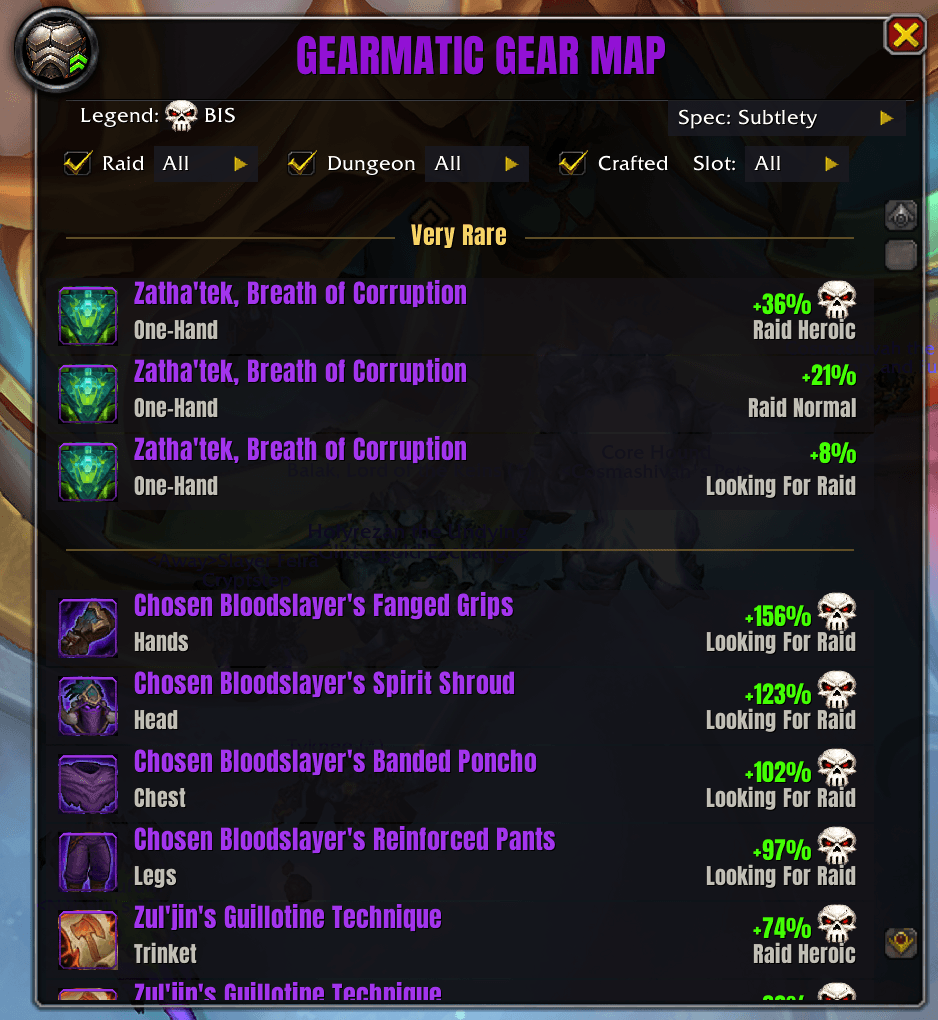
Type /gm gear and GearMatic lays out every upgrade waiting for you across the game's dungeons and raids in one ranked window, biggest jump first. Each row tells you the item, the slot it fills, its armor type, where it drops and on which difficulty, and a green "+N%" showing exactly how much better it is than what you are wearing right now. Hover any row for a preview panel: the instance, the boss that drops it, the drop chance, and the auction-house buyout for bind-on-equip pieces.

Still leveling? The Gear Map looks ahead and shows the gear coming up on your horizon, tagged with the level you can equip it at, so you always know what to chase next. On Retail and Mists you can filter the map by difficulty and by spec.

Open or close it with /gm gear (or force it with /gm gear show and /gm gear hide).

Best in Slot

GearMatic ships with the Icy Veins best-in-slot list for every spec on every supported game version, and it marks the real best-in-slot item for each slot as your best choice. Because a true best-in-slot pick accounts for set bonuses, on-use and proc effects, and crafted embellishments that a raw stat score cannot value, the best-in-slot list overrides the usual stat ranking for those slots. A skull icon replaces the upgrade arrow on your best-in-slot pieces:

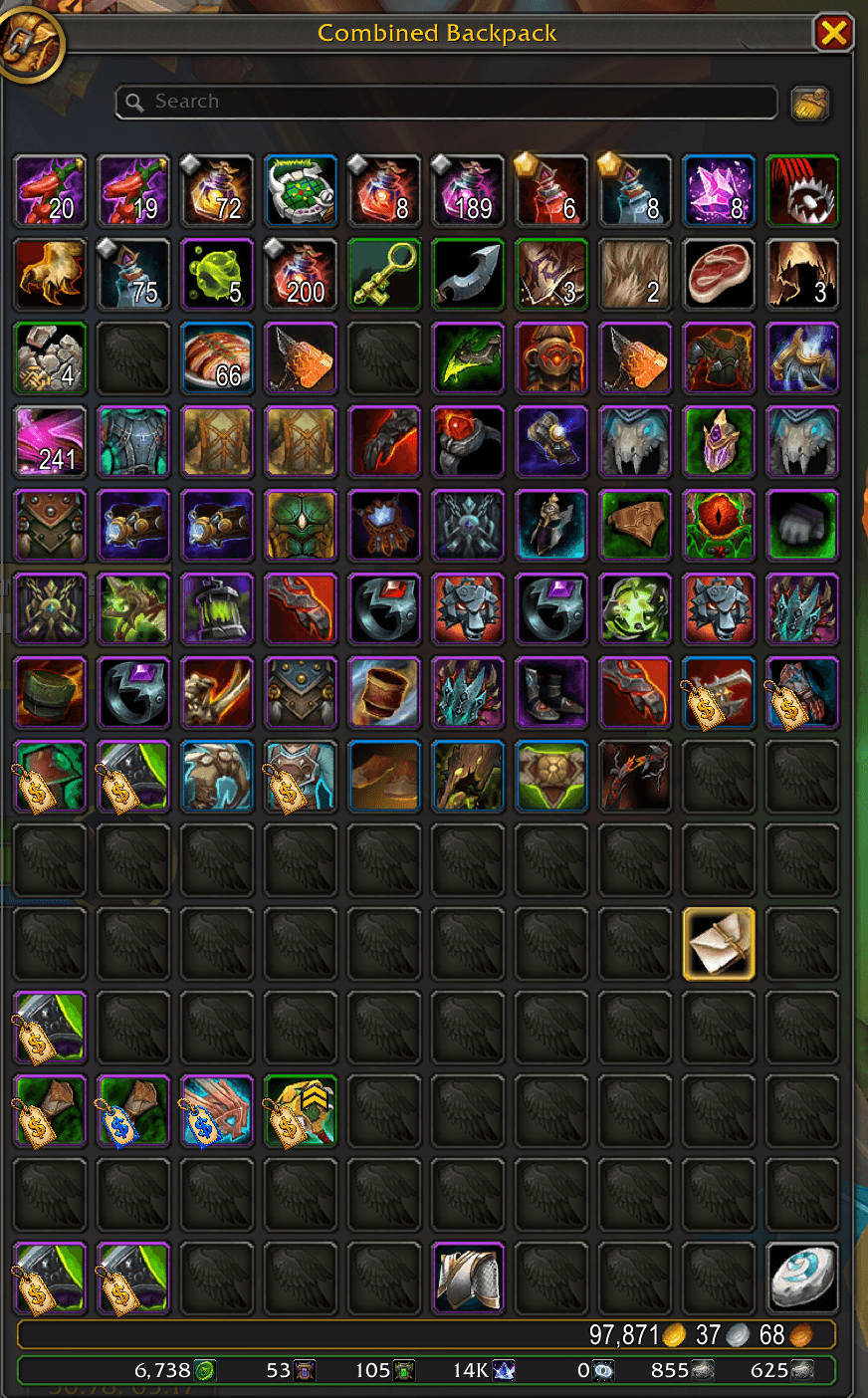
  • In your bags, so a best-in-slot drop stands out the instant it lands.
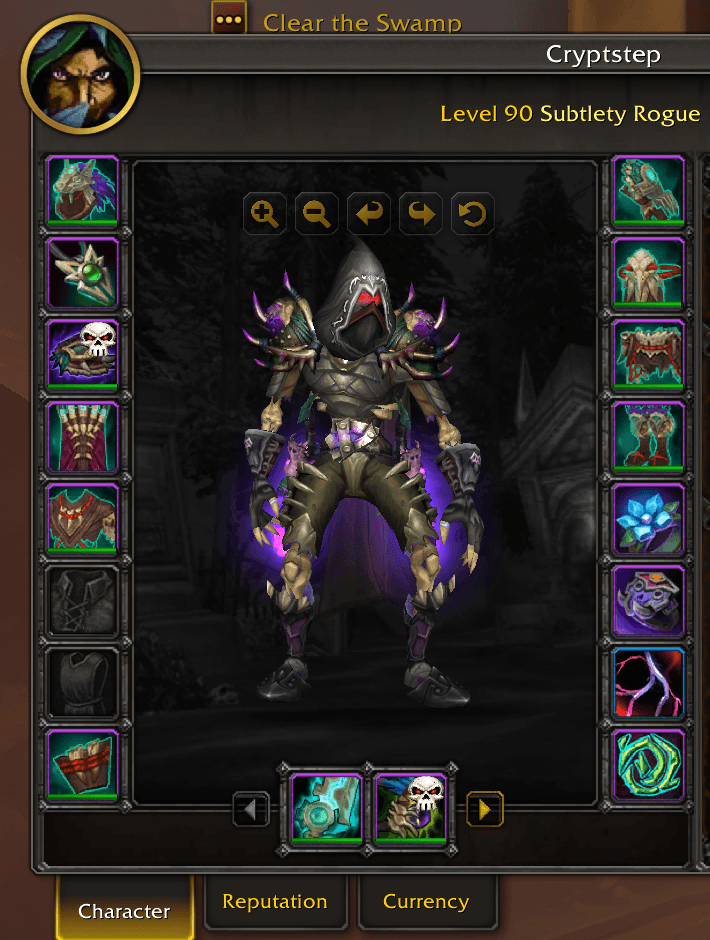
  • On your character sheet, on the slot of any best-in-slot piece you already wear, so you can see which slots are finished.
  • On the group-loot roll window, the moment a best-in-slot item is rolled for, so you never pass on one by accident.

Best-in-slot detection covers Retail, Mists of Pandaria, Burning Crusade, and Classic Era including Season of Discovery and Hardcore. The in-game FAQ has an entry explaining how it works and why a lower-stat piece can be the true best in slot.

Features

  • Icy Veins guide-based scoring, built in - per-spec stat guidance for every class, spec, and role on every game version, including healers and tanks. It knows each spec's stat caps (hit, expertise, spell hit) and haste breakpoints, and weighs your main stat and item level heavily, so a higher item-level piece wins unless a lower one truly has better stats (like rings and necklaces). No setup, no stat-weight authoring.
  • Icy Veins best-in-slot marking - knows the published Icy Veins best-in-slot list for your spec and marks the real best-in-slot item with a skull, in your bags, on your character sheet, and on the group-loot roll window, overriding the stat ranking for those slots because set bonuses and trinket effects cannot be judged by stats alone. Works on Retail, Mists, Burning Crusade, and Classic Era including Season of Discovery and Hardcore.
  • Use Pawn weights instead (optional) - if you run the Pawn addon, a single in-game option switches scoring to Pawn's own weights for your current spec. Off by default.
  • Pawn-format scale import - paste a (Pawn: ...) string from wowsims or Raidbots into /gm import and you are scored. Already run the Pawn addon? /gm pawn pulls every scale straight out of it.
  • The Gear Map - /gm gear opens a ranked list of every upgrade available to you across the game's content, complete with drop locations, drop chances, auction-house buyouts on hover, and leveling-aware "available at level X" entries.
  • Tooltip / quest / loot / bag indicators - upgrade percent plus a coloured chevron everywhere an item shows up: item tooltips, quest reward frames, the loot window, and right on the icons in your bags, with the skull replacing the chevron on best-in-slot pieces. Sidegrades within +/- 1% are shown as neutral so you do not get false-positive arrows. Works with or without Pawn installed.
  • Classic scoring parity with Pawn - on Classic flavors GearMatic reads the same stats Pawn does, including per-school spell damage, block value, flat health and mana, defense, and spell hit / crit / haste pulled from tooltips. Your scores line up with what Pawn would show.
  • Loadout window - paperdoll view of your current set, swap between saved scales, and see exactly what each slot is worth.
  • Saved gear sets - on Classic and TBC, save your current gear as a named set with /gm save, swap to it instantly with /gm load, and manage them with /gm loadouts (rename, delete, custom icons). On Retail GearMatic defers to Blizzard's built-in Equipment Manager.
  • On-screen upgrade alerts - a customizable banner pops when you pick up or are offered an upgrade, and warns you on a downgrade, with your choice of font, colour, sound, animation and bounce style, position, and count-up. Alerts from every Infinite Loop Alchemist addon stack together in one shared spot.
  • Auto-equip (optional) - automatically swap clear upgrades into your equipment, or run it on demand with /gm equip. Hardened against the well-known "+100% over empty" pitfall: only swaps when both old and new score positive, the raw delta clears the configured minimum, and a live inventory cross-check confirms the slot is not briefly nil from a transient API hiccup. You will not lose a shirt.
  • Auto-sell junk (optional) - /gm junk lets GearMatic clear grey trash at any vendor, stopping safely before it fills your buyback.
  • Cross-character durability and equipped-gear tracking - log in on any character and see at a glance which alts have damaged armor or pieces below an item-level threshold, with a heads-up at login if an alt is wearing thin. Mouse over your own character names in chat, the friends list, the guild roster, or /who for a one-line gear summary.
  • Spec-aware scoring - GearMatic auto-detects your spec on Classic flavors so you do not have to /gm import a fresh scale every time.
  • In-game FAQ - a per-version FAQ in the settings, written for your exact game version, covering best-in-slot, simming, lower item-level picks, healers and tanks, and more.

Localized in enUS, enGB, deDE, esES, esMX, frFR, itIT, koKR, ptBR, ruRU, zhCN, zhTW.

Slash Commands

  • /gm - open settings / loadout
  • /gm gear - open the Gear Map, a ranked view of every upgrade across all content (/gm gear show or /gm gear hide to force it)
  • /gm import - paste a Pawn-format scale string
  • /gm pawn - import every scale straight from the Pawn addon
  • /gm scales - list your scales, or /gm scales <name> to make one active
  • /gm loadout - open the cross-character loadout / browser window
  • /gm loadouts - manage your saved gear sets (Classic / TBC)
  • /gm save <name> / /gm load <name> - save your current gear as a set, or equip a saved one
  • /gm equip - auto-equip detected upgrades right now
  • /gm auto on|off - toggle automatic upgrade swapping
  • /gm junk on|off - toggle auto-selling grey trash at vendors
  • /gm export - export your active scale or a saved loadout as a shareable string
  • /gm scan - rescan the current character's gear and durability
  • /gm peers - list who is running GearMatic in your guild / group right now
  • /gm changelog - open the in-game changelog
  • /gmhelp - print every slash command GearMatic knows

License

All Rights Reserved. Embedded third-party libraries keep their own original licenses.## Support / Feedback


Join Discord Donate via PayPal Buy Me A Coffee


The GearMatic Team

profile avatar
  • 1
    Followers
  • 6
    Projects
  • 179.2K
    Downloads
Donate

More from InfiniteLoopAlchemist

  • RepMatic project image

    RepMatic

    • 897
    • Addons

    Cross-character reputation tracker with floating gain/loss alerts, sortable browser, and tooltip overlay showing every alt's standing.

    • 897
    • June 24, 2026
    • Addons
    • +4
  • CritMatic project image

    CritMatic

    • 173.3K
    • Addons

    Track your Highest critical and normal hits. Display an Alert message and play a sound. Display a tooltip for each spell in your spell book or action bar. and more.

    • 173.3K
    • June 23, 2026
    • Addons
    • +4
  • MailMatic project image

    MailMatic

    • 203
    • Addons

    MailMatic greets you with an on-screen pop-up and a sound the moment new mail arrives, including at login. Per-race, per-gender voice lines, a wax-sealed envelope icon, and adjustable text, position, and timing. Fully localized. /mailmatic to set up.

    • 203
    • June 22, 2026
    • Addons
    • +4
  • RepMatic project image

    RepMatic

    • 897
    • Addons

    Cross-character reputation tracker with floating gain/loss alerts, sortable browser, and tooltip overlay showing every alt's standing.

    • 897
    • June 24, 2026
    • Addons
    • +4
  • CritMatic project image

    CritMatic

    • 173.3K
    • Addons

    Track your Highest critical and normal hits. Display an Alert message and play a sound. Display a tooltip for each spell in your spell book or action bar. and more.

    • 173.3K
    • June 23, 2026
    • Addons
    • +4
  • MailMatic project image

    MailMatic

    • 203
    • Addons

    MailMatic greets you with an on-screen pop-up and a sound the moment new mail arrives, including at login. Per-race, per-gender voice lines, a wax-sealed envelope icon, and adjustable text, position, and timing. Fully localized. /mailmatic to set up.

    • 203
    • June 22, 2026
    • Addons
    • +4