FRF SummonPop

Cursor-centered radial menus for mounts, companions, toys and hearthstones, with favorites and utility mount categories. // 커서 위치에서 펼쳐지는 탈것·애완동물·장난감·귀환석 원형 메뉴. 즐겨찾기와 목적별 탈것을 편하게 사용하세요.
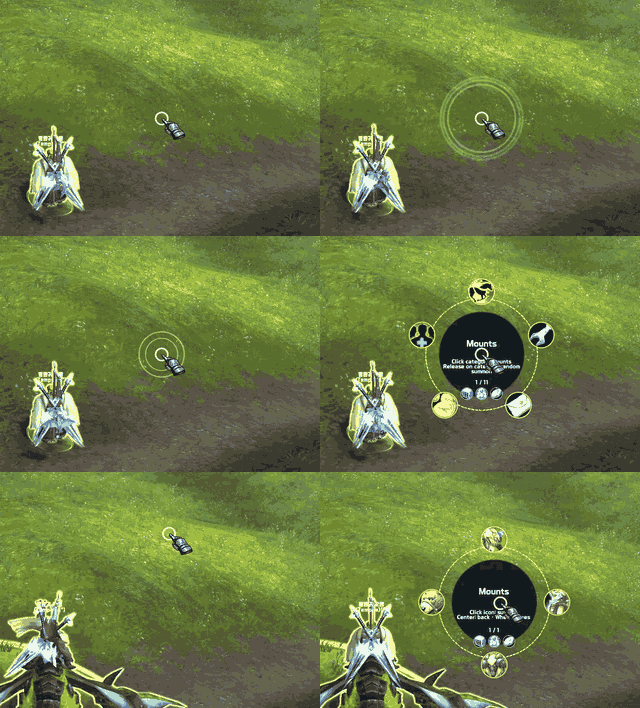
Spop-CurseForge-under2MB.gif
Spop-CurseForge-under2MB.gif

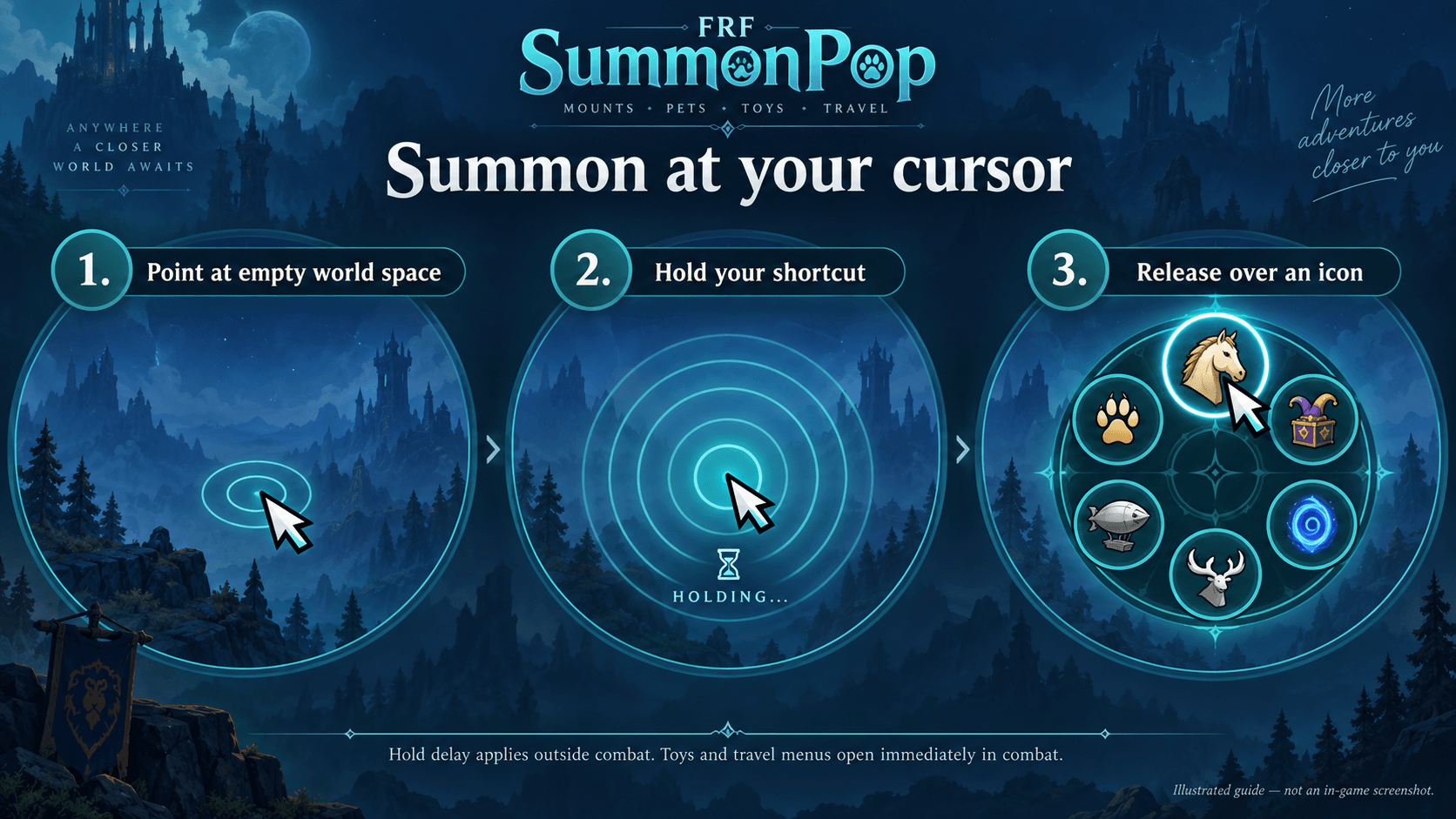
SummonPop-guide-EN.png

SummonPop-guide-EN.png

Description

FRF SummonPop

Hold. Choose. Summon.

FRF SummonPop opens circular menus at your cursor, keeping mounts, companions, toys and travel options close to where you are already pointing.

Place your cursor over empty world space and briefly hold a shortcut to open a menu. Each of the five menus has its own activation settings.

Five menus

  • Mounts: Browse favorites and purpose-based categories such as ground mounts, repairs, mail, auctions and passenger mounts.
  • Companions: Summon favorite pets, choose a random companion, or browse supported service companions.
  • Toys: Access favorites and optional categories including utilities, transformations and placed or summoned objects.
  • Hearth & Travel: Keep selected hearthstones and travel items together.
  • Utilities: Find supported mail, vendor, repair, bank, auction and transmog options across mounts, companions, toys, items and spells.

Activation and controls

  • Assign separate keyboard shortcuts for each menu.
  • Enable or disable right-click gesture activation independently for all five menus.
  • Disabling a mouse gesture preserves its assignment and leaves keyboard activation available.
  • Supported menus provide release-to-use and click-to-use interaction settings.
  • Toy and utility category buttons open a selection list; click the actual entry to use it.
  • Optional menu-switch buttons let you move between categories without reopening the menu. Hover them to see shortcut information.

Default mouse gestures

Menu Gesture
Mounts Ctrl + Right-click
Companions Shift + Right-click
Toys Alt / Option + Right-click
Hearth & Travel Ctrl + Shift + Right-click
Utilities Ctrl + Alt / Option + Right-click

Use these gestures over empty world space. Existing keybinding conflicts may prevent a gesture from activating; check the status beneath its selector.

Favorites and categories

Regular collection lists use your selected favorites. Supported journal favorites are synchronized with the game’s collection journals, and you can organize favorite order in the settings.

Purpose-based lists are separate from the regular favorite list. They can include owned entries with the relevant function even when those entries are not favorites. Toys with multiple supported functions may appear in more than one category.

Random and quick actions

  • Random mounts: Choose from usable favorites, preferring flying mounts in flyable areas. Flying preference is not applied while submerged.
  • Random companions: Summon a usable favorite companion.
  • Random hearthstone: Outside combat, choose a usable selected home-bound hearthstone with no cooldown. Fixed-destination and unverified travel items are excluded.
  • Optional central quick buttons: Place the random action in the center for faster access. Quick options are off by default and remove the duplicate outer random entry.
  • Clear random labels: Random buttons describe their random function rather than displaying the selected item’s tooltip.

Choose your layout

Use Standard mode for a spacious circular menu, or Compact mode for a tighter arrangement that reduces cursor movement.

Compact mode adapts to the number of icons, places names above the menu and reveals icons in a quick clockwise sequence. Circular icons, hover highlights and smooth transitions keep the selection readable.

Service requirements and combat

Owning a service mount, companion or toy does not always mean its service is unlocked or currently usable. Some entries require an upgrade, a profession, interaction after summoning or a completed cooldown.

Utilities filters supported availability conditions and hides providers with unverified requirements by default. Service and travel coverage is curated; newly added or unverified entries may not yet be categorized.

Combat uses a separate supported interaction path. Random and central quick hearthstone actions are currently available outside combat; combat retains individual hearthstone entries. Game restrictions still apply to every action.

Getting started

  1. Open FRF SummonPop in FRF Config.
  2. Choose one of the five collection pages.
  3. Select favorites and configure its shortcut, mouse activation and interaction style.
  4. Choose Standard or Compact mode.
  5. Place your cursor over empty world space and briefly hold the assigned shortcut.

Language

Korean and English interface text is supported.


FRF SummonPop

잠시 누르고, 고르고, 소환하세요.

FRF SummonPop은 커서 위치에 원형 메뉴를 펼쳐 탈것·애완동물·장난감·귀환 및 편의 기능을 빠르게 선택할 수 있게 합니다.

다른 UI가 없는 빈 화면에 커서를 두고 단축키를 잠시 누르면 메뉴가 열립니다. 다섯 메뉴의 호출 방식을 각각 설정할 수 있습니다.

다섯 가지 메뉴

  • 탈것: 즐겨찾기와 지상 탈것·수리·우편·경매장·함께 타기 등의 목적별 목록을 사용합니다.
  • 애완동물: 즐겨찾기 펫, 무작위 펫과 지원되는 기능성 펫을 소환합니다.
  • 장난감: 즐겨찾기와 편의·변신·설치·소환 등의 선택형 분류를 사용합니다.
  • 귀환: 선택한 귀환석과 이동 아이템을 모아봅니다.
  • 편의: 탈것·펫·장난감·아이템·스킬에 있는 우편·상점·수리·은행·경매장·형상변환 수단을 찾아봅니다.

호출과 조작

  • 메뉴마다 키보드 단축키를 따로 지정합니다.
  • 다섯 메뉴의 우클릭 조합 호출을 각각 켜고 끌 수 있습니다.
  • 마우스 호출을 꺼도 지정한 조합은 보존되며 키보드 단축키는 유지됩니다.
  • 지원되는 메뉴에서 키를 놓아 사용하거나 아이콘을 클릭해 사용하는 방식을 선택합니다.
  • 장난감·편의의 목적별 버튼은 목록을 엽니다. 실제 사용은 펼쳐진 항목을 클릭합니다.
  • 선택형 메뉴 전환 버튼으로 다른 메뉴로 이동합니다. 마우스를 올리면 해당 메뉴의 단축키를 확인할 수 있습니다.

기본 마우스 조합

메뉴 조합
탈것 Ctrl + 우클릭
애완동물 Shift + 우클릭
장난감 Alt / Option + 우클릭
귀환 Ctrl + Shift + 우클릭
편의 Ctrl + Alt / Option + 우클릭

빈 화면에서 사용합니다. 기존 단축키와 충돌하면 마우스 조합이 동작하지 않을 수 있으므로 선택 버튼 아래의 상태 안내를 확인하세요.

즐겨찾기와 목적별 목록

일반 목록에는 선택한 즐겨찾기를 표시합니다. 지원되는 수집품은 게임 도감의 즐겨찾기와 연동되며, 설정에서 표시 순서를 정리할 수 있습니다.

목적별 목록은 일반 즐겨찾기 목록과 별개입니다. 즐겨찾기가 아니어도 해당 기능을 가진 보유 수집품을 표시할 수 있습니다. 여러 기능을 가진 장난감은 지원되는 분류에 중복으로 나타납니다.

무작위와 빠른 실행

  • 무작위 탈것: 사용 가능한 즐겨찾기에서 선택하고, 비행 가능 지역에서는 비행 탈것을 우선합니다. 물속에서는 비행 우선을 적용하지 않습니다.
  • 무작위 펫: 소환 가능한 즐겨찾기 펫을 선택합니다.
  • 무작위 귀환: 전투 밖에서 선택한 귀환 지점용 귀환석 중 사용 가능하고 쿨타임이 없는 항목을 고릅니다. 고정 목적지·미확인 이동 수단은 제외합니다.
  • 선택형 중앙 빠른 버튼: 무작위 기능을 중앙에 배치해 이동 거리를 줄입니다. 기본값은 꺼짐이며, 켜면 바깥쪽의 중복 무작위 항목을 제거합니다.
  • 무작위 전용 안내: 선택된 개별 아이템 대신 무작위 기능 자체를 툴팁으로 안내합니다.

두 가지 화면 구성

여유 있는 원형 배치의 기본 모드, 커서 이동을 줄이는 촘촘한 배치의 미니멀 모드를 선택합니다.

미니멀 모드는 아이콘 개수에 맞춰 배치가 달라지고 이름을 위쪽에 표시합니다. 아이콘은 시계 방향으로 빠르게 나타나며, 원형 아이콘과 마우스 오버 강조·부드러운 전환 효과를 제공합니다.

서비스 조건과 전투

기능성 탈것·펫·장난감을 보유했다고 항상 해당 서비스를 이용할 수 있는 것은 아닙니다. 강화나 전문기술이 필요하거나, 소환 후 대화해야 하거나, 재사용 대기시간이 적용될 수 있습니다.

편의 메뉴는 지원되는 사용 조건을 확인하고, 조건을 확인할 수 없는 수단은 기본적으로 숨깁니다. 서비스·이동 수단 분류는 관리되는 목록을 사용하므로 새 항목이나 미확인 항목이 아직 분류되지 않았을 수 있습니다.

전투 중에는 별도의 지원 경로로 동작합니다. 무작위 귀환과 중앙 빠른 귀환은 현재 전투 밖에서 지원하며, 전투 중에는 개별 귀환석 목록을 사용합니다. 모든 기능에는 게임 자체의 사용 제한이 적용됩니다.

시작하기

  1. FRF Config에서 FRF SummonPop 설정을 엽니다.
  2. 다섯 수집품 페이지 중 하나를 선택합니다.
  3. 즐겨찾기·단축키·마우스 호출·사용 방식을 설정합니다.
  4. 기본 모드 또는 미니멀 모드를 고릅니다.
  5. 빈 화면에 커서를 두고 지정한 단축키를 잠시 누릅니다.

언어

한국어와 영어 인터페이스를 지원합니다.

The FRF SummonPop Team

profile avatar
  • 9
    Projects
  • 5.6K
    Downloads

More from FRF_SEAHView all

  • FRF Sekili project image

    FRF Sekili

    FRF Sekili enhances your gameplay by displaying WoW's default skill recommendations alongside a customizable history of your recently used abilities.

    • 3.9K
    • September 13, 2026
  • FRF_Ready project image

    FRF_Ready

    Track combat buffs, consumable supplies, and weapon enhancements in a compact, customizable bar with clickable items.

    • 49
    • September 13, 2026
  • FRF Config project image

    FRF Config

    Unified settings for the FRF addon series, with Korean and English support. // FRF 시리즈 애드온의 설정을 한곳에서 관리하는 통합 설정창입니다.

    • 843
    • September 13, 2026
  • !!!FRF_SlashThief project image

    !!!FRF_SlashThief

    An efficient tool that automatically collects and organizes slash commands into a manageable list with favorites and custom memos.

    • 128
    • September 13, 2026
  • FRF Sekili project image

    FRF Sekili

    FRF Sekili enhances your gameplay by displaying WoW's default skill recommendations alongside a customizable history of your recently used abilities.

    • 3.9K
    • September 13, 2026
  • FRF_Ready project image

    FRF_Ready

    Track combat buffs, consumable supplies, and weapon enhancements in a compact, customizable bar with clickable items.

    • 49
    • September 13, 2026
  • FRF Config project image

    FRF Config

    Unified settings for the FRF addon series, with Korean and English support. // FRF 시리즈 애드온의 설정을 한곳에서 관리하는 통합 설정창입니다.

    • 843
    • September 13, 2026
  • !!!FRF_SlashThief project image

    !!!FRF_SlashThief

    An efficient tool that automatically collects and organizes slash commands into a manageable list with favorites and custom memos.

    • 128
    • September 13, 2026