FRF PINOTE
- By
Save map pins, follow a 3D direction arrow and keep customizable notes with game links on your screen. // 지도에 핀을 저장하고 입체 화살표로 방향을 확인하며 게임 링크를 넣은 메모를 화면에 띄웁니다.
FRF_PINOTE.png
ì¤í¬ë¦°ì· 2026-09-26 204016.png
ì¤í¬ë¦°ì· 2026-09-26 205238.png
Description
# FRF PINOTE
## English
**Mark a place. Keep a note. Find it again.**
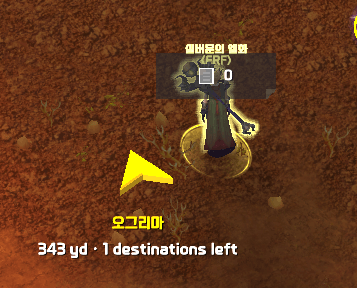
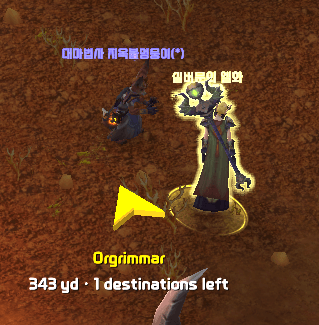
FRF PINOTE combines map destinations with personal on-screen notes. Save places you want to visit, follow a dimensional direction arrow and keep useful information visible while you play.
### Add destinations directly on the map
- Alt-left-click the map to add a pin without opening the PINOTE window.
- Enter X and Y coordinates from 0 to 100 in the map input panel. Drag the panel to a convenient position.
- Alt-click supported native map icons to use their locations as destinations.
- Keep destinations in an ordered list and attach a short note to each pin.
- Review, edit and remove pins from the list, or right-click a map pin to confirm deletion.
### Follow your destination
Choose a 3D arrow design, size and tilt. See the destination name and distance, and optionally advance to the next saved destination on arrival.
Click a supported quest icon in the objective tracker for temporary guidance. Selecting another quest, clearing the selection, turning in or abandoning the quest removes the temporary target without deleting manually saved pins.
The arrow shows the straight-line direction, not a route around obstacles. It does not move your character. Guidance stops inside instances, including dungeons and raids, and needs usable position data.
### Write and style independent notes
- Create multiple notes, each with its own text, position and appearance.
- Adjust title and body fonts, sizes, alignment and colors while writing, along with the note background.
- Move and resize notes, lock their placement or use a title-only view.
- Insert supported game links with Shift-click. Click web links to copy their addresses for use outside the game.
- Browse all note titles in one list and click a title to expand its contents. Show hidden notes again when needed.
### Reach your pins and notes quickly
A movable floating button cycles through the PINOTE title, pin count and note count. Left-click opens the displayed list, the mouse wheel switches the display and right-click opens settings. Adjust its size, opacity and combat/dungeon/raid visibility.
Use optional Clocking or Compass shortcuts, or combine PINOTE information with other FRF displays through NewsHub.
### Getting started
Install [FRF Config](https://www.curseforge.com/wow/addons/frf-config), then open `/frf` and select **FRF PINOTE**. Open the world map to add your first pin, or use the floating button to open your notes. `/pinote` opens the manager.
Supports **Retail and Forever**, with English and Korean settings. Native-icon and quest guidance work where the client provides a usable destination. Web links are copied rather than opened in an in-game browser.
---
## 한국어
**장소는 핀으로, 기억할 내용은 메모로.**
FRF PINOTE는 지도 목적지와 화면 메모를 함께 사용하는 애드온입니다. 다시 가고 싶은 곳을 저장하고 입체 화살표로 방향을 확인하세요. 플레이 중 필요한 내용은 메모로 띄워 둘 수 있습니다.
### 지도에서 바로 목적지 추가
- PINOTE 창을 열지 않아도 지도에서 Alt+왼쪽 클릭으로 핀을 찍습니다.
- 지도 입력창에 0~100 범위의 X·Y 좌표를 입력합니다. 입력창은 드래그해 편한 곳으로 옮깁니다.
- 지원되는 게임 기본 지도 아이콘을 Alt+클릭해 해당 위치를 목적지로 추가합니다.
- 목적지를 순서대로 모으고 각 핀에 짧은 메모를 붙입니다.
- 목록에서 핀을 확인·수정·삭제하거나 지도 핀을 오른쪽 클릭해 삭제를 확인합니다.
### 화살표로 목적지 방향 확인
입체 화살표의 디자인·크기·기울기를 고릅니다. 목적지 이름과 거리를 확인하고, 도착하면 다음 저장 목적지로 자동 전환하도록 선택합니다.
오른쪽 퀘스트 목록의 지원되는 아이콘을 누르면 임시로 안내합니다. 다른 퀘스트 선택·선택 해제·완료 보고·포기 시 임시 목적지는 자동으로 정리하며 직접 저장한 핀은 지우지 않습니다.
화살표는 목적지의 직선 방향을 표시합니다. 장애물을 피해 길을 찾거나 캐릭터를 자동으로 이동시키지는 않습니다. 던전·공격대 등 인스턴스 안에서는 안내를 멈추며, 안내하려면 위치 정보를 확인할 수 있어야 합니다.
### 메모마다 따로 쓰고 꾸미기
- 여러 메모를 만들고 내용·위치·모양을 각각 저장합니다.
- 작성하면서 제목과 본문의 글꼴·크기·정렬·색상과 메모 배경을 조절합니다.
- 메모를 이동하거나 크기를 바꾸고, 위치를 잠그거나 제목만 표시합니다.
- Shift+클릭으로 지원되는 게임 링크를 넣습니다. 웹 링크를 누르면 게임 밖에서 사용할 주소를 복사합니다.
- 전체 메모 목록에서 제목을 누르면 내용을 펼쳐 봅니다. 숨긴 메모도 다시 표시할 수 있습니다.
### 핀과 메모로 빠르게 이동
움직일 수 있는 플로팅 버튼에 PINOTE 이름·핀 개수·메모 개수가 차례로 나타납니다. 왼쪽 클릭으로 표시된 목록을 열고, 휠로 표시를 바꾸며, 오른쪽 클릭으로 설정을 엽니다. 크기·불투명도와 전투·던전·공격대 표시 조건을 조절합니다.
Clocking·Compass의 바로가기를 사용하거나 NewsHub에서 다른 FRF 정보와 함께 표시할 수도 있습니다.
### 시작하기
[FRF Config](https://www.curseforge.com/wow/addons/frf-config)를 함께 설치하고 `/frf`에서 **FRF PINOTE**를 선택하세요. 지도를 열어 첫 핀을 찍거나 플로팅 버튼으로 메모 목록을 엽니다. `/pinote`로 관리 창을 열 수도 있습니다.
**리테일·포에버**와 한국어·영어 설정을 지원합니다. 기본 아이콘·퀘스트 안내는 게임에서 목적지 위치를 확인할 수 있는 경우에 동작합니다. 웹 링크는 게임 안에서 웹페이지를 여는 대신 주소를 복사합니다.
The FRF PINOTE Team