FRF Sekili
- By
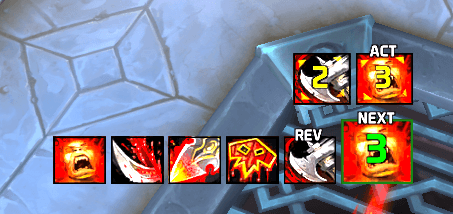
FRF Sekili enhances your gameplay by displaying WoW's default skill recommendations alongside a customizable history of your recently used abilities.
ì¤í¬ë¦°ì· 2026-02-15 170244.png
ì¤í¬ë¦°ì· 2026-02-21 004551.png
ì¤í¬ë¦°ì· 2026-09-17 164318.png
ì¤í¬ë¦°ì· 2026-09-17 164419.png
Description
English
FRF Sekili
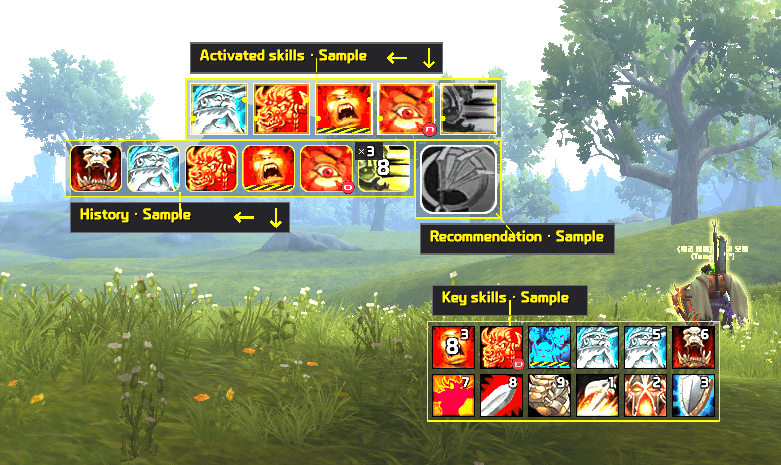
Keep recommended skills, activated skills, cast history, and your chosen key skills where you want them.
FRF Sekili organizes skill information into four display areas. Enable the areas you need and customize their icon size, shape, layout, effects, and visibility.
Features
-
Recommended skills
Display recommendations provided by WoW, with configurable hotkey labels and highlight effects. -
Activated skills
Make activated skills easier to notice. Choose separate entry and ongoing effects. -
Cast history
View skills in the order you used them. Start a fresh history when a new combat begins, or keep recording across encounters. -
Key skills
Choose which skills to display and arrange their order. Supports multiple rows, hotkey labels, and options to hide skills that are on cooldown or unavailable.
Customize your layout
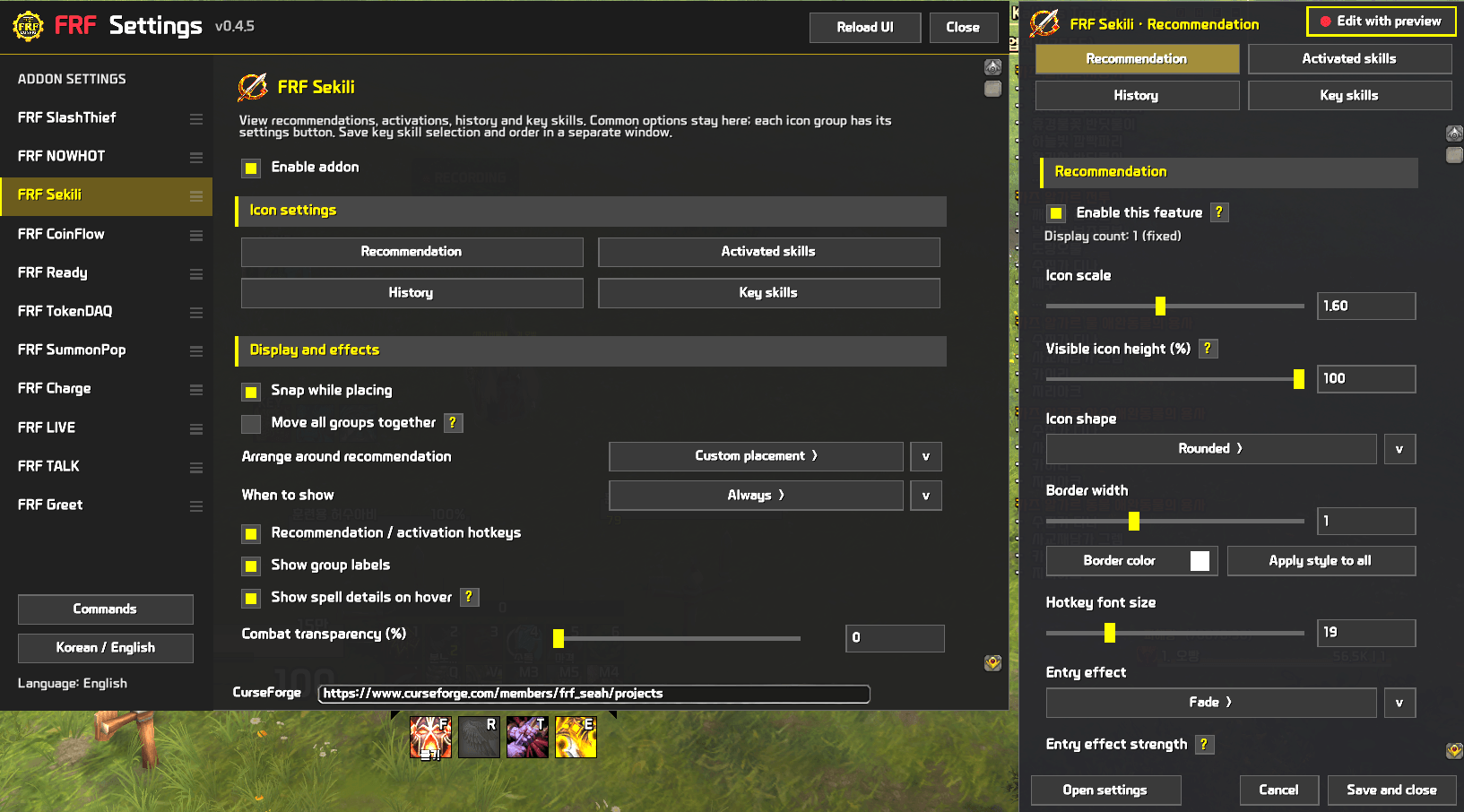
- Separate icon size, shape, borders, and layout settings for each area
- Drag displays into position
- Snap displays together and move all areas as a group
- Shared visibility conditions and individual area settings
- Select visual effects and adjust intensity where supported
- Click title artwork to enlarge it
- Korean and English support
Read skill availability at a glance
Unavailable recommended and activated skills use dimmed icons and hotkey labels. When a hotkey appears in the center, numeric cooldown text is hidden to avoid overlap, while the cooldown sweep remains visible.
Key-skill filtering and availability indicators depend on the state information provided by the game.
Settings
Configure the addon through FRF Config. Shared options and settings for each display area are organized separately.
Promotional images include illustrative examples. Actual skills and displayed states vary by character and gameplay situation.
한국어
추천 스킬, 활성화 스킬, 사용 기록, 주요 스킬을 원하는 위치에서 확인하세요.
FRF Sekili는 스킬 정보를 네 영역으로 나누어 보여줍니다. 필요한 영역만 켜고, 아이콘의 크기·모양·배치와 표시 조건을 원하는 방식으로 설정할 수 있습니다.
주요 기능
-
추천 스킬
와우에서 제공하는 추천 스킬을 표시합니다. 단축키와 강조 효과를 함께 설정할 수 있습니다. -
활성화 스킬
활성화된 스킬을 알아보기 쉽게 표시합니다. 등장 효과와 유지 효과를 따로 고를 수 있습니다. -
사용 기록
사용한 스킬을 순서대로 확인합니다. 새 전투가 시작될 때 기록을 새로 시작하거나, 이전 기록을 이어갈 수 있습니다. -
주요 스킬 관리
표시할 스킬과 순서를 직접 고릅니다. 여러 줄 배치와 단축키 표시를 지원하며, 쿨타임 중이거나 사용할 수 없는 스킬을 숨기도록 설정할 수 있습니다.
원하는 화면으로 조정
- 영역별 아이콘 크기, 모양, 테두리와 배치 설정
- 아이콘을 끌어서 위치 조정
- 배치 시 자석 효과와 모든 영역 함께 이동
- 공통 표시 조건과 영역별 설정
- 연출 종류 선택과 지원하는 연출의 강도 조정
- 대표 아이콘을 클릭해 크게 보기
- 한국어·영어 지원
스킬 상태를 더 쉽게 확인
추천·활성화 스킬을 사용할 수 없을 때는 아이콘과 단축키가 어두워집니다. 가운데 단축키가 표시되는 동안에는 쿨다운 숫자를 겹쳐 그리지 않고, 회전하는 쿨다운 표시를 유지합니다.
주요 스킬의 숨김과 사용 불가 표시는 게임에서 제공하는 상태 정보를 기준으로 동작합니다.
설정
FRF Config에서 설정합니다. 공통 설정과 각 영역의 설정을 나누어 원하는 항목을 쉽게 찾을 수 있습니다.
소개 이미지에는 기능 설명용 예시가 포함되어 있습니다. 실제 표시되는 스킬과 상태는 캐릭터와 게임 상황에 따라 달라집니다.
FRF Sekili Team