FRF_Greet
- By
Guild arrival alerts, a waiting ticker, and click-to-send grouped greetings. // 길드원 접속 알림과 대기 목록을 보고 클릭으로 모아 인사합니다.
FRF_Greet-sample.png
ì¤í¬ë¦°ì· 2026-09-14 175604.png
Description
# FRF_Greet
Collect guild arrivals and welcome them with a click.
## Features
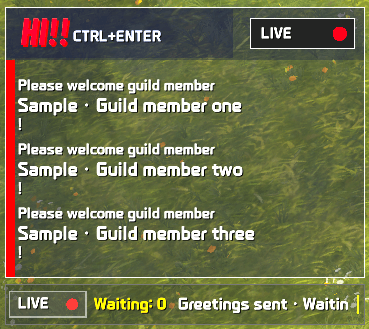
- A LIVE ticker shows the unique waiting count and comma-separated scrolling names.
- NEW!! announces arrivals; HI!! reminds you to welcome waiting members.
- Click the ticker or press your assigned key to greet. Right-click opens settings.
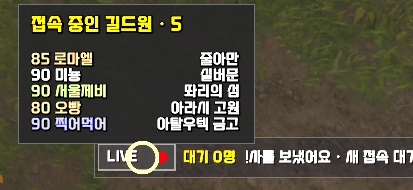
- Hover over LIVE to see online guild members, levels and zones.
- Customize class-colored names, sound, font size, transparency, visibility and scroll timing.
- Drag the bar to move it and use the right-edge handle to resize it.
## Greeting formats
**Name + greeting:** combines multiple names into one chat message, such as `Alice, Bob, Welcome!`.
Only names fitting within the chat length limit are included. Remaining names stay queued for your next click or keypress. Your greeting is never truncated.
**Greeting only:** sends one greeting for the waiting list, regardless of its size.
Save up to ten greetings and optionally pick one at random. Built-in Korean and English greetings follow your selected language. Edited greetings remain unchanged when you switch languages.
Characters who log out before you greet them are removed from the waiting list.
## Getting started
1. Install FRF_Greet and FRF Config. Settings are managed in FRF Config.
2. Type `/fg` or right-click the ticker to open settings.
3. Choose your greeting and key binding. The default is Ctrl+Enter; an existing binding is not overwritten.
4. Click the bar or press your key when members are waiting.
Greetings are sent only through your click or keypress. If combat or a game sending restriction prevents sending, try again later. Dungeon and raid sending restrictions are configurable.
FRF TokenDAQ is not required. Disabling the addon stops its features and hides its displays while preserving settings.
The gallery screenshot uses sample names.
# FRF_Greet
길드원 접속을 모아두고, 클릭 한 번으로 반갑게 인사하세요.
## 주요 기능
- LIVE 바에 중복을 제외한 인사 대기 인원과 닉네임을 표시합니다. 닉네임은 쉼표로 이어서 흐릅니다.
- 새 접속은 NEW!! 팝업으로, 대기자 알림은 HI!! 팝업으로 표시합니다.
- 바를 클릭하거나 지정한 단축키로 인사합니다. 우클릭하면 설정을 엽니다.
- LIVE에 마우스를 올리면 현재 접속 중인 길드원의 레벨, 닉네임, 지역을 확인합니다.
- 닉네임 직업색, 알림 소리, 글자 크기, 배경 투명도, 표시 조건과 스크롤 시간을 설정합니다.
- 바를 드래그해 이동하고 오른쪽 손잡이로 너비를 바꿉니다.
## 인사 방식
**닉네임 + 인사말:** 여러 닉네임을 한 채팅 메시지로 묶습니다. 예: `하나님, 두리님 어서오세요!`
채팅 길이에 들어가는 인원만 처리하고, 남은 인원은 다음 클릭이나 단축키 입력 때 처리합니다. 인사말을 잘라서 보내지 않습니다.
**그냥 인사말:** 대기 인원수와 관계없이 인사말 한 번을 보냅니다.
인사말은 최대 10개를 저장하고 무작위로 선택할 수 있습니다. 한국어·영어 기본 인사말은 설정 언어를 따릅니다. 직접 수정한 문구는 언어를 바꿔도 유지됩니다.
인사하기 전에 접속을 종료한 캐릭터는 대기 목록에서 빠집니다.
## 사용 방법
1. FRF_Greet와 FRF Config를 설치하세요. 설정은 FRF Config에서 관리합니다.
2. `/fg` 또는 바 우클릭으로 설정을 여세요.
3. 인사말과 단축키를 정하세요. 기본 단축키는 Ctrl+Enter이며, 이미 사용 중인 키는 덮어쓰지 않습니다.
4. 대기 인원이 생기면 바를 클릭하거나 단축키를 누르세요.
인사는 직접 클릭하거나 키를 눌렀을 때만 보냅니다. 전투 중이거나 게임에서 전송을 제한하면 잠시 후 다시 시도하세요. 던전·공격대의 전송 제한은 설정에서 조절합니다.
FRF TokenDAQ 없이도 동작합니다. 사용을 끄면 표시와 기능이 멈추고 설정은 유지됩니다.
첨부 소개 이미지는 예시 닉네임으로 촬영한 화면입니다.
The FRF_Greet Team