Forever Wow BiS
- By
See if an item is BiS for your spec and level, right in its tooltip for every class.
Screenshot 2026-10-19 222640.png
Description
ForeverWoW.gg BiS
Best-in-slot rankings for World of Warcraft: Forever, right in your item tooltips.
Hover any item and see where it ranks for your spec at your level, straight from the lists on ForeverWoW.gg. No more alt-tabbing to check whether that quest reward or dungeon drop is actually an upgrade.
Features
Item tooltips
Every item that makes a top 10 for your class shows a line like:
ForeverWoW.gg #1 Head · Fury +17% over equipped Also: Arms #2 Head Quest: The Helm Quest (level 18)
- Ranked for your level. Lists change as you level, and the tooltip follows. Items you can't use yet show when they become good: #1 Head (from level 56).
- Your spec first. Your spec is detected from your talents. Other specs of your class are listed underneath, handy for off-specs and dual-spec plans.
- Random-suffix greens. For "of the Bear" / "of the Eagle" style items it tells you which roll is the one that ranks: (best roll: of the Tiger).
- Compared with what you wear. +17% over equipped, equipped is better, or usable at level 40. Rings and trinkets are compared with your weaker one, two-handers with main hand plus off hand, and random-suffix greens are scored from their actual roll. This works for any item your class can use, not just the top 10.
- Where it comes from. The quest (and the level you can pick it up), the boss, the vendor or the profession.
- Faction aware. Alliance-only and Horde-only rewards only show for the side that can get them.
Best quest reward, marked
When a quest offers a choice of rewards, the one that ranks best for your spec gets a checkmark and its rank, on both the accept and the turn-in screen.
Upgrade alerts
Loot, roll on or receive an item that beats what you wear, and a small pop-up tells you: Upgrade for you: [item] #2 Head · +14% over equipped. Click it for your BiS page. Nothing pops up mid-fight; it waits until combat ends.
Bags and character frame
Bag items that are upgrades you can use right now get a green arrow, and every equipped item shows its BiS rank on the character frame (#1 in gold).
My BiS panel
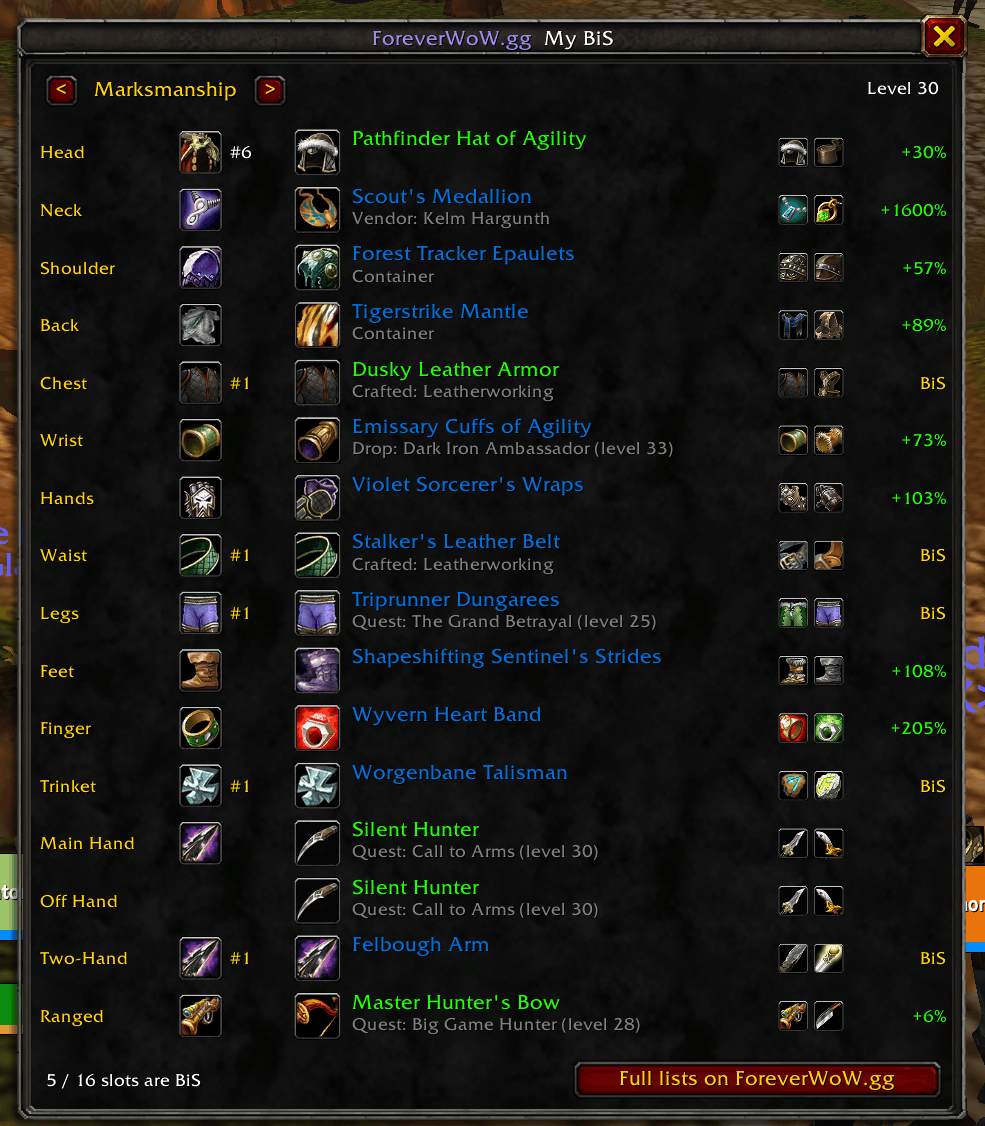
Type /fwow bis for a panel with every slot: what you wear and its rank, the best pick at your level for your spec (plus the next two), where to get it and how much better it is. Switch specs with the arrows, shift-click an item to link it, ctrl-click to try it on.
Minimap button
A ForeverWoW.gg button on the minimap edge (drag it anywhere around it) and an entry in the minimap's addon menu: left-click opens My BiS, right-click gives the link to your BiS page.
Your BiS page, one command away
Type /fwow for a ready-to-copy link to your class, spec and level page on ForeverWoW.gg (full top-10 lists for every slot, sources, set bonuses, stat priority and leveling upgrades), in your game language.
How the rankings work
The rankings are the same ones you see on ForeverWoW.gg, built from World of Warcraft: Forever's own game data:
- When you can use an item. Required level, and for quest rewards the level you can pick up the quest. For dungeon and raid drops it's the boss's level, and for crafted and reputation gear the profession or reputation it needs.
- Real item stats. Stats, armor and weapon DPS are calculated from the game files, including the built-in spell power on caster weapons and every random-suffix roll.
- Spec stat weights. Each spec has its own weights, plus value for set bonuses you can actually complete and for on-use trinkets.
- Updated automatically. New versions are released whenever the rankings change, for example after a patch or hotfix.
Want to tune the stat weights yourself? The website's custom search lets you change every weight and re-rank instantly.
Commands
| Command | What it does |
|---|---|
/fwow |
Link to your BiS page on ForeverWoW.gg |
/fwow bis |
Open the My BiS panel |
/fwow tooltip |
Turn the tooltip line on or off |
/fwow sources |
Turn item sources in tooltips on or off |
/fwow rewards |
Turn the quest reward marker on or off |
/fwow alerts |
Turn upgrade pop-ups on or off |
/fwow bags |
Turn the bag upgrade arrows on or off |
/fwow charframe |
Turn the ranks on the character frame on or off |
/fwow minimap |
Show or hide the minimap button |
/fwow spec <name> |
Rank for a specific spec (e.g. /fwow spec fury) |
/fwow spec auto |
Go back to detecting your spec from talents |
/fwow help |
Version and settings |
Languages
English, Deutsch, Français, Español (EU & Latinoamérica), Português, Русский, 한국어, 简体中文 and 繁體中文. Slot and spec names come from your game client, so they always match the rest of your UI.
FAQ
Does it slow down my game? No. Rankings are stored in a compact format, only your own class's data is unpacked when you log in, and an item is only looked up when you hover it.
Does it send anything over the internet? No. WoW addons can't access the internet, and this one only reads item and talent information to show its tooltip line.
An item I'm wearing doesn't show a rank. Only items in the top 10 for a slot (for your class, at some level) are shown. Check the full list for your slot on ForeverWoW.gg, and if you think an item is missing or ranked wrong, use the feedback button on the website.
Which spec does it use before I have talents?
Until you spend talent points it lists every spec of your class the item ranks for at your level. Use /fwow spec <name> to pick one.
Made by ForeverWoW.gg. Best-in-slot lists for every World of Warcraft: Forever class, spec and level, in 10 languages.
Forever Wow BiS Team