Forever Travel
- By
Keep learned teleports, portals and bagged hearthstones in one configurable flyout to save action-bar slots.
Forever Travel
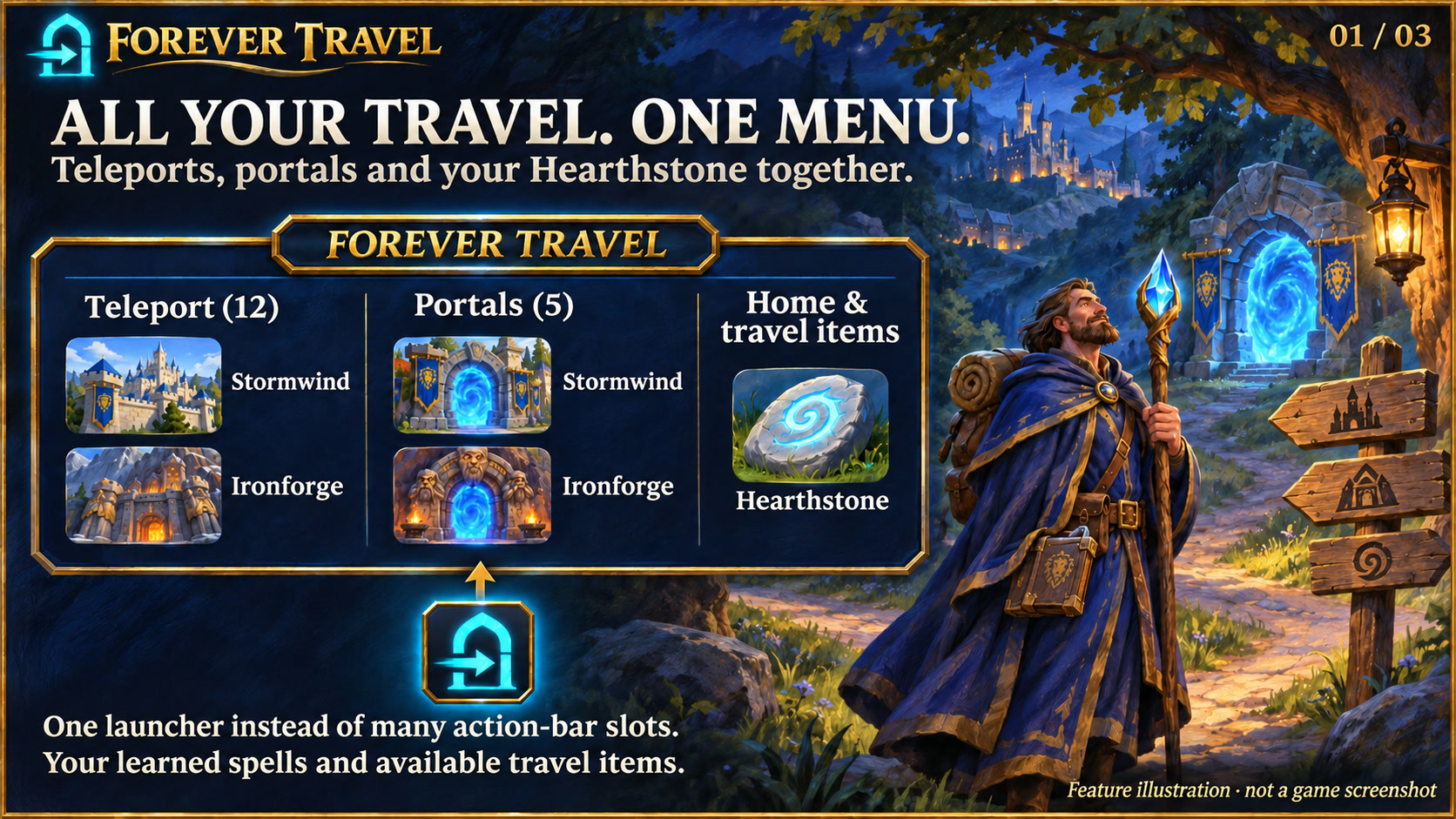
Feature illustration: schematic example, not an in-game screenshot.
Menus use the shared Forever Hub presentation: dark textured panels, subtle metal borders and clear selection states. Compact action menus stay compact; the Forever launcher icons stay frameless. Update Forever Hub to 1.10.1 or later for this appearance.
Language (from version 1.4.7): follows the WoW client by default. Each addon has a Language dropdown; select a language and click Reload UI. Available translation coverage varies by addon and language; missing labels fall back to English. Game-provided names stay in the client language. Update Forever Hub to 1.11.0 or later.
Requires Forever Hub. Install and enable Forever Hub alongside this addon. https://www.curseforge.com/wow/addons/forever-hub
Reach your travel abilities from one launcher instead of filling several action-bar slots.
Features
- Hearthstone cooldown appears directly on the launcher, scaled to the icon size selected in Forever Hub.
- Clear hover/pressed feedback and correctly spaced wrapped headings.
- Learned teleports and portals, grouped separately from hearthstones and return actions.
- Teleport and portal headings show the remaining casts from their respective runes in your bags, such as Teleport (12) and Portals (5). A red heading with zero warns when the required rune is missing; the tooltip explains the shared supply. Bank stock is excluded, and counts update automatically after inventory changes. Menu icons and the return/travel-items heading have no quantity labels.
- Bagged travel items are available on any class, including a hunter's Hearthstone.
- Choose up, down, left or right opening direction, labels and 1–8 icons per row.
- Drag the launcher onto an action bar to create a launcher macro.
- Alt-drag moves the launcher or attaches it to a shared bar with compatible Forever launchers.
- Add custom owned items or learned spells.
- Four designs: Runic Seal (default), Minimal, Tactical and Signal.
Getting started
Left-click the launcher or use /ftravel to open the menu. Use /ftravel options or Shift-right-click on the large launcher for settings; right-click hides it. Normal dragging creates an action-bar macro; Alt-dragging moves the icon. A Hearthstone must be in your bags. Custom examples: /ftravel add spell 556 return and /ftravel add item 6948 return.
Scope
Only your click casts a spell or uses an item. Open and configure the menu outside combat; an already open menu retains its secure action buttons. Layout changes and adding/removing action tiles wait until combat ends; rune counts in existing headings keep updating. Only known spells and owned bag items are included; toy-journal-only travel items are not automatically discovered. Rune counts describe reagent supply, not current mana or cooldown readiness. No teleport bypasses the game's normal requirements or cooldowns.
Compatibility and testing
WoW Forever 1.60.1 / interface 16001. The owner has confirmed the addon works in the game; Lua/API and package checks have also passed. This does not mean every class, locale or addon combination has been tested. Please report issues in the project comments with the version and steps to reproduce. Requires Forever Hub. Install and enable Forever Hub alongside this addon.
Large launcher icons and faction dock
Left-click the large launcher to open the addon. Right-click hides that launcher; use /ficons and enable its checkbox to restore it. Shift-right-click opens options where available. Alt-drag moves the launcher or the shared dock. Existing visibility and position settings are preserved.
The dock defaults to your character's faction: blue/gold for Alliance, red/gold for Horde. Use /ficons > Bar style to choose Automatic, Alliance or Horde manually; the choice is stored per character. The required Forever Hub includes a Large launcher icons manager.
Changelog and version history
Each file has its own Changelog on CurseForge. The complete version history is also available at kowarek.de – Forever Travel changelog. New release notes are added to that website automatically.
Deutsch
Die Überschriften zeigen den Runenvorrat in Klammern, etwa Teleport (12) und Portale (5). Bei fehlenden Runen wird die jeweilige Überschrift mit 0 rot. Die Menü-Icons und Heimkehr & Reiseitems haben keine Stückzahlanzeige. Der Tooltip erklärt den gemeinsamen Vorrat; Bankbestände zählen nicht mit. Die Zähler aktualisieren sich automatisch, auch bei bereits geöffnetem Menü im Kampf. Der Ruhestein-Timer auf dem Starticon bleibt erhalten.
Teleport, Portale und Ruhesteine in einem aufklappbaren Menü. Auch ohne Magierzauber erscheint ein Ruhestein aus deinen Taschen. Linksklick oder /ftravel öffnet das Menü, Shift+Rechtsklick die Optionen; Rechtsklick blendet das große Icon aus. Richtung, Beschriftungen und 1–8 Icons pro Reihe sind einstellbar. Starticon auf eine Aktionsleiste ziehen oder mit Alt verschieben und anheften. Das Menü außerhalb des Kampfes öffnen und konfigurieren; jede Reiseaktion benötigt deinen Klick.
Starticons und Fraktionsfarben
Linksklick öffnet das Addon, Rechtsklick blendet sein großes Starticon aus. /ficons und das Häkchen beim Addon holen es zurück. Shift+Rechtsklick öffnet die verfügbaren Optionen. Die Leiste startet passend zur Charakterfraktion in Blau/Gold (Allianz) oder Rot/Gold (Horde); unter Leistenstil ist eine manuelle Auswahl möglich.
Sprache: standardmäßig automatisch nach WoW-Client. Die Sprachwahl in jedem Addon greift nach /reload; benötigt Forever Hub ab 1.11.0. Fehlende Übersetzungen erscheinen auf Englisch. Namen aus dem Spiel bleiben in der Clientsprache. Nicht alle Texte sind bereits in jede auswählbare Sprache übersetzt.
Forever Travel Team