Forever Flex UI
- By
A compact, customizable Adlerwacht interface with movable elements, faction artwork and integrated Forever tools.
Forever Flex UI
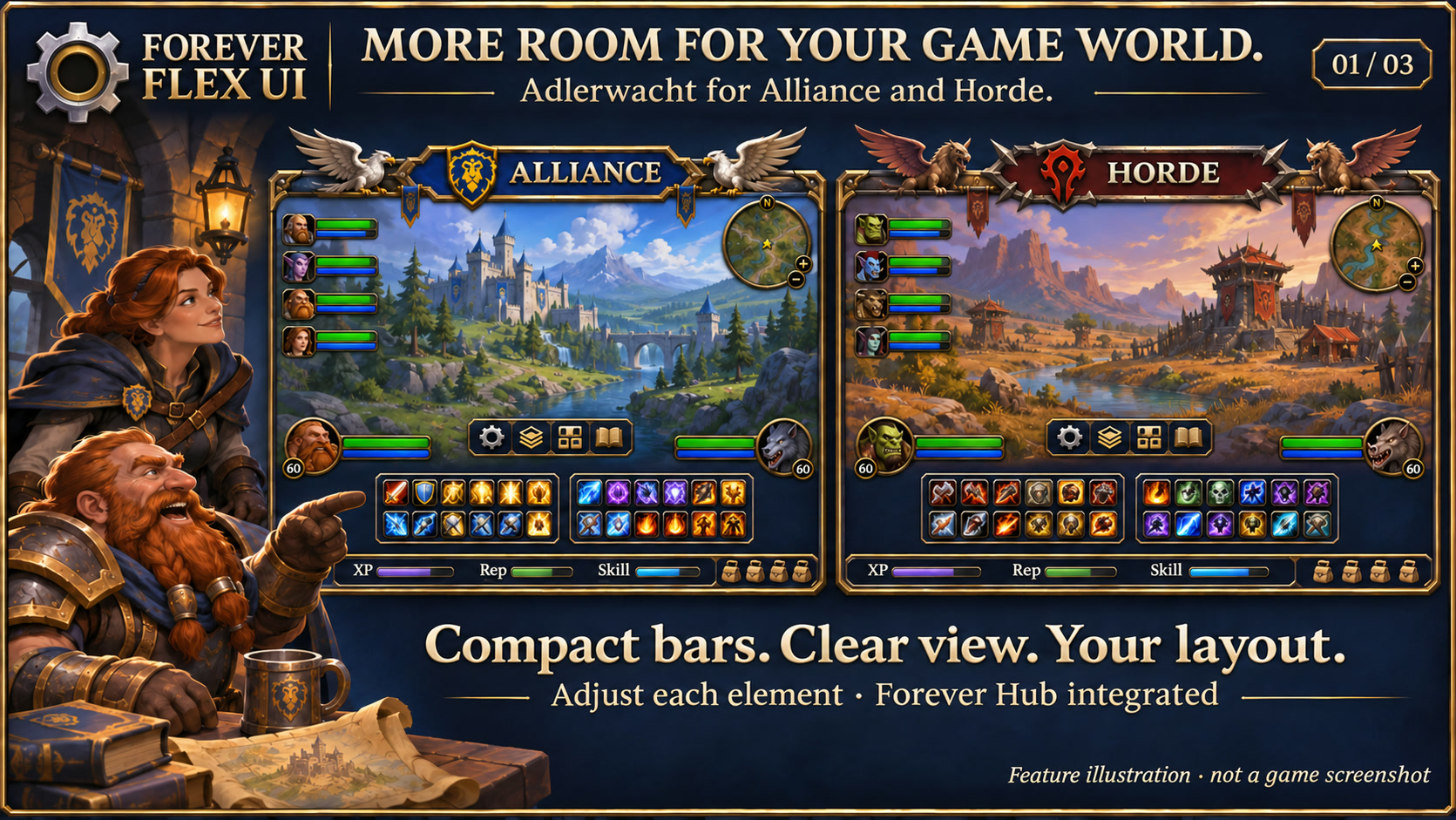
Feature illustration: schematic example, not an in-game screenshot.
Menus use the shared Forever Hub presentation: dark textured panels, subtle metal borders and clear selection states. Compact action menus stay compact; the Forever launcher icons stay frameless. Update Forever Hub to 1.10.1 or later for this appearance.
Language (from version 1.3.6): follows the WoW client by default. Each addon has a Language dropdown; select a language and click Reload UI. Available translation coverage varies by addon and language; missing labels fall back to English. Game-provided names stay in the client language. Update Forever Hub to 1.11.0 or later.
Forever Flex UI brings the Adlerwacht layout to WoW Forever 1.60.1: compact action bars, sculpted metal frames, readable progress bars and faction artwork, with more room left for the game world.
Requires Forever Hub. Install and enable both addons. Open the options through the Forever Hub, the Forever Flex UI gear icon or /fui.
Recent additions (1.4.5)
Unchanged positions and unrelated addon loads no longer rebuild the UI. Placement repairs are separate from artwork; content and settings still refresh fully. Optional click casting is now in the separate Forever Heal package, submitted separately on CurseForge.
Incoming-heal previews remain part of Flex UI. /fui heal opens Forever Heal when installed. Use /fdoctor functions with Doctor 1.2.0 for optional detailed timing. These changes remove measured unnecessary work; they do not claim to solve every stutter.
Make the layout yours
- Move, resize, fade and show or hide supported UI elements individually.
- Choose automatic faction styling, Alliance gryphons or Horde wind riders.
- Configure portraits, names, health and resource text, extra information, key bindings and macro labels where applicable.
- Scale individual elements with Ctrl + mouse wheel outside combat; disable this shortcut per element if preferred.
- Name three account-wide layout profiles and see their source character. In Profiles & characters (
/fui profiles), copy another own character's recorded layout independently and undo the last load. Log in once per character with version 1.3.0 or newer to populate the list. Existing profiles remain available; other settings stay per character. - Saved layouts also apply when managed windows or the Questie tracker are created later; the tracker's custom height is restored automatically.
- Action shortcuts without a bound key stay clear, without a placeholder or dark highlight.
- Native range warnings remain visible: out-of-range abilities get a red tint even when key labels are empty or hidden.
- Mail and tracking controls sit below the minimap coordinate row, keeping the map header clear.
Compact and connected
- Two central twelve-slot action bars, additional side bars, stance/pet actions and individually configurable empty-slot hiding.
- A dynamic Forever launcher bar that grows with the icons you dock.
- Styled player, target and group frames, a compact minimap, casting/crafting/gathering progress and freestanding buff/debuff icons.
- Matching player and party portraits with a class symbol beside each name and a level badge at the lower left; names, portraits and class symbols remain configurable.
- An aligned footer for XP, optional watched reputation, profession progress and bags. Hiding reputation gives its space back to XP.
- Rested XP display, native localized XP hover information, optional XP/hour and time-to-level estimates based on recent session gains.
Incoming-heal preview (1.3.9)
A translucent mint-green segment shows incoming healing on styled player, target, party and raid health bars. It follows the current health fill, stays inside the border and uses only healing data supplied by the client.
Getting started
Open /fui, enable the element editor and drag the handles. Search or filter the element list to change individual settings. In Profiles & characters (/fui profiles), name a profile and use its Save or Load button; recorded character layouts have a separate copy action. Reset Adlerwacht layout deliberately restores the default arrangement. /fui off restores the native UI; /fui on reapplies your saved layout.
Windows and contextual elements are available when the game creates them. Open a window such as the bank or mail before enabling its custom placement. Protected layout changes wait until combat ends. Native spell execution, targeting, aura interactions and key bindings remain controlled by the game.
Automatic client-language detection and a per-addon language override; missing translations fall back to English. Designed for WoW Forever 1.60.1; compatibility with other full UI replacements depends on which frames they also modify.
Project information: https://kowarek.de/wow-addons/forever-flex-ui/
Changelog: https://kowarek.de/wow-addons/changelog/forever-flex-ui/
Shared stance bar
Action Bar 1 can optionally keep the same twelve action slots across warrior stances. Enable Same slots in every stance outside combat. The current page is used on first activation; original stance pages are preserved. Special control bars remain native. Switching the option off restores normal paging.
Class portraits
Each supported player, target, focus or party element can show Blizzard’s round class symbol instead of the character portrait. Enable Class icon instead of portrait in that element’s options. NPCs and pets keep normal portraits; frame, mask and level badge remain in place.
Sharing layouts and fitting the quest tracker
Share your Flex UI layout using a checked export code. Import positions, sizes, visibility and appearance settings, with optional adaptation to another screen size and a backup of the previous layout. No spell placements, key bindings, contacts or third-party addon settings are transferred. Both players need Forever Flex UI 1.2.0 or newer and Forever Hub.
Questie's tracker now fits its displayed contents up to a configurable maximum height, with scrolling for long lists and a stable top edge. Fixed height remains available as an option.
Chat fonts and portrait badges
Preserves Blizzard’s multilingual font families, including Cyrillic player names. Each managed chat window has its own font-size control from 8 to 24 (default 13). Chat stays left-aligned, and sizes are included in profiles and layout exports. Configure /fui > Chat 1 > Chat font size.
Player and party frames place the class symbol beside the name and the level in a smooth circle at the lower left of the portrait (layout C). Target and focus retain their round portrait class badge. Toggle the class symbol per element; full class portraits, NPCs, pets and unavailable classes hide the extra badge automatically.
Party buffs and debuffs (1.2.6)
Group members have separate compact buff and debuff rows beside their bars. Both rows are on by default. Configure /fui > Group > Party buffs & debuffs: toggle either row, choose 14–28px icons and 4–16 icons per row (defaults: 18px and eight). Hover an icon for its native tooltip, or the + indicator for additional aura names. Stack counts and publicly available cooldown animations are shown.
Updates are event-driven and coalesced for affected party members. No idle aura polling or combat layout pass is added. Disabling the group skin restores native aura display. Raid frames remain separate. Settings are included in profiles and layout codes; new aura fields require 1.2.4 or newer at the receiving end.
Racial artwork (1.2.12)
Choose a matching left/right ornament pair under /fui > Racial artwork or /fui skins: Orcs, Trolls, Undead, Tauren and Horde Skyborne; Humans, Dwarves, Gnomes, Night Elves and Alliance Skyborne. The faction selector determines the available choices. Each faction remembers its selection separately; this is manual customization, not automatic race detection.
Faction default keeps the original Alliance gryphons or Horde wind riders. Artwork fits directly against the action bars and retains the existing dimensions, positions, scaling and visibility controls. Profiles and layout exports include both choices; recipients need version 1.2.7 or newer. Changes wait until combat ends.
Interface language
Automatic client language or an individual language choice in options, applied after /reload. English, German, French, Spanish, Italian, Portuguese, Russian, Korean, Simplified Chinese and Traditional Chinese are covered by the interface dictionaries; regional choices share dictionaries. Game-provided spell, item and NPC names keep the client language. Future missing entries fall back to English.
Deutsch
Unveränderte Positionen und unbeteiligte Addon-Ladevorgänge bauen die UI nicht mehr neu auf. Positionskorrekturen sind von der Grafik getrennt; Inhalte und Optionen werden vollständig aktualisiert. Optionale Klickzauber liegen jetzt im separaten Forever Heal, separat bei CurseForge eingereicht.
Vorschau eingehender Heilung (1.3.9)
Ein durchscheinender mintgrüner Abschnitt zeigt eingehende Heilung auf den gestalteten Lebensbalken von Spieler, Ziel, Gruppe und Raid. Er folgt der aktuellen Lebensfüllung, bleibt innerhalb des Rahmens und nutzt nur vom Client bereitgestellte Heilungsdaten.
Unter /fui > Aktionsleiste 1 > Gleiche Plätze in allen Haltungen lässt sich eine gemeinsame Belegung aktivieren. Haltungsvoraussetzungen der Fähigkeiten gelten weiterhin.
Unter /fui > Spieler / Ziel / Gruppe > Klassensymbol statt Porträt lässt sich die Anzeige je Element umschalten. Porträt und Design-Gestaltung müssen aktiv sein. Ohne Häkchen erscheint wieder das Charakterbild.
Unter /fui > Layout exportieren / importieren kannst du deine Anordnung als Code teilen oder übernehmen. Der vorherige Stand wird vor einem Import gesichert. Die Questliste passt ihre Höhe standardmäßig an die angezeigten Inhalte an; ihre maximale Höhe bleibt einstellbar.
Unter /fui > Chat 1 > Chat-Schriftgröße lässt sich der Chat unabhängig einstellen. Kyrillische Namen bleiben lesbar, der Chat linksbündig. Bei Spieler und Gruppe steht das Klassensymbol neben dem Namen; der geglättete Levelkreis sitzt links unten am Porträt. Ziel und Fokus behalten ihre runde Klassenplakette. Die Anzeige lässt sich pro Element abschalten.
/fui > Gruppe > Gruppen-Buffs & Debuffs zeigt getrennte Reihen neben den Gruppenbalken. Buffs und Debuffs sind einzeln abschaltbar; Icongröße und Anzahl pro Reihe sind einstellbar. Weitere Auren stehen im Plus-Tooltip. Beide Reihen sind standardmäßig aktiv.
/fui > Rassengestaltung bietet zehn Rassenpaare. Allianz und Horde merken sich ihre Auswahl getrennt. Fraktionsstandard stellt die bisherigen Greifen bzw. Windreiter wieder her. Deine Anordnung und Größen bleiben erhalten.
Forever Flex UI Team