Forever Storage
- By
Track cached bag, bank and guild-bank item counts across your characters, grouped by realm and faction. Requires Forever Hub.
Forever Storage
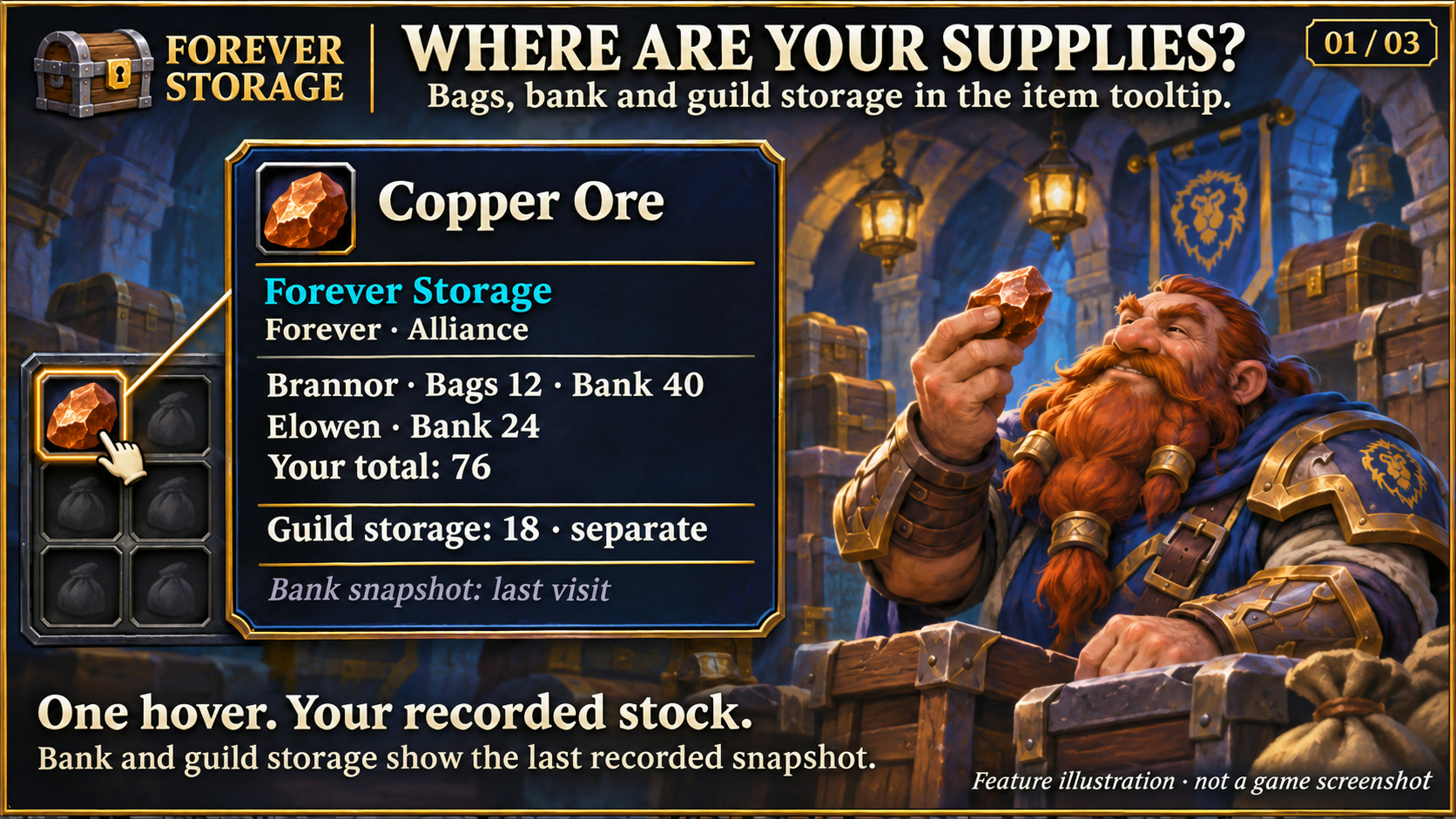
Feature illustration: schematic example, not an in-game screenshot.
Menus use the shared Forever Hub presentation: dark textured panels, subtle metal borders and clear selection states. Compact action menus stay compact; the Forever launcher icons stay frameless. Update Forever Hub to 1.10.1 or later for this appearance.
Language (from version 1.3.5): follows the WoW client by default. Each addon has a Language dropdown; select a language and click Reload UI. Available translation coverage varies by addon and language; missing labels fall back to English. Game-provided names stay in the client language. Update Forever Hub to 1.11.0 or later.
See where your items are stored without switching characters just to check your bags. Forever Storage adds clearly labelled stock information to item tooltips and a searchable overview, grouped by realm and faction.
Requires Forever Hub. Install and enable both addons. Designed for WoW Forever 1.60.1 (interface 16001).
Features
- Bag counts, including equipped herb and reagent bags, plus the last recorded personal-bank contents for every character you have logged into with the addon enabled.
- Shared guild-bank snapshots, counted once per guild rather than once per character. Guild stock is shown separately from your personal stock.
- Character and item views, item-name or item-ID search, and realm/faction filters.
- Item tooltips with per-character bag/bank counts, guild totals, capture times and clear indications of incomplete data. Other characters appear only with recorded positive stock of that item; unknown alt locations and unshared friend locations are omitted. Hold Shift and hover again for all matching characters.
- Four designs: Runic Seal by default, Minimal, Tactical and Signal. Bags, bank stock, other characters, guild stock, received friend stock and timestamps can be hidden independently in both the overview and tooltips. Display sources default on; guild stock is automatically hidden when you have no guild.
- Open through Forever Hub, the movable launcher, or /fstorage. Use /fstorage options for settings.
First setup and data freshness
Log into each character once. Open that character's bank, then open each accessible guild-bank tab to record its contents. Bag changes are captured automatically. Bank data refreshes while the bank is open; guild tabs refresh when the client provides the viewed tab's contents.
Offline characters and closed banks show last recorded snapshots, not live inventory. Unknown data is shown as ? and is never described as an empty bank. Guild permissions still apply. The account/Warband bank, mail and auction listings are not included.
Optional friend sharing
Sharing is off by default. Open Friends & sharing (or /fstorage friends). Both players need Forever Storage 1.1.0 or newer, must enable sharing, and must approve each other's WoW character in the list. Supported friends must be on the same realm and faction; Battle.net-only contacts are not included in this first implementation.
Choose whether to share bags, your last recorded personal bank, and optionally aggregated counts from your other characters of the same realm/faction. Click Request stock for an online approved friend. There are no automatic requests on hover. The reply is sent over WoW addon whispers if the client allows addon communication. Combat or realm restrictions can prevent a transfer.
Shared records contain item IDs, quantities, snapshot times and whether the total includes other characters. Guild storage, gold, alt names and other people's snapshots are never sent. Friend counts appear separately and are never added to your personal stock. Revoking access stops future replies; copies already received by the other player remain there. You can delete received records locally.
Records are stored in local SavedVariables. There is no external server or web upload. No items are moved or sold. Material requests: open Friends & sharing, request a friend’s stock, then choose Materials. Select an item, quantity and optional message. Your friend can accept or decline; both sides keep a request history. Acceptance is a promise only: send items manually by mail or trade. No automatic mail, reservation, trade or inventory action. Requests require mutual character-friend permissions, the same realm/faction, both players online and out of combat, and Forever Storage 1.3.0 or later on both sides. Open requests expire after 24 hours. Up to 50 recent requests are saved per character; requests are never resent automatically after reloading.
Changelog
Each release file includes its changelog. Collection version history: https://kowarek.de/wow-addons/changelog/forever-storage/
Bank contents (1.2.0)
Open Bank contents in the overview or /fstorage bank. Choose a character within the selected realm/faction and search its last saved personal-bank contents by name or item ID. Shows item quantities, timestamps and incomplete or unknown data. This is an item list, not a live bank window or a slot layout.
Deutsch
Forever Storage zeigt beim Hover über einen Gegenstand deine gespeicherten Taschen-, Bank- und Gildenbankbestände. Charaktere werden nach Realm und Fraktion getrennt; gemeinsam genutzte Gildenbestände werden nicht mehrfach gezählt. Die Übersicht bietet eine Suche nach Gegenstandsname oder Item-ID.
Zum Start jeden Charakter einmal einloggen, seine Bank besuchen und die zugänglichen Gildenbankreiter nacheinander öffnen. Offline-Bestände bleiben Momentaufnahmen mit Erfassungszeit. Ein ? bedeutet unbekannt, nicht leer. Bestände werden lokal gespeichert. Nur die ausdrücklich aktivierte Freundesfreigabe sendet ausgewählte eigene Bestände an einzeln freigegebene Charakterfreunde. Konto-/Kriegsmeutenbank, Post und Auktionen sind nicht enthalten.
Öffnen über Forever Hub, das verschiebbare Starticon oder /fstorage. Runensiegel ist Standard; alle vier Designs und die Tooltip-Anzeige sind in den Optionen auswählbar. Forever Hub muss mitinstalliert und aktiviert sein.
Item-Tooltips zeigen andere Charaktere nur mit erfasstem positivem Bestand des Items und Freunde nur mit empfangenem Bestand in freigegebenen Lagerorten. Unbekannte Alt-Bestände und ungeteilte Freundeslager bleiben dort ausgeblendet; die Bankübersicht behält ihre Erfassungshinweise.
Taschen, Bank, weitere Charaktere, Gildenlager, empfangene Freundesbestände und Zeitstempel lassen sich separat ausblenden. Standardmäßig sind die Anzeigen aktiv; ohne Gilde bleibt die Gildenanzeige aus.
Unter Freunde & Freigabe müssen beide Spieler das Teilen einschalten und sich gegenseitig auf der Charakter-Freundesliste freigeben. Danach kann ein Online-Freund über Bestand anfragen abgerufen werden. Gildenlager, Gold und Namen weiterer Charaktere bleiben privat. Die Funktion startet ausgeschaltet; ein Widerruf stoppt zukünftige Übertragungen. Bereits beim Freund gespeicherte Kopien werden nicht aus der Ferne gelöscht. Materialanfragen mit Annehmen und Ablehnen sind ab Version 1.3.0 enthalten; der tatsächliche Versand bleibt manuell.
Bankinhalt: eigene Ansicht mit Charakterauswahl, Suche, Mengen und Zeit des letzten Besuchs. Keine Gegenstandsbewegung und kein Fernzugriff auf die Bank.
Materialanfragen: Unter Freunde & Freigabe zuerst den Bestand eines Freundes anfragen, dann Material öffnen. Gegenstand, Menge und optionale Nachricht auswählen. Der Freund kann annehmen oder ablehnen; beide Seiten sehen den Status in der Anfragenübersicht. Eine Zusage verschickt und reserviert keine Gegenstände: Post und Handel bleiben manuell. Beide Spieler benötigen Forever Storage ab 1.3.0, gegenseitige Charakterfreund-Freigaben, denselben Realm/dieselbe Fraktion und müssen online sowie außerhalb des Kampfes sein. Offene Anfragen verfallen nach 24 Stunden. Die letzten bis zu 50 Anfragen werden pro Charakter gespeichert. Nach /reload werden Anfragen nicht automatisch erneut gesendet.
Forever Storage Team