Forever Square Minimap
- By
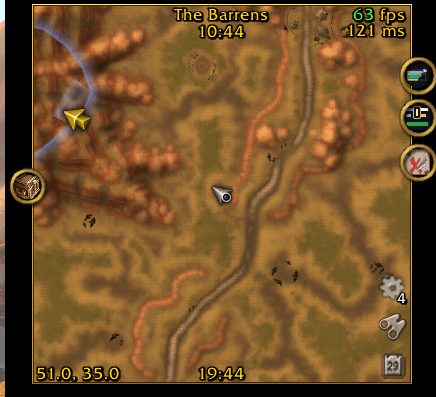
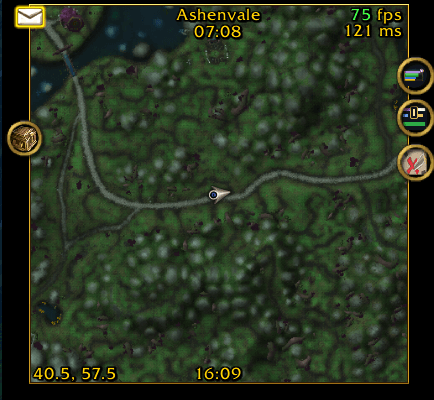
A clean square minimap you resize by dragging its corner, with a flat or gold border. Addon icons stay on the edge, Blizzard's clutter is gone, and zone, clocks, FPS and latency sit inside the map.
Description
Forever Square Minimap
A square minimap for WoW: Forever, without the round frame, the zoom buttons and the rest of Blizzard's decoration around it. One small addon, no libraries needed. English, Deutsch, Español, Français.
Resize by dragging
- Hold Ctrl and drag the bottom left corner of the map: it grows and shrinks from 100 to 400 pixels and stays square.
- The map is anchored at its top right corner, so it grows away from the screen edge and never jumps while you drag.
- Size and position can also be set exactly with sliders in the options or with a slash command.
Border
- Flat: any colour, with opacity.
- Gold: shaded like a bevel, light at the top and dark at the bottom, with a dark line along the inside.
- Thickness from 1 to 8 pixels, sharp at any UI scale. Or no border at all.
Addon icons stay on the edge
- The addon tells other addons that the minimap is square (
GetMinimapShape), so every LibDBIcon button (Questie, DBM, Details, WeakAuras, Bartender4, AtlasLoot, …) sits on the square edge instead of a circle inside the map. - Resize the map and the icons follow the new edge at once. You can still drag them around the edge as usual.
Less clutter
- Hidden: the round border, the north tag, the zoom buttons (the mouse wheel zooms instead), the world map button, the close button and Blizzard's clock and zone bar.
Texts on and around the map
- Zone name at the top, with the server time below it.
- Local time of your computer at the bottom.
- Coordinates of your character in the bottom left corner.
- FPS and world latency, coloured green, yellow or red, on top of each other or side by side with a gap of your choice.
- Every text is yours to arrange: switch it on or off, pin any of its points to any point of the map (inside or outside, with X/Y offset), and pick its font and size. Fonts from LibSharedMedia show up too.
- One slider for all text sizes makes every text bigger or smaller together.
- All text has an outline, so it stays readable on bright map ground.
Mail icon
- Sits just outside the map's top left corner, or anywhere you place it. Any size from 50 to 250 %.
- Animated while you have unread mail: glow, pulse, bounce or none.
- Test view in the options: shows the icon while the options are open, so you can place it without waiting for a letter.
Blizzard's buttons
- Tracking, calendar, the addon compartment and the instance difficulty move onto the map, since the round frame they hung from is gone.
- Drawn as bare symbols in one size, like the mail icon, by default as a small column in the map's bottom right corner. Each can be switched off, placed anywhere and scaled.
- The addon compartment gets a grey gear with the addon count, since Blizzard's round button has no bare symbol.
- Every minimap button in the addon compartment: addons with a LibDBIcon minimap button (most of them) are listed there too, not only those that register for it. No addon is listed twice. Optionally their buttons disappear from the map.
Opacity
- Separate opacity for out of combat and in combat, from fully visible down to invisible.
- Optionally fully visible again while the mouse is over the map.
Minimap button
- A button on the map's edge opens the options with one click. Drag it along the edge to move it, or switch it off.
- The addon is also listed in Blizzard's addon compartment.
Options
- Its own options window in the style of Forever Unit Frames, opened with one click on the minimap button, from the addon compartment, with
/fsmor under Interface > AddOns, also in combat: General (language, minimap button, opacity, profiles), Map (size, position, border), Texts, FPS & coordinates, Mail, Buttons. Every slider has a number box for exact values. - Profiles: save your layout under a name and switch between profiles per character. Your language stays when you switch.
Commands
/squareminimap or /fsm (status), /fsm size <100-400>, /fsm move <x> <y>, /fsm reset, /fsm dump
Positive values always mean right or up. dump opens a copyable window with the size, anchor and parent of every minimap element, handy for bug reports. It is always in English.
Notes
- Made for WoW: Forever.
- Languages: English, German (Deutsch), Spanish (Español, also for Latin American clients) and French (Français). The addon follows the game's language; the first option in its settings picks another one, and the change applies at once. Other game languages use English.
- The translations were not written by native speakers: corrections are very welcome on the issue tracker.
- Other minimap addons that reshape or move the minimap (e.g. the minimap module of Leatrix Plus) will fight over the same frames: use only one of them.
- Bug reports and ideas are welcome on the project's issue tracker.
Forever Square Minimap Team