Forever Quest Log
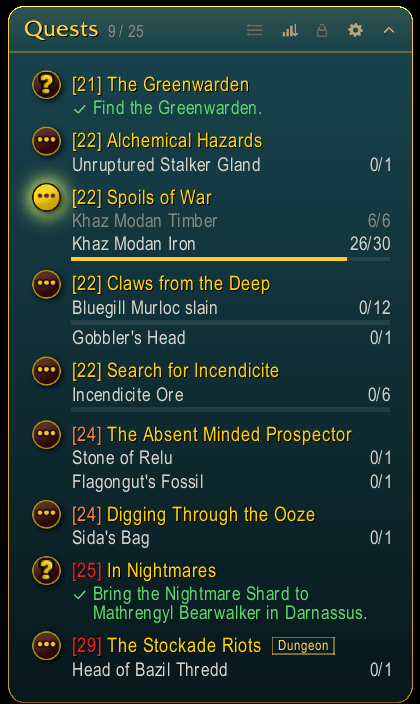
A quest tracker in the style of the Forever addons, a frame for your focused quest, and a movable, restyled world map, all without losing anything Blizzard's tracker does.
ql.png
ql3.png
ql5.png
Description
Forever Quest Log
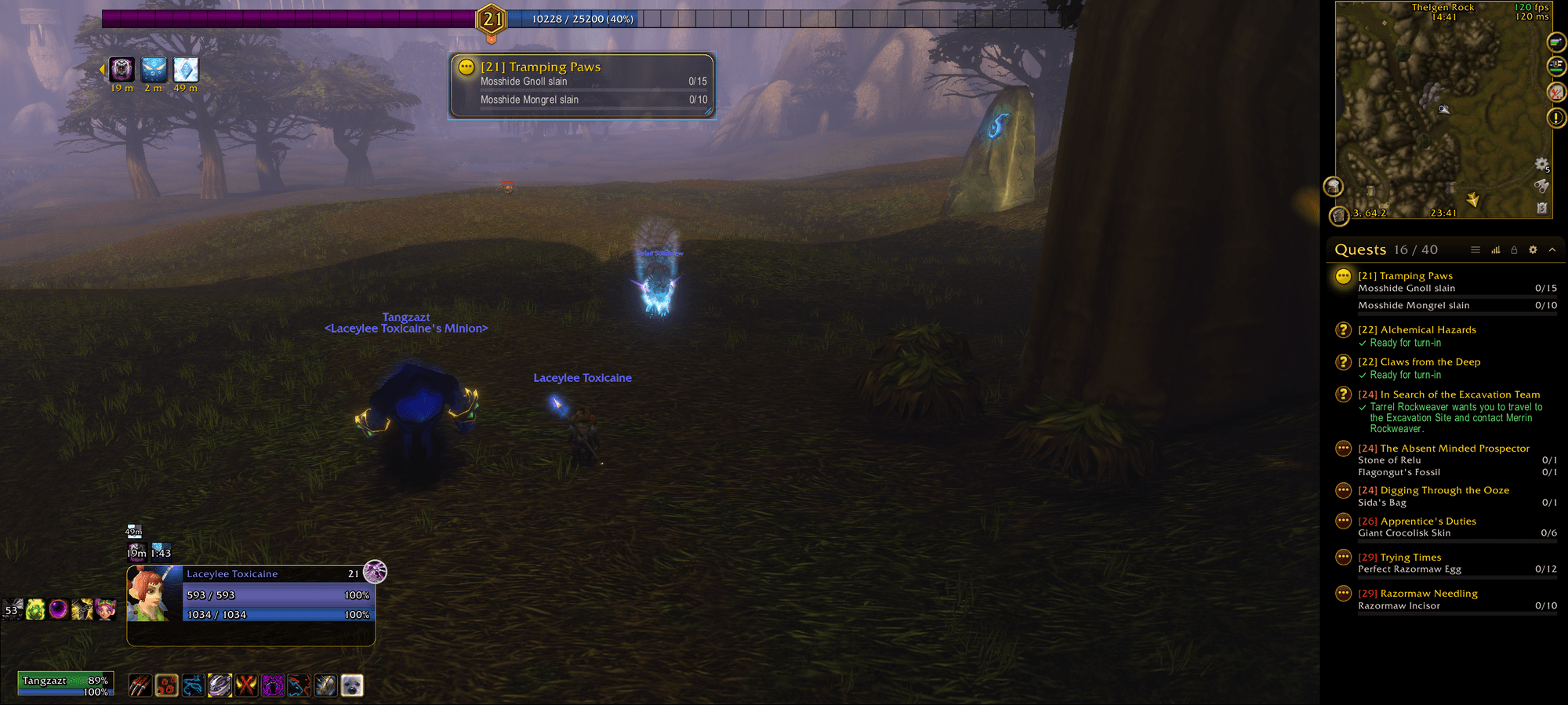
A new quest tracker for the right side of your screen, made for WoW: Forever, plus a frame for the quest you are working on and a world map you can move and restyle. It looks like Forever Unit Frames, Forever Square Minimap and Forever Progress Bars, it is easy to move and resize, and it keeps everything Blizzard's tracker does on a click. English, Deutsch, Español, Français.
Your quests at a glance
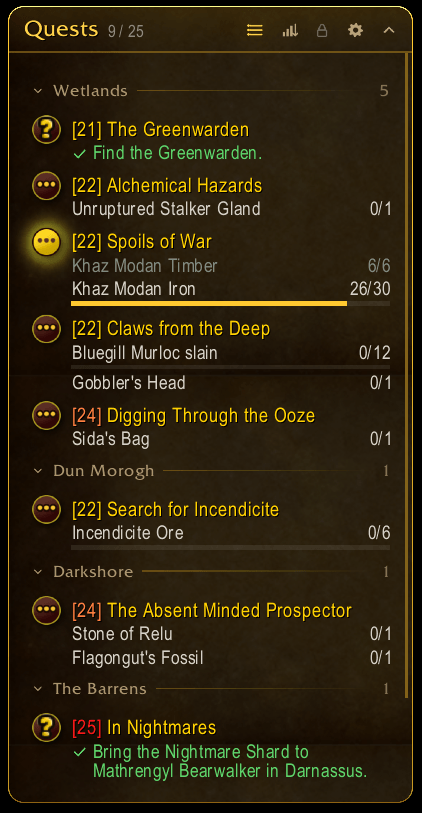
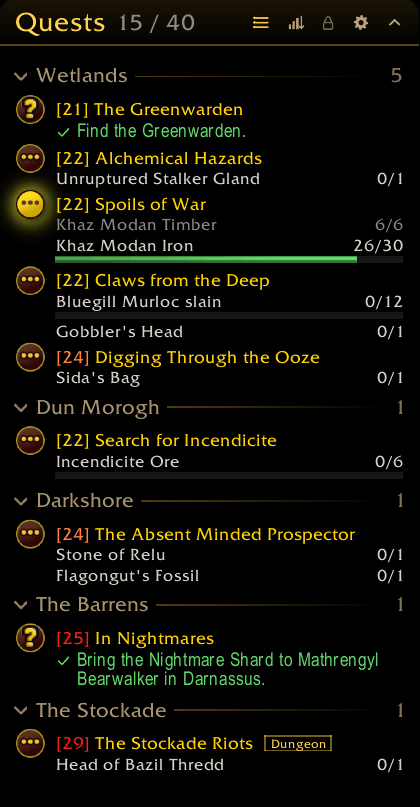
- Grouped by zone, with your current zone on top, or as one list. One click on the header switches.
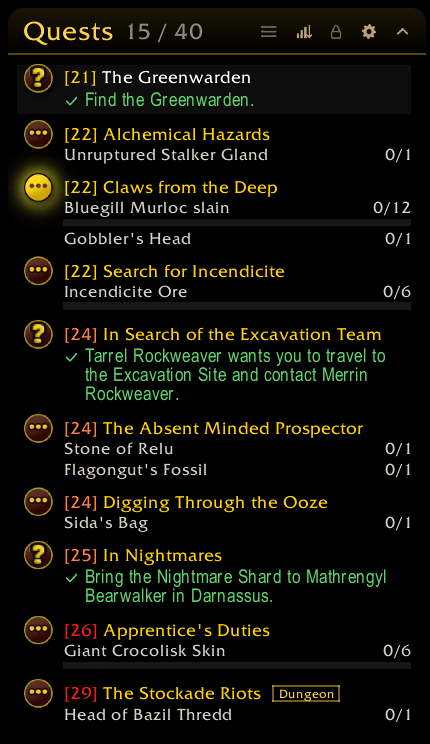
- Sorted like Blizzard's tracker (nearest first) or by level, also with one click, and both combine: by level inside each zone.
- The quest level in front of every title, in its difficulty colour (grey, green, yellow, orange, red), and tags such as Elite, Dungeon or Raid.
- Every counted objective with its number on the right and a thin progress bar under it. Finished objectives are dimmed (or hidden, if you prefer).
- Completed quests show how to turn them in, with a check mark; failed quests say so; missing gold for a quest is shown as well.
- Zones collapse on a click; the header counts your quests like the quest log does (15 / 40), the tooltip tells how many of them you track.
- Tracked recipes in their own section, with every reagent and how many you have.
Nothing lost
- Left-click a quest: details on the map. Shift-click: stop tracking. Right-click: Blizzard's own menu (focus, quest details, show on map, stop tracking, share in a group, abandon).
- Blizzard's own map buttons in front of the quests: click to focus a quest, exactly as on the map.
- Quest items as buttons next to their quest, usable in combat, with cooldown, charges and range colouring. Shift-click links the item.
- Auto-complete quests complete with a click; in a group, hovering shows your party's progress; Shift-click a recipe to untrack it.
- Blizzard's tracker is not modified or hooked, only made invisible, so it cannot break your quest items or other frames. One checkbox gives it back.
Move it, size it
- Unlock it (lock button in the header, right-click on the minimap button or
/fql unlock): drag the header to move it, drag the corner to resize it, with the size shown while you drag. Ctrl + drag moves it even while locked. - Or set the position exactly: X from the centre of the screen, Y from its top, with sliders and number fields.
- Grows down or up, shrinks to its content if you like, and has a button to sit right under your minimap.
- Scale, inner margin, spacing between quests, and how far it fades while the mouse is elsewhere. The scrollbar only shows when there is something to scroll.
Make it yours
- Gold border with rounded corners and a soft shadow (the Forever look, one click away as a preset), a flat border in any colour, or none.
- Background as a colour, a gradient or a texture (Blizzard's and every texture from LibSharedMedia), with its own opacity.
- Five text styles: header, zones, quest titles, objectives and turn-in, each with font (Blizzard's and LibSharedMedia's), size, outline or shadow and colour.
- Progress bars: height, texture, colour and how strong the empty part shows.
Selected quest tracker
- The quest you focus (its map button, or "Focus" in its menu) in a frame of its own: title, level, every objective with its count and bar, or how to turn it in.
- Anywhere on screen: drag it, widen it at its corner, or set X / Y exactly. When no quest is focused, the frame is gone.
- Its own look: width, scale, opacity, inner margin, background (colour, gradient or texture), border (gold, flat or none, corners, shadow), fonts, sizes, outlines and colours for title, objectives and turn-in, and its own bars.
- Clicks work as in the tracker; it can hide in combat.
World map
- Move the world map by its title bar, or set X / Y exactly; it opens where you left it. Scale it from 50 to 150 %. The maximized map stays as it is.
- Frame style: Blizzard's, like the tracker, or your own: gold, flat or no border, shadow, the title's font and colour, the portrait on or off, and a background of your choice.
- The quest list beside the map: Blizzard's, like the tracker, or your own background and fonts for zone headers, quest titles and objectives. Rows keep their height, colours and clicks stay Blizzard's.
- Nothing of Blizzard's map is replaced: zoom, pins, filters, quest details and the quest log work as always.
Dungeons and raids
- Collapses to its header when you enter a dungeon or raid (can be switched off); one click on the arrow opens it again. Leaving restores it.
- A switch in the header shows only the quests for the dungeon you are in (the default), or all of them.
- Optionally collapses in combat.
Options
- Its own options window in the style of Forever Unit Frames, opened from the gear in the header, the minimap button, Blizzard's addon compartment or
/fql: General, Layout, Appearance, Text, Bars, Instances, Focused quest, World map and Profiles. Only the settings that apply are shown. - Profiles shared between characters, three presets ("Forever" with the gold frame of the other Forever addons, "Minimal" and the shipped look), and export / import of a whole profile as a text string (only read as settings, never run as code).
Commands
/fql (options), /fql lock, /fql unlock, /fql reset (position and size), /fql status
Notes
- Made for WoW: Forever.
- Quest item buttons cannot move in combat (the game does not allow it): while they show, the list waits for the end of combat before it rearranges.
- Feedback and ideas are welcome in the comments.
Forever Quest Log Team