Forever Loot Finder
- By
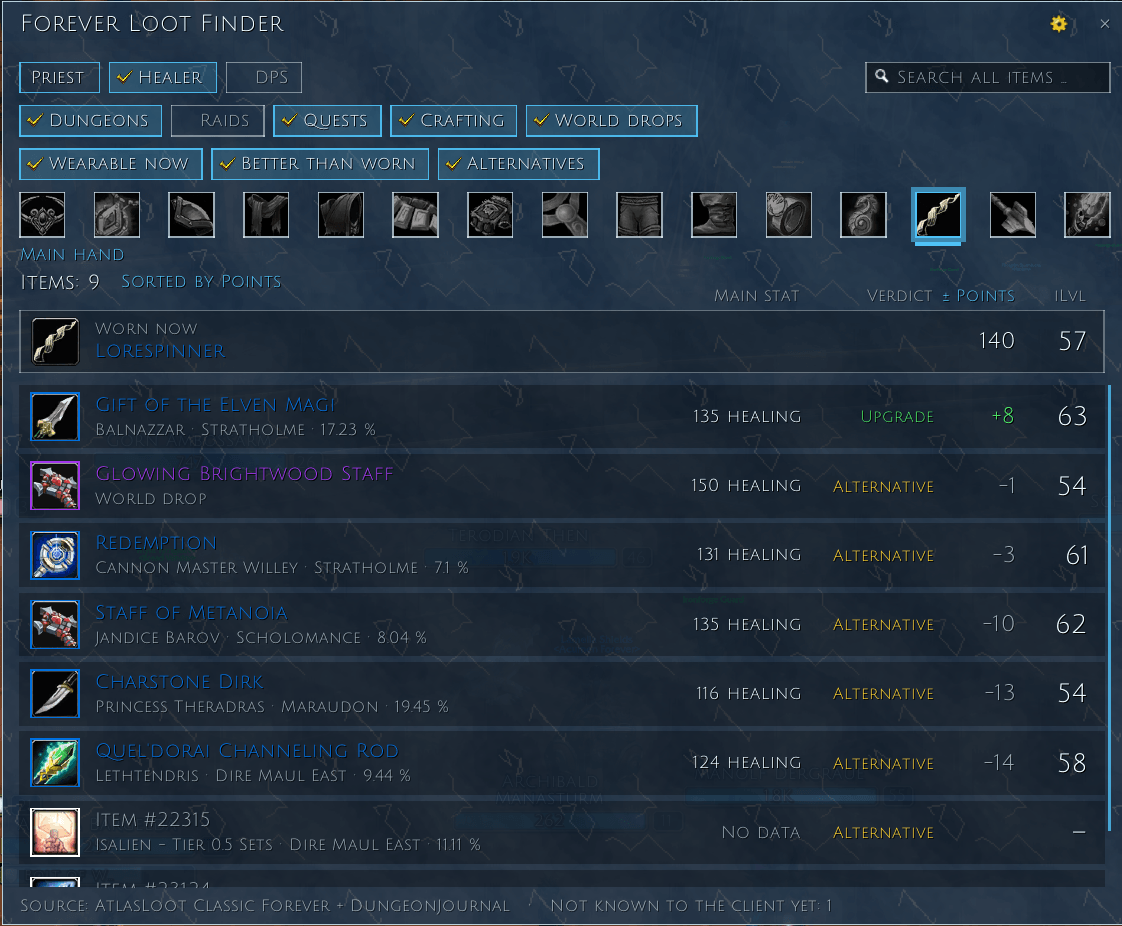
Find gear for your class, role and equipment slot and see where it comes from: boss and drop chance, world drop, quest or profession, with the reagents' auction house prices.
Description
Forever Loot Finder
A gear finder for WoW: Forever. Pick a class, a role and a slot, and the list shows every dungeon and raid drop, world drop, quest reward and crafted item that suits them, with where to get it, scored in points for your role. For crafted items it adds up what the reagents cost at your auction house. English, Deutsch.
Requirements
Install both, and keep AtlasLoot's Dungeons and Raids, Crafting and Collections modules enabled. The boss drops and the crafts come from AtlasLoot Classic Forever; the quest rewards, the dungeon entrances and the boss models from DungeonJournal.
Classes and roles
- Each class has its own roles: Priest Healer and DPS; Paladin Healer, Tank and DPS; Druid Healer, Caster DPS, Tank and Melee DPS; Shaman Healer, Caster DPS and Melee DPS; Warrior Tank and DPS; Hunter, Rogue, Mage and Warlock DPS. One role is looked at at a time, since each is measured differently.
- Items are judged by their stats, with weights per class and role: an item must have a stat the role wants and none the role excludes. Casters never see attack power or defense items, tanks never see spell power (except paladin tank sets).
- Tanks get their heaviest armor type preselected and no two-handers (bears excepted); damage roles get no defense, dodge, parry or block items.
- Bear tanks count armor, stamina, agility, defense and dodge, but no parry or block. School spell damage (fire, frost, shadow, …) counts only for the classes that cast that school.
- Spell damage items count for healers too, since they carry the same healing. Healing items do not count for casters.
- Damage casters get no points for mana regeneration. Priest and druid healers weigh spirit higher (Meditation, Reflection, Spiritual Guidance).
- Trinkets with a Use effect that stands for stats (spell power for 15 sec, mana, attack power, dodge, …) count it averaged over its cooldown, as if used 75% of the time.
- Items limited to some classes ("Classes: Mage") are shown to those classes only.
Filters
- Wearable now: only items for your level and the armor types you have learned.
- Best armor only: body armor of your class's heaviest type only (mail or plate from level 40 on); cloaks, jewelry and trinkets always count. Not shown for cloth wearers.
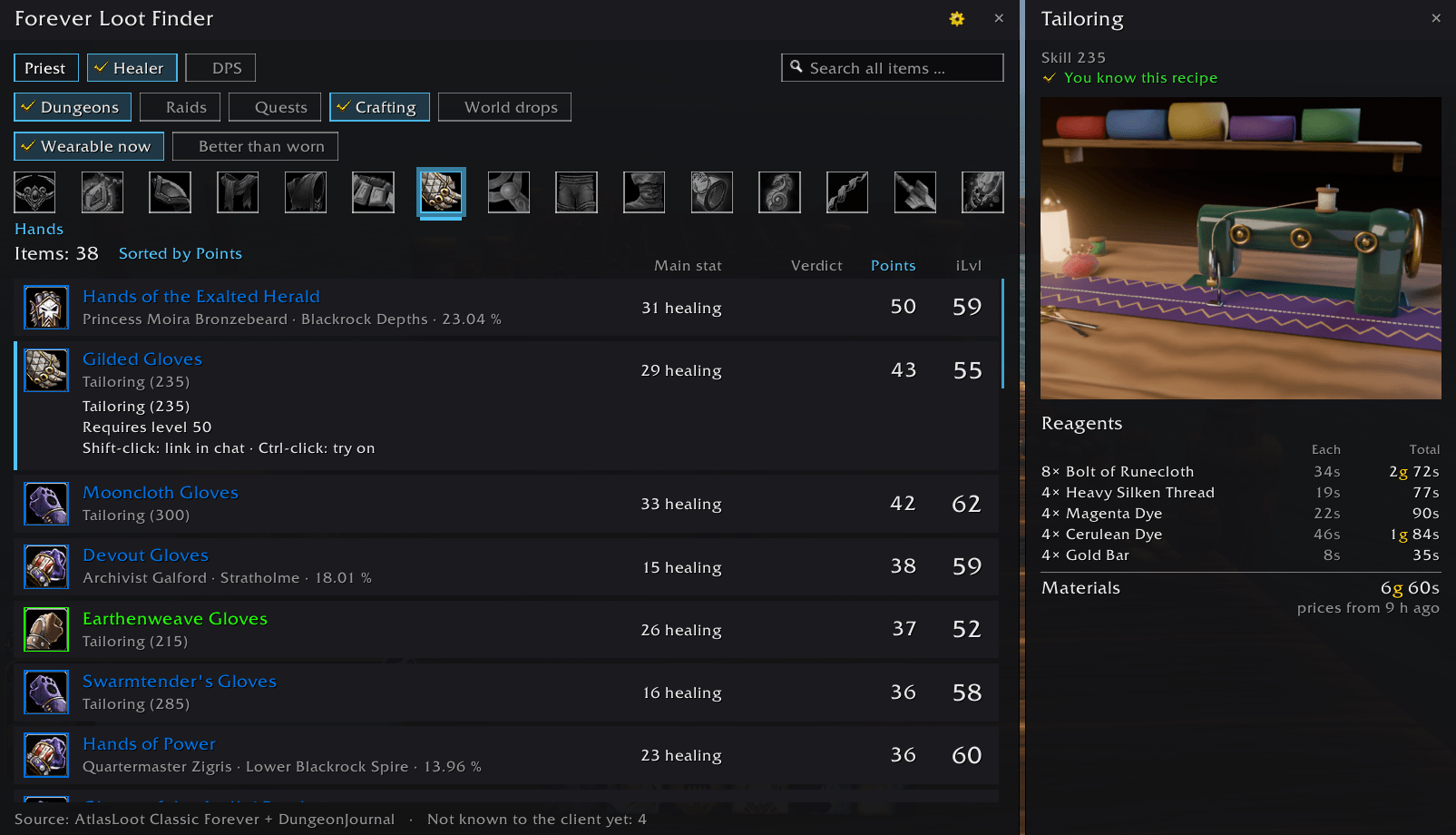
- Dungeons, raids, quests, crafting and world drops, each on or off. World drops are AtlasLoot's world epics and the blue and purple world drops Wowhead knows for Forever. Crafted items show the profession and the skill needed; the panel lists the reagents. Quest rewards (blue and better) show the quest instead of the boss; quests of the other faction or another class are left out.
- Trinkets and other items without plain stats are judged by their Use, Equip and Chance-on-hit texts: a weapon proc is out for healers, a Fire spell effect is out for priests.
- Better than worn compares every item with what you wear in its slot (only for your own class); Alternatives adds the ones about as good. What you wear is not listed.
- Hit items (tanks only): also lists items with hit that no tank stat would bring in, and marks the hit of every item.
- A global name search: typing a name searches every item, whatever the class, slot, role and source filters say.
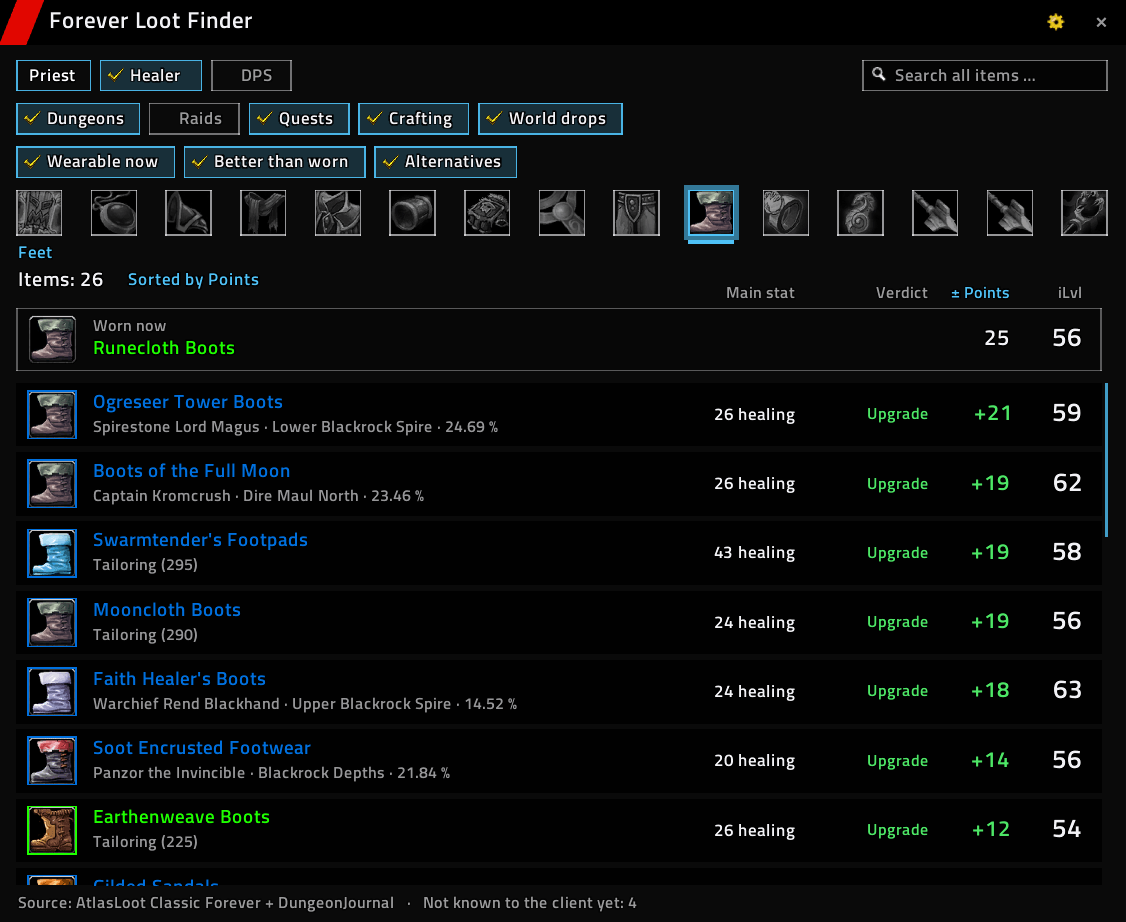
- All 15 equipment slots, each showing the icon of what you wear there; the picked slot is framed and underlined.
- Sort by points, item level, quality or name; a click on the Points or iLvl header sorts by it.
From the character window
- A small search button on every equipment slot opens the list for that slot and compares it with what you wear:
- Upgrades: more points for your role and no less of its main stat.
- Alternatives: about as good, or better in total but with less of the main stat (less healing but more spirit, for example). Items whose effects are not plain stats, like trinkets with a Use effect, are listed here too.
- The button's tooltip tells how many upgrades and alternatives there are.
- Size, anchor point and X/Y offset of the buttons can be set in the options.
The list
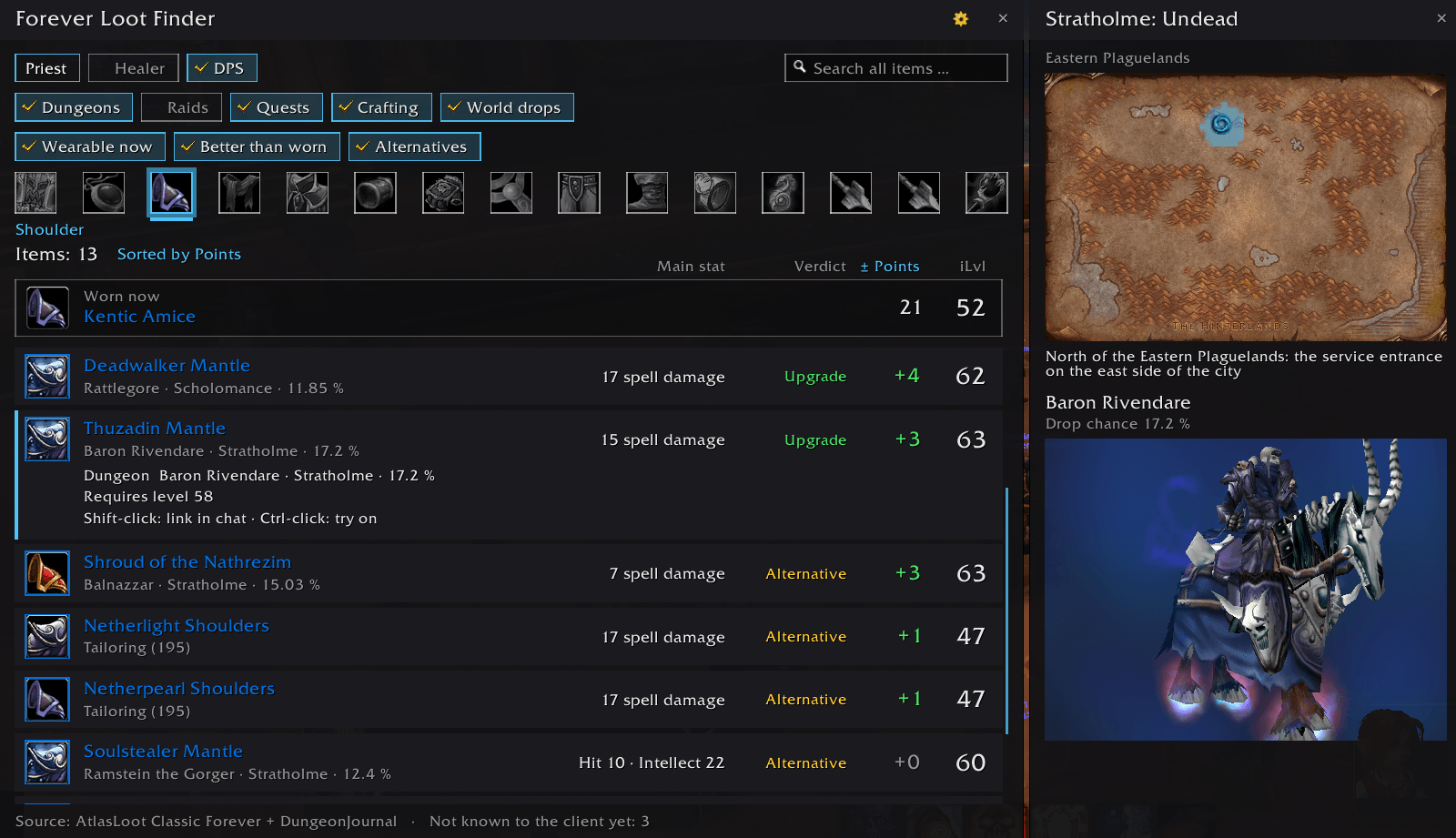
- Columns under their headers: the value that matters for the role, Upgrade or Alternative, the points for the role and the item level. With a slot picked, the points column shows the difference to what you wear (+24); the worn item sits above the list in its quality colour. The row tooltip explains the points (Healing 37 + Mp5 17.5 + Intellect 10).
- Two-handers are compared with your main hand and off hand together; a one-hander or off hand beside a worn two-hander is at best an alternative.
- Items the game has no data for show No data instead of loading forever.
- Click a row to see all its drop locations: boss and instance, with the drop chance when it is known.
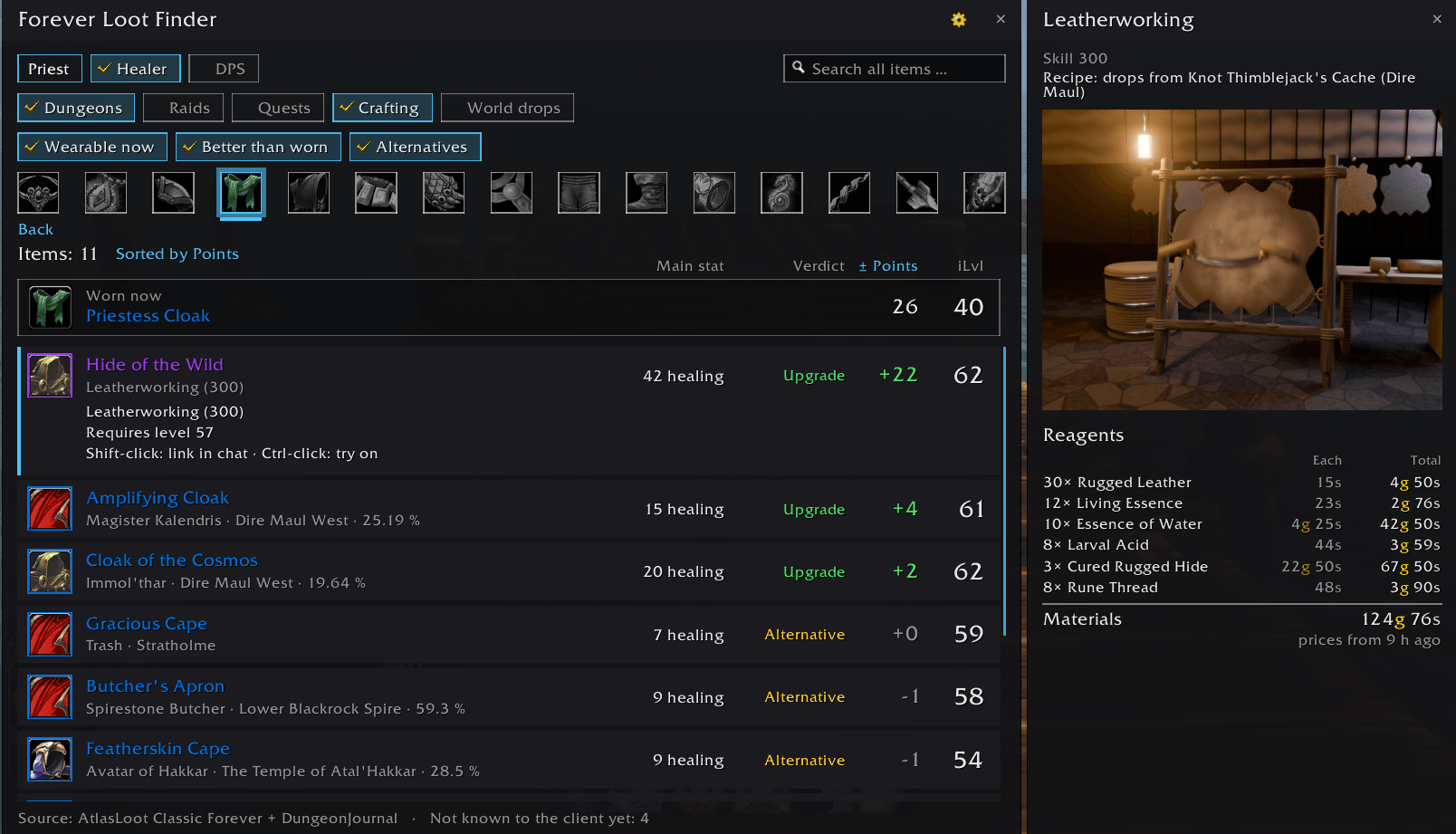
- A panel opens beside the list: the zone's map with the dungeon's entrance marked, and the boss as a 3D model you can turn (for a quest reward: the quest and who gives it). Raids have no entrance on the map yet. For a crafted item the panel shows an animated scene of the profession instead: a forge, a sewing machine, a tanning rack, an enchanting altar or a gnomish workbench (made for this addon).
- Hover a row for the item's tooltip and, under it, what it gives or takes against what you wear, stat by stat (+14 Spirit, -7 Healing). Hover Worn now for the worn item's tooltip.
- Shift-click links the item in chat, ctrl-click tries it on.
Recipes
- The panel of a crafted item tells where its recipe comes from: from the trainer, a boss or world drop, a quest, or a vendor with name and zone (only vendors of your faction).
- A recipe you have already learned shows a green check instead.
- Vendors are listed for your faction only, at most two by name.
- The sources come from Wowhead's Forever recipe lists; creature, vendor and quest names are in English, zones in your language.
Reagent prices
- The panel of a crafted item lists its reagents as a table with the auction house price of each, the cost per craft and the total.
- Prices come from Auctionator when it is installed; without it, a Scan button under the auction house window reads all auctions at once (about 10 seconds, at most every 20 minutes).
- A note asks for a scan when prices are missing, or when they are older than two days. Reagents link to their tooltip; shift-click searches them at the open auction house.
Point weights (advanced)
- Under Options → General → Advanced, a Weights page lets you set how many points each stat is worth, per class and role: one slider per stat the role counts, with the default beside its name.
- Changed weights are highlighted; the list, the verdicts and the sorting follow at once, and the points tooltip says when your own weights are in use.
- Defaults for this role and All weights to defaults bring the standard weights back.
- Which stats a role wants or excludes stays fixed (casters never see attack power items, for example).
Where to find it
The minimap button, /flf, or Blizzard's addon compartment.
Themes
Styled like the other Forever addons, with all Forever themes and their colors. With the Forever Themes addon installed, it follows the central theme.
Data
- The items and drop locations come from the dungeon, raid and world epic tables of AtlasLoot Classic Forever, the quest rewards, entrances and boss models from DungeonJournal, both read while you play. Nothing is copied from them.
- Items the client does not know yet (some new Forever items) are left out until it does; the footer counts them.
Commands
/flf opens the finder, /flf options the options.
Notes
- Made for WoW: Forever 1.60.1 (Interface 16001).
- Bug reports and ideas are welcome on the project's issue tracker.
Forever Loot Finder Team