Forever Presence
- By
Shows your character on your Discord profile. Needs PixelBridge and the ForeverPresence desktop app.
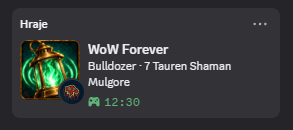
image-1793994822037.png
Description
ForeverPresence
Shows the character you are playing on your Discord profile: name, level, race and class, the zone or instance, your group size and how long you have been playing.
This addon does nothing on its own. You need all of these:
- this addon,
- the PixelBridge addon (CurseForge apps install it with this one),
- the ForeverPresence app for Windows, and
- Discord as the desktop app on the same PC.
Addons cannot reach anything outside the game, so PixelBridge draws a small strip of coloured cells in the top-left corner and the app reads the strip from the screen.
What you should know before you install it
- What this addon sends: character name, realm, level, class, race, faction, zone, subzone, instance name, type and difficulty, group size, status (dead, ghost, AFK, DND, in combat, resting, in a group or raid), XP percent, guild and client, plus level ups, deaths and revives.
- Where it goes: the app gives the card to the Discord client on your PC. The card shows only what the templates in the app use, and you can hide your name. Discord shows it to whoever can see your profile. The strip is encoded, not encrypted, so anything that can see your screen could read it.
- Nothing sends input to the game. No keys, no clicks, no changes to the game's memory or files.
- Reading the screen from outside the game is the technique pixel bots use. I do not know how Blizzard treats this on WoW Forever. Decide for yourself whether you want to use it.
- The app never asks for a Discord or Battle.net login.
Commands
| Command | What it does |
|---|---|
/fpres or /fpres show |
Sends the current state now and shows the strip |
/fpres on / off |
Turns the presence on or off; off clears it on Discord |
/fpres status |
On/off, the state revision and the PixelBridge session |
MIT licence.
Forever Presence Team