Forever Party Board - LFG Chat Board for WoW Forever
- By
LFG board for WoW Forever: reads LookingForGroup, General and Trade chat and lists every group by dungeon, with roles needed, filters, one-click whisper and alerts.
foreverpartyboard-header.png
foreverpartyboard-1.png
foreverpartyboard-2.png
foreverpartyboard-3.png
Description
📖 Full guide: https://korivash.com/addons/forever-party-board/
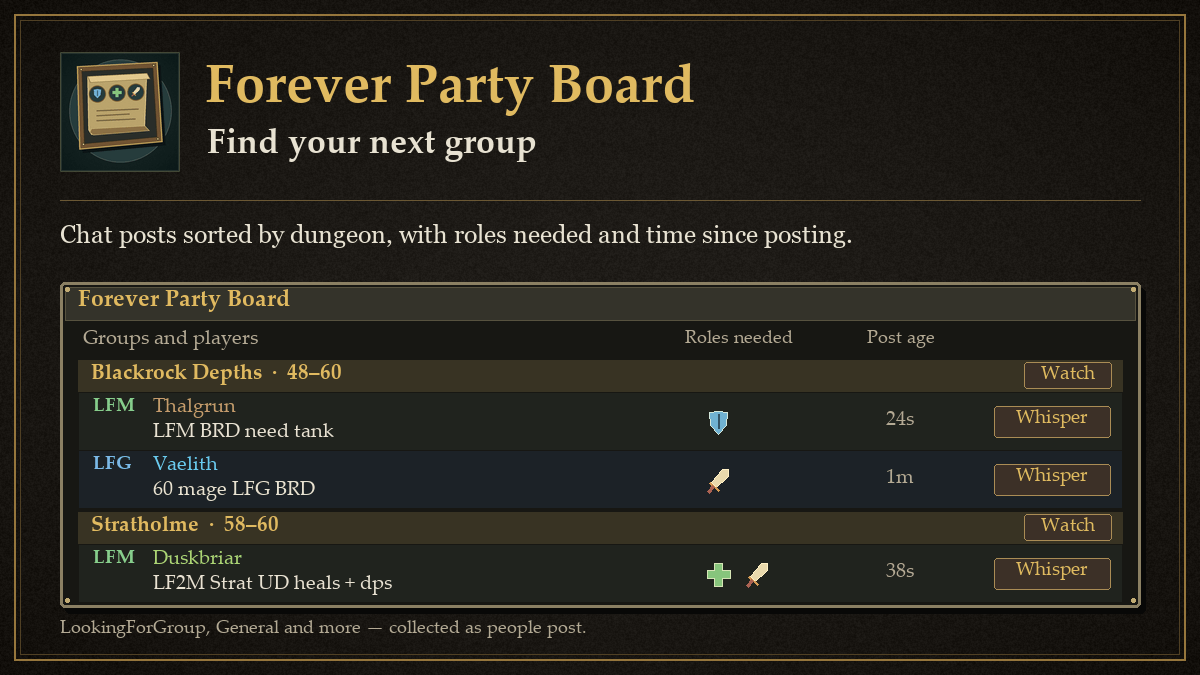
Forever Party Board turns fast-scrolling group chat into a clean board. It reads LookingForGroup, General and Trade for you, picks out the posts from people building or looking for a group, and lists them under the right dungeon. Works out of the box: install it, open the board, and posts fill in as people talk.
In game
- Open the board: left-click the minimap button or type
/fpb. - Forever's own dungeons: Hall of Thanes, Ruins of Lordaeron, Excavation Site, City of Dalaran, The Drowned City, Krol'dok Stronghold, Alcaz Prison, Blackmaw Hold and Shaper's Terrace, plus the Hyjal Summit and Barrow Deeps raids, sit next to the classic ones.
- Read it at a glance: posts are grouped by dungeon with the level range next to the name. Green
LFMrows are groups looking for more, blueLFGrows are players looking for a group. Role icons show what a group needs, and the time on the right shows how long ago it was said. - Filters: search box, groups or players or both, the role a group needs,
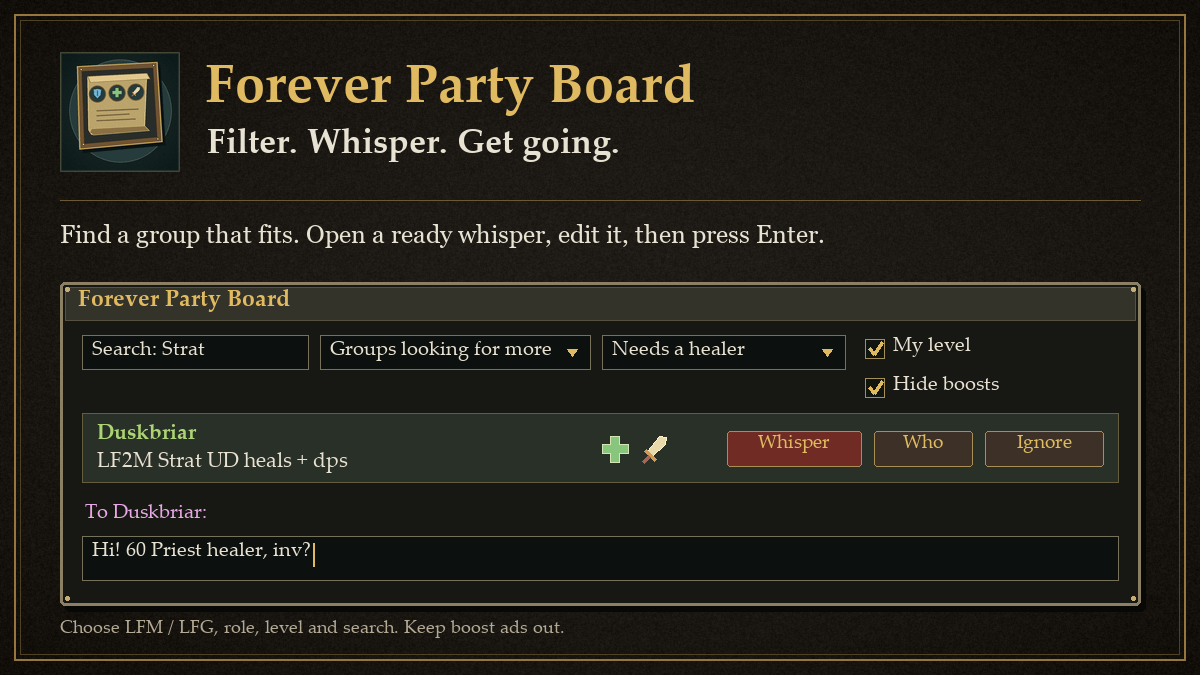
My level(on by default, hides dungeons outside your level range) andHide boosts(on by default, hides boost and sale ads). - Answer a post:
Whisperopens a whisper with a ready line such asHi! 60 Priest healer, inv?that you can edit before pressing Enter.Wholooks the poster up.Ignoreasks first, then adds the poster to your ignore list and takes them off the board. Right-click a row for the same actions. - Watch a dungeon: click
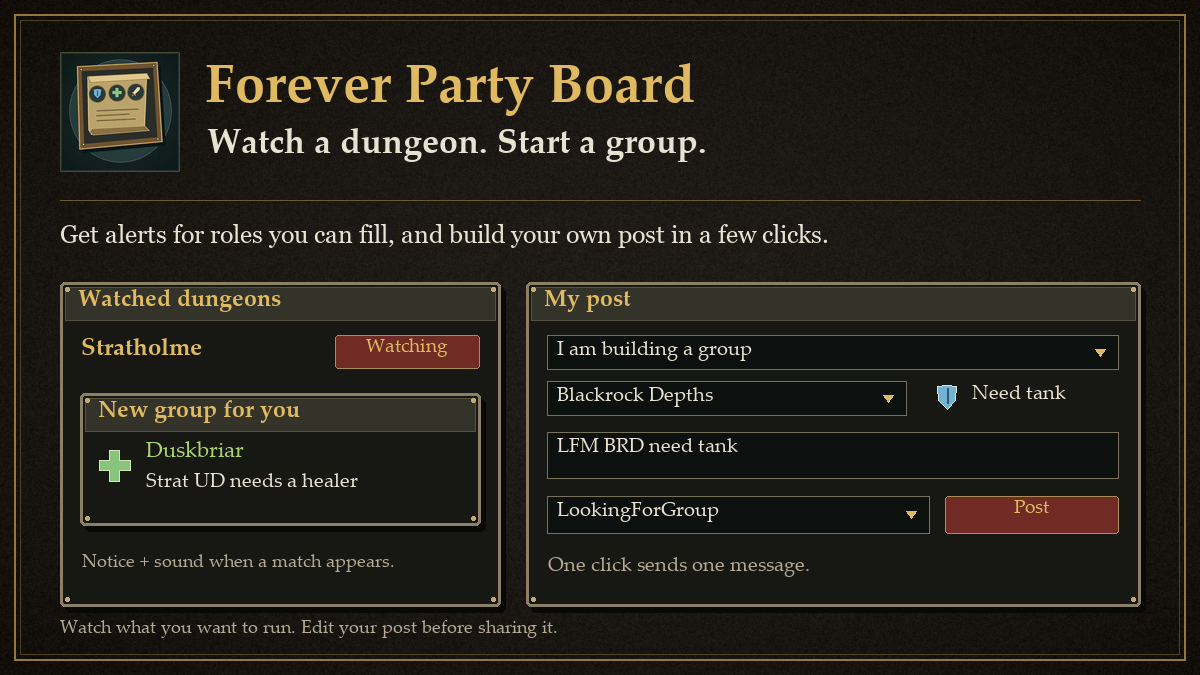
Watchnext to a dungeon name. When a new group for it needs a role you can fill, you get a small notice and a sound. Alerts are spaced out and stay quiet in combat unless you allow them. - My post: the button at the bottom of the board builds your own line. Pick looking for a group or building a group, the dungeon and the roles you need, edit the text if you like, pick the channel and click
Post. One click sends one message. Forever Party Board never repeats it for you. - Posts clean themselves up: a post drops off after 10 minutes (you can change this), and a newer post from the same player replaces the old one.
A short setup guide opens the first time you log in. It shows a sample board, lets you tick the roles you can play and explains alerts. Open it again any time with /fpb setup.
Commands
| Command | What it does |
|---|---|
/fpb or /partyboard |
Open or close the board |
/fpb show |
Open the board |
/fpb config |
Open Settings |
/fpb setup |
Open the setup guide |
/fpb reset |
Reset the window position, size and filters |
/fpb post |
Open the My post helper |
/fpb clear |
Empty the board |
/fpb minimap |
Show or hide the minimap button |
/fpb help |
List the commands |
Settings
Type /fpb config, click Settings on the board, or find Forever Party Board under Options > AddOns.
- Board: how long posts stay, level filter, boost filter, what to show, order of dungeons, minimap button, window scale.
- You: the roles you can fill, your main role and the wording of your whispers.
{level},{class},{role},{dungeon}and{name}are filled in for you. - Listen to: which chats are read. LookingForGroup, General, Trade, World and other channels are on. Say and Yell are off until you turn them on.
- Alerts: notice, sound, which sound, only for roles you can fill, players looking for a group, combat, watch every dungeon for your level, quiet time between alerts.
Good to know
- Forever Party Board only reads chat you can already see. Join a channel to have it read:
/join LookingForGroup. DMcan mean The Deadmines or Dire Maul. Forever Party Board looks at the rest of the message (dm east,60 mage, other dungeons named) and, if there is no hint, at your own level.- It never sends a whisper, a /who or a chat message on its own. Every one of those happens only when you click.
Install
- Download Forever Party Board from CurseForge, or with the CurseForge app.
- If you install by hand, unzip it so the folder is
World of Warcraft/_forever_/Interface/AddOns/ForeverPartyBoard, withForeverPartyBoard.tocdirectly inside. - Fully restart the game, and make sure Forever Party Board is ticked in the AddOns list on the character screen.
Made by Korivash. More addons: Settings > More from Korivash.
📖 Full guide: https://korivash.com/addons/forever-party-board/
Forever Party Board - LFG Chat Board for WoW Forever Team