Forever Gather Highlight
- By
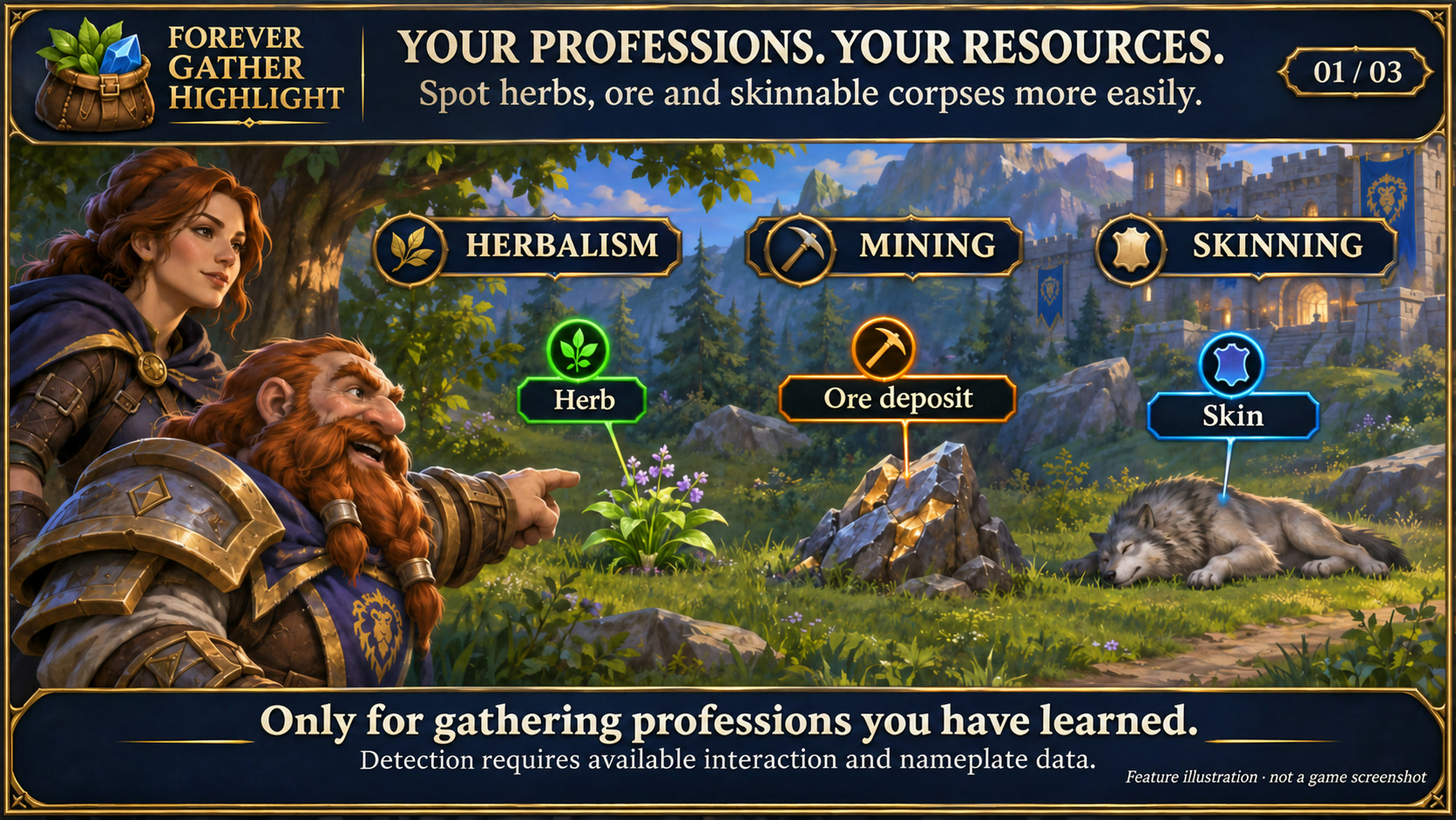
Highlight nearby herbs, ore and skinnable corpses for your learned gathering professions, with three customizable marker styles.
Forever Gather Highlight
Feature illustration: schematic example, not an in-game screenshot.
Menus use the shared Forever Hub presentation: dark textured panels, subtle metal borders and clear selection states. Compact action menus stay compact; the Forever launcher icons stay frameless. Update Forever Hub to 1.10.1 or later for this appearance.
Language (from version 1.6.2): follows the WoW client by default. Each addon has a Language dropdown; select a language and click Reload UI. Available translation coverage varies by addon and language; missing labels fall back to English. Game-provided names stay in the client language. Update Forever Hub to 1.11.0 or later.
Account-wide learned knowledge
Learned resources, skinnable species, cloth drops, quest-item sources and remembered ore locations are shared within the local WoW account. Each character merges its old knowledge on login. Active quests, progress, professions and preferences stay character-specific.
Forever Gather Highlight makes gathering resources and quest objects easier to notice in WoW Forever.
Personal quest-loot learning (from 1.10.0): learns new NPC/item pairs from your own confirmed quest loot, including sources missing from QuestieDB. Requires exact loot-source identity, a cleared slot and your personal receipt; ambiguous or partial sources are skipped. Stored locally per account from 1.11.0 (up to 8192 pairs), with a separate learning switch and optional chat notice for new sources. Learned enemies are only marked while the item is still needed. No network sharing or guaranteed drops.
Quest-item loot sources (from 1.9.0): highlight actual living enemies that can drop items still required by your active quests. Exact QuestieDB Forever NPC sources or matching native quest-objective tooltip evidence supply the link. The gold sign names the required item, shows your collection count and labels the drop as possible, never guaranteed. Gold Glimmer is also available. Markers disappear when you have enough, the objective is complete or the quest is abandoned; enemies needed for another open objective stay marked. Quest targets has a separate loot-source switch, enabled by default. Visible enemy nameplates are required. Source and count lookups are cached and refreshed on quest/bag events.
Kill-quest enemies (from 1.8.0): the Quest targets tab also marks living enemies needed for unfinished kill objectives. Enabled by default; disable the kill-target switch without losing quest-object highlights. Choose gold Glimmer or one of the three sign styles. Signs include the current kill count. Completed or abandoned objectives stop marking enemies. Exact native quest evidence and optional QuestieDB Forever references identify targets; this kill-target switch stays separate from the quest-loot-source switch. Visible enemy nameplates are required, and protected or ambiguous data is skipped. Glimmer is anchored to the nameplate, not projected onto the world model. Fully restart WoW after installation.
Optional cloth sources (from 1.7.0, off by default): the Cloth tab highlights actual accessible enemy nameplates with several possible cloth types. Each row identifies a QuestieDB/Classic reference or your own observed drop. QuestieDB for Forever is optional and installed separately; historical source hints are not guaranteed loot or verified Forever percentages. Personal learning requires exact creature loot-source data and confirmation that you received the cloth. Empty corpses stop showing cloth markers. Choose Rune seal, Fine marker or Signal independently of gathering and quest styles. No gathering profession is required; learned data stays local to your WoW account from 1.11.0.
Optional remembered ore locations (off by default): enable this in the resource options to record your approximate player position after confirmed mining. A separate movable arrow points toward a nearby possible ore spawn, with a 100/250/500-yard search radius. Historical locations never become live resource markers. Mining is required, instances are excluded, and only public valid position data is used. From 1.11.0 data stays local per WoW account, limited to 2048 deduplicated locations. Right-click skips a spot for five minutes; newly mined spots also receive a five-minute display pause, not a respawn prediction. Disabling the option stops recording and position polling.
Highlights nearby resources for a gathering profession learned by your current character: Herbalism, Mining or Skinning. Skinning checks native cursor textures, including numeric file IDs, and the client's localized leather/skinnable tooltip label. Detection is not limited to a list of creature names. Confirmed species are remembered locally; Young Wolf remains an additional verified seed. Known skinnable corpses with loot show "Loot first". A confirmed current skinning signal shows "Skin"; a known, still-interactable corpse without that signal shows "Check skinning". Unknown corpses are not marked merely because they are beasts.
Automatically learns confirmed resource types from current cursor evidence and successful gathering casts whose target uniquely matches a current object or creature GUID. Failed or ambiguous attempts do not teach entries. Quest-object materials are linked to their actual loot sources and current incomplete item objectives. Saved knowledge does not create guessed spawn locations or keep completed quests marked. If the client supplies no usable source identity or current world anchor, a reliable marker is not possible. Restart WoW after installing an update that adds new Lua files.
Skinning also checks accessible corpse nameplates, your target and mouseover. Multiple corpses can be highlighted when the client exposes their nameplates. A world marker always requires an actual client nameplate; learned species data does not supply world positions. No Questie dependency or copied Questie database is required.
Newly confirmed resource types can be announced once in local chat. This can be disabled without disabling learning.
Choose Rune seal (default for resources), Fine marker, Signal or Glimmer. Gathering resources and quest objects have separate style selections in their own option tabs. Adjust marker size and opacity, and show or hide names on signs. Settings are saved per character. Profession changes are detected automatically.
Glimmer replaces the sign with six small animated lights: green for herbs, orange for ore, blue for skinning and gold for quest objects. Quest objects default to gold Glimmer; any of the three sign designs can be selected instead. Quest marking can be disabled separately and does not require a gathering profession. The client must report an active quest relationship or an applicable quest cursor on an interactable world object; arbitrary chests, NPC quest givers and resources of unlearned professions are not treated as quest objects by name guesses.
The Rune seal uses a clean, antialiased circular outline. All skinning stages use the blue profession marker, including loot-first and check states. After successful skinning, the completed corpse does not show another loot-first marker.
The complete selected marker appears as soon as the client detects a resource. Detection is configured automatically; no range experiments or icon-only distance mode need to be selected.
Additional native quest sparkle: optionally keep the game's built-in sparkle enabled on eligible quest objects in Glimmer mode. Enabled by default. This native effect has its own client-controlled appearance and viewing distance; its colour cannot be customized by this addon. Sign mode requests native sparkle off. Character outlines are preserved. Native settings are retained across restarts while the feature is enabled, and the previous value is restored when quest highlighting or Gather is switched off in its options. If native sparkle persists after changing style, fully restart WoW. No other sparkle addon is required.
Requires Forever Hub. Open settings from the Forever Hub minimap menu, the shared launcher bar or /fgather. The Hub also controls launcher size and docking. Interface strings follow your game language, with English fallback.
All custom signs and coloured glimmer are limited to the interaction targets and nameplates exposed by the client. Face an object and approach it; this is not a map-wide radar and choosing Glimmer does not extend detection range. Gather temporarily enables the necessary native interaction settings and restores its changes when switched off, without overwriting later player changes. No automatic gathering, movement or network sharing.
Public changelog: Forever Gather Highlight changelog
Deutsch
Gelernte Ressourcen, häutbare Arten, Stoffbeute, Questitem-Quellen und gemerkte Erzorte werden im lokalen WoW-Account geteilt. Jeder Charakter übernimmt sein Altwissen beim Einloggen. Aktive Quests, Fortschritt, Berufe und Optionen bleiben getrennt.
Forever Gather Highlight Team