Forever Crew
- By
Highlight party, raid and guild members with class icons and private markers on accessible nameplates.
Forever Crew
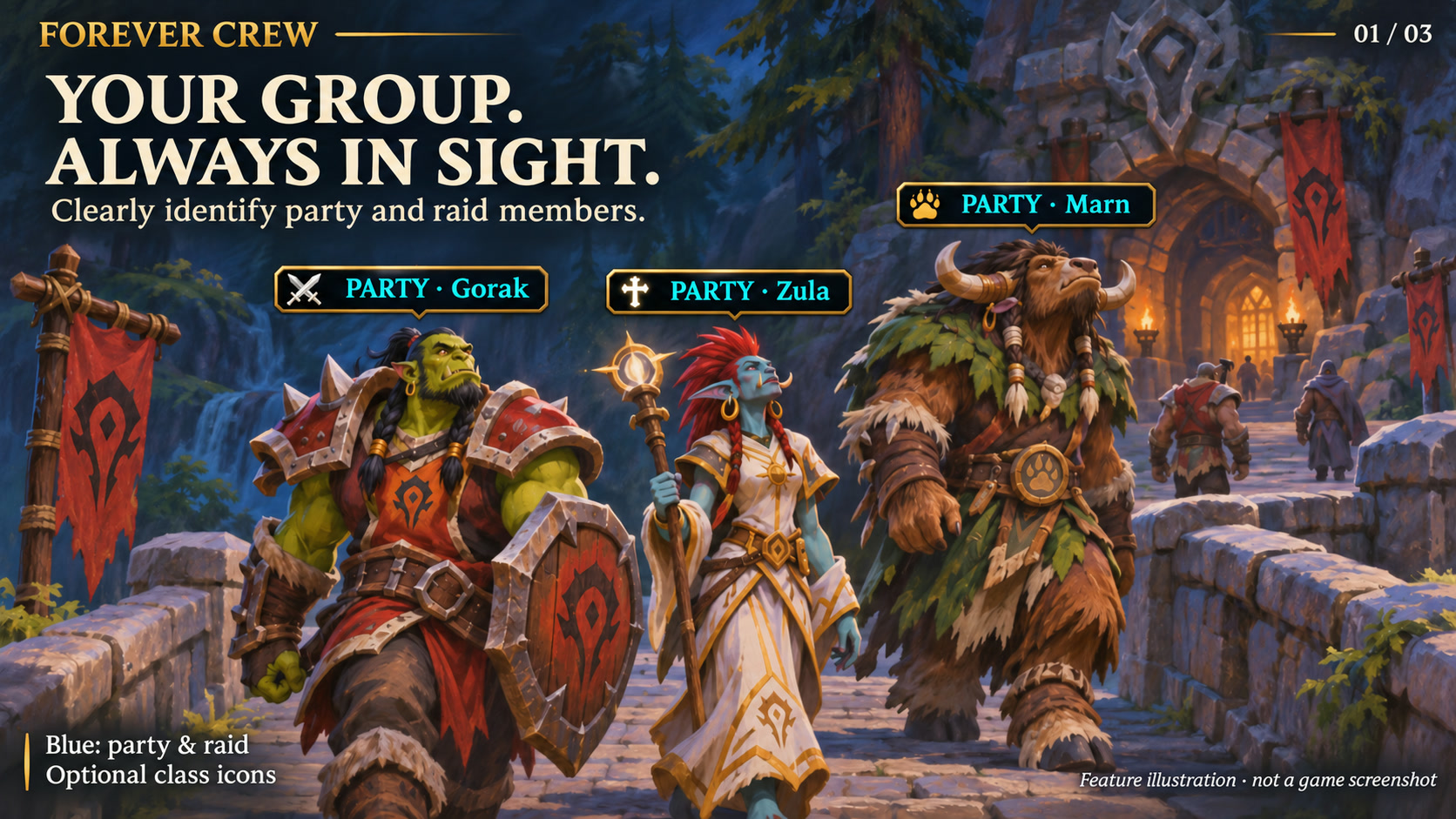
Feature illustration: schematic example, not an in-game screenshot.
Menus use the shared Forever Hub presentation: dark textured panels, subtle metal borders and clear selection states. Compact action menus stay compact; the Forever launcher icons stay frameless. Update Forever Hub to 1.10.1 or later for this appearance.
Language (from version 1.6.2): follows the WoW client by default. Each addon has a Language dropdown; select a language and click Reload UI. Available translation coverage varies by addon and language; missing labels fall back to English. Game-provided names stay in the client language. Update Forever Hub to 1.11.0 or later.
Requires Forever Hub. Install and enable Forever Hub alongside this addon.
https://www.curseforge.com/wow/addons/forever-hub
Find your party, raid and guildmates more easily, identify their classes at a glance and keep your own target markers private.
Features
- Blue labels distinguish PARTY, RAID and BATTLEGROUND membership above accessible nameplates. The label updates automatically when your group or zone changes.
- Green labels for members of your own guild, including outside a group. Group labels take priority.
- Optional class icons beside the labels, supporting the nine WoW Forever classes and all four designs.
- Personal raid-style markers for friendly or hostile units, visible only on your own interface.
- Optional group roster with click-to-cycle markers.
- Automatic friendly player nameplates, with restoration of previous settings afterward.
- Four designs: Runic Seal (default), Minimal, Tactical and Signal.
Startup and nameplate handling
Improved automatic startup after login and entering the world, including retries when nameplate settings or frames are not ready yet. Improved frame anchoring and reuse, stale-label cleanup and recovery from transient display errors. Decorative labels can appear on accessible nameplates during combat; protected setting changes wait until combat ends. Class icons can be switched off separately. Existing settings and private markers are preserved. Guild highlighting is included.
Getting started
Open settings with /fcrew or Forever Hub. Use /fcrew guild to toggle guild highlighting, /fcrew mark 1 through 8 on your target, /fcrew clear to remove its marker, or /fcrew roster for the optional roster. Mouseover/target shortcuts are available in the game's keybindings.
Scope
Highlights require visible, accessible nameplates within the client's visibility range. Restricted friendly nameplates in instances and secret unit data are not bypassed. Enabling automatic nameplates can also make other friendly players and already-enabled enemy nameplates visible; Crew highlights only the matching group or guild members. No 3D body outlines, shared raid markers or addon messages.
Compatibility and testing
WoW Forever 1.60.1 / interface 16001. Requires Forever Hub. Install and enable Forever Hub alongside this addon. Automated Lua/API and package checks passed; group highlighting was also confirmed by the owner in game. Not every class, locale or addon combination has been visually reviewed. Please report issues in the project comments with the version and steps to reproduce.
Large launcher icons and faction dock
Left-click the large launcher to open the addon. Right-click hides that launcher; use /ficons and enable its checkbox to restore it. Shift-right-click opens options where available. Alt-drag moves the launcher or the shared dock. Existing visibility and position settings are preserved.
The dock defaults to your character's faction: blue/gold for Alliance, red/gold for Horde. Use /ficons > Bar style to choose Automatic, Alliance or Horde manually; the choice is stored per character. The required Forever Hub includes a Large launcher icons manager.
Changelog and version history
Each file has its own Changelog on CurseForge. The complete version history is also available at kowarek.de – ForeverCrew changelog. New release notes are added to that website automatically.
Deutsch
Gruppen- und Raidmitglieder erhalten blaue, eigene Gildenmitglieder grüne Beschriftungen. GRUPPE, RAID und SCHLACHTGRUPPE im Schlachtfeld werden automatisch unterschieden. Gruppenmarkierungen haben Vorrang. Außerdem: Klassen-Icons neben den Namen in allen vier Designs, separat abschaltbar, sowie verbesserte automatische Aktivierung beim Login und Spielwelteintritt. Noch nicht verfügbare Namensplaketten werden erneut geprüft; vorübergehende Anzeigefehler stoppen die Aktualisierung nicht mehr. Der neue Schlachtgruppenhinweis ist automatisch geprüft; die Sichtprüfung im Schlachtfeld steht noch aus.
/fcrew öffnet die Optionen, auch über Forever Hub erreichbar. /fcrew guild schaltet die Gildenanzeige um, /fcrew mark 1 bis 8 markiert dein Ziel privat, /fcrew clear entfernt die Markierung und /fcrew roster öffnet die Zusatzliste. Runensiegel ist das Standarddesign; Minimal, Taktisch und Signal sind ebenfalls wählbar. Bestehende Einstellungen und private Marker bleiben erhalten. Gesperrte Instanzplaketten werden nicht umgangen. Die technischen Prüfungen sind bestanden; Gruppenmarkierungen wurden vom Besitzer auch im Spiel bestätigt.
Starticons und Fraktionsfarben
Linksklick öffnet das Addon, Rechtsklick blendet sein großes Starticon aus. /ficons und das Häkchen beim Addon holen es zurück. Shift+Rechtsklick öffnet die verfügbaren Optionen. Die Leiste startet passend zur Charakterfraktion in Blau/Gold (Allianz) oder Rot/Gold (Horde); unter Leistenstil ist eine manuelle Auswahl möglich.
Sprache: standardmäßig automatisch nach WoW-Client. Die Sprachwahl in jedem Addon greift nach /reload; benötigt Forever Hub ab 1.11.0. Fehlende Übersetzungen erscheinen auf Englisch. Namen aus dem Spiel bleiben in der Clientsprache. Nicht alle Texte sind bereits in jede auswählbare Sprache übersetzt.
Forever Crew Team