Options

Button
Description
Forever Coatings
Easily refresh weapon coatings and imbues from one compact button.
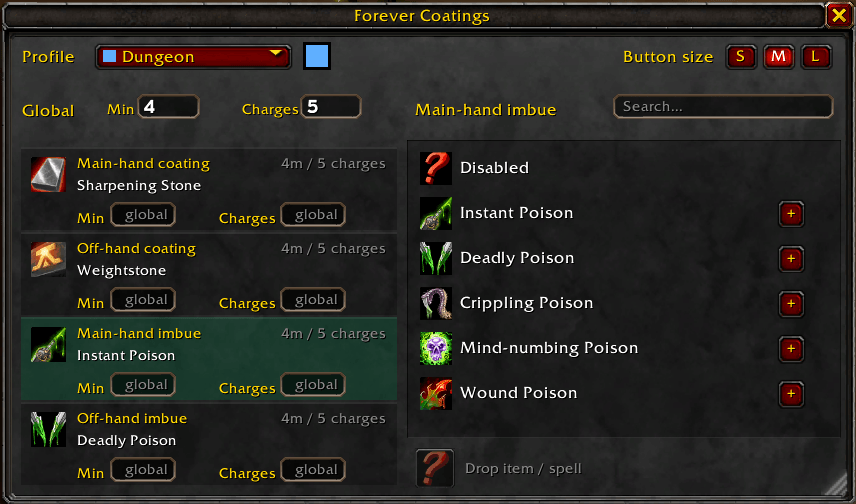
Forever Coatings helps you reapply weapon enhancements in WoW Forever: sharpening stones, weightstones, oils, Rogue poisons, Shaman imbues, and Warlock Firestones and Spellstones. Class-specific choices appear only for the relevant class.
Setup
1. Install the addon and type /reload.
2. Type /fc (or /coatings) to open options.
3. Select a main-hand or off-hand slot, then choose an enhancement from the icon list. Choose Disabled for slots you don't need.
4. Expand a family with + to choose a specific rank. Automatic uses the highest usable rank in your bags, or the highest learned spell rank.
5. Set your refresh thresholds. Defaults are below 5 minutes or 10 charges. Blank per-slot fields use the global setting; 0 disables that threshold. Press Enter to save.
Using the button
Left-click to apply the next missing or low enhancement. Wait for its cast to finish, then click again for the next one. Right-click to force a refresh cycle. This is one button with a separate click for each application, not four applications from one click.
New items or spells
Select a hand/group and drag a coating item from your bags, or a spell from your spellbook, onto the empty learning slot. It saves the exact ID, name, and icon for future use. Custom entries appear at the top; X removes a saved entry. Only items or spells that actually apply a weapon enhancement are suitable.
Multiple Profiles with colors for different options. Scroll the button to quickly swap between profiles.
Alt-drag the floating icon to move it. Drag the options window's bottom-right grip to resize it. Settings save per character. The button hides during combat; charge thresholds ignore enhancements without charges.
Built specifically for WoW Forever, with cached data and event-driven updates instead of continuous polling. Not intended for Retail or other Classic versions.
Forever Coatings Team