FocusClassic
- By
The missing focus system for WoW Classic — class-based auto macros, cast bar, raid markers, and reliable tracking in PvP and raids.
Interface1FC.png
Interface2FC.png
OptionsFocusFC.png
Description
FocusClassic — The missing focus system for WoW Classic
WoW Classic has no native focus. FocusClassic fills that gap with a full-featured window, automatic class-based macros, and reliable tracking even outside a group or in PvP.
What is focus?
A secondary target you track alongside your main target. The healer keeps the boss targeted and tracks the tank on focus. The DPS keeps the boss targeted and interrupts an add via macro. The PvP player monitors a priority enemy without losing their main target.
The focus window
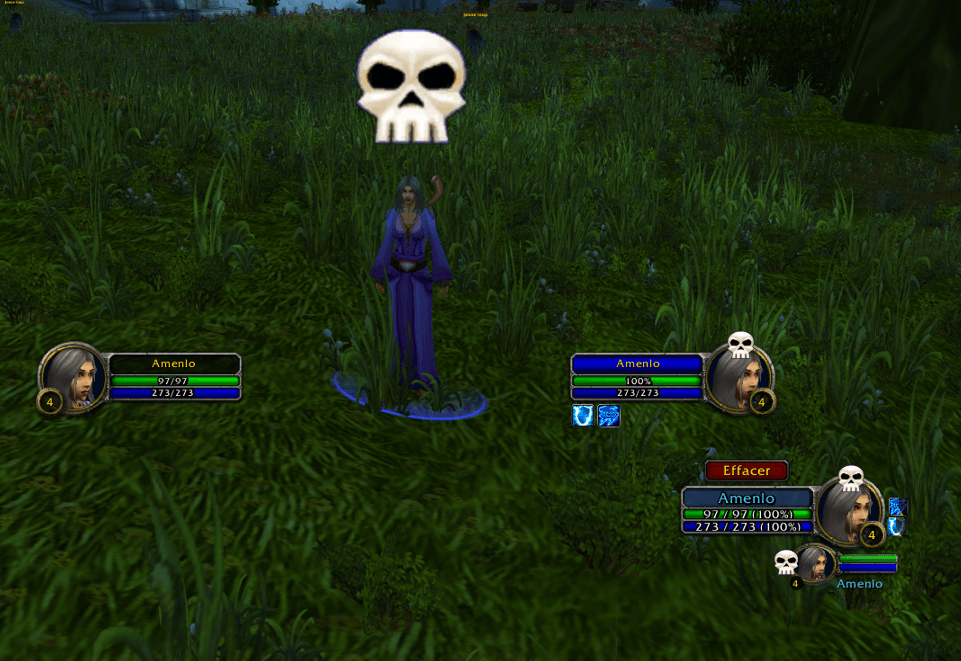
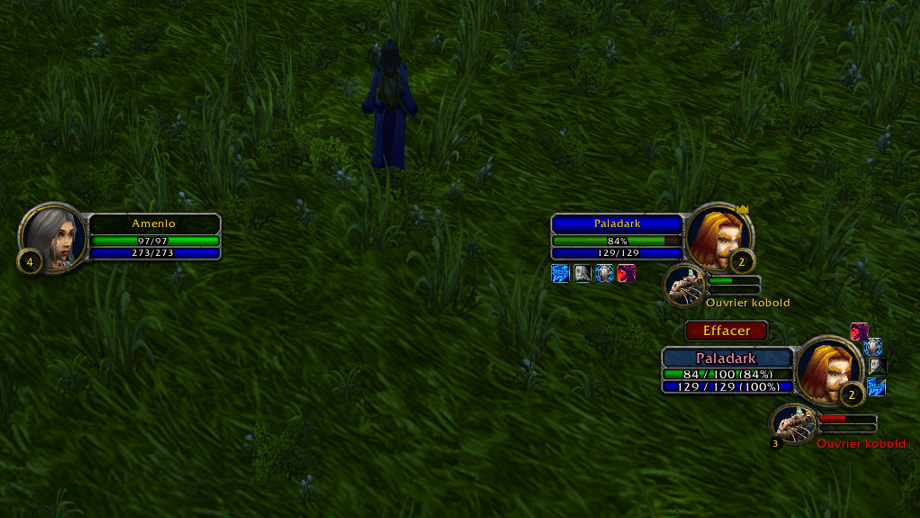
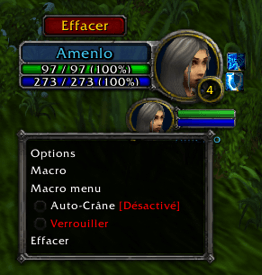
- Circular portrait, name colored by class or reaction (friend/enemy), level badge
- Health bar with exact values and percentage, resource bar (mana, rage, energy)
- Target of target — a circular frame shows your focus's target with portrait, health/mana bars, and level. Left-click to place a skull marker, right-click to remove it.
- Buffs around the portrait — up to 7 buffs displayed in an arc with icons, stack counters, and visual cooldowns
- Cast bar — shows the spell being cast with time remaining. For group members, detects if the spell is interrupted.
- Raid markers — the icon stays visible even when the focus goes out of range
The window automatically hides 5 seconds after clearing focus and reappears as soon as a new focus is set.
Dynamic class macros
Type /focusmacro once. The addon automatically generates all your CC and interrupt macros based on your class:
- Mage: FC Polymorph, FC Counterspell
- Rogue: FC Kick, FC Sap, FC Gouge, FC Blind
- Warrior: FC Pummel, FC Shield Bash, FC Intercept
- Hunter: FC Silencing Shot, FC Scatter Shot
- … and so on for every class
Macros update automatically when you change focus (out of combat). Drag them to your action bar, assign a keybind, and cast on your focus without ever losing your main target.
Auto-skull
Enable auto-skull and the addon automatically places a skull marker on your focus's target. If that target dies, it re-skulls the next one. It never replaces a marker placed by another player.
Setting and using your focus
3 ways to set focus: click the button on the frame, type /fc, or right-click any unit → "Set as Focus".
The Target button on the frame targets your focus in one click, even in combat. Setting or clearing focus is blocked in combat (game limitation) — plan ahead before engaging.
Options
Access via /fc options or the gear icon on the frame:
- Global scale (50% to 200%)
- Individual toggles: health bar, resource bar, cast bar, raid markers, buffs
- Class color on the health bar, numeric values on/off
- Nameplate settings to improve out-of-group tracking
Commands
/fc · /setfocus · /clearfocus · /focusmacro · /fc options · /fc lock · /fc reset · /fc help
Compatibility
WoW Classic Era, Season of Discovery. Interface available in 8 languages — auto-detected (FR, EN, DE, ES, IT, PT, RU).
Thanks to N4UX for his contribution and his vision of the addon.
----
[FR] FocusClassic — Le système de focus manquant dans WoW Classic
WoW Classic n'a pas de focus natif. FocusClassic comble ce manque avec une fenêtre complète, des macros automatiques par classe, et un suivi fiable même hors groupe ou en PvP.
C'est quoi le focus ?
Une cible secondaire que vous suivez en parallèle de votre cible principale. Le healer garde le boss en cible et suit le tank en focus. Le DPS garde le boss en cible et interrompt un add via une macro. Le joueur PvP suit un ennemi prioritaire sans perdre sa cible principale.
La fenêtre focus
- Portrait circulaire, nom coloré selon la classe ou la réaction (ami/ennemi), badge de niveau
- Barre de vie avec valeurs exactes et pourcentage, barre de ressource (mana, rage, énergie)
- Cible de la cible — un cadre circulaire affiche la cible de votre focus avec portrait, barres de vie/mana et niveau. Clic gauche pour poser un crâne, clic droit pour le retirer.
- Buffs autour du portrait — jusqu'à 7 buffs affichés en arc de cercle avec icônes, compteurs de stack et cooldowns visuels
- Barre d'incantation — affiche le sort en cours avec le temps restant. Pour les membres du groupe, détecte si le sort est interrompu.
- Marqueurs de raid — l'icône reste visible même si le focus sort de portée
La fenêtre se masque automatiquement 5 secondes après l'effacement du focus et réapparaît dès qu'un nouveau focus est défini.
Macros dynamiques par classe
Tapez /focusmacro une seule fois. L'addon génère automatiquement toutes vos macros CC et interruption selon votre classe :
- Mage : FC Polymorph, FC Counterspell
- Voleur : FC Kick, FC Sap, FC Gouge, FC Blind
- Guerrier : FC Pummel, FC Shield Bash, FC Intercept
- Chasseur : FC Silencing Shot, FC Scatter Shot
- … et ainsi de suite pour toutes les classes
Les macros se mettent à jour automatiquement quand vous changez de focus (hors combat). Glissez-les sur votre barre d'action, assignez un raccourci, et lancez vos sorts sur le focus sans jamais perdre votre cible principale.
Auto-crâne
Activez l'auto-crâne et l'addon pose automatiquement un marqueur crâne sur la cible de votre focus. Si la cible meurt, il recrâne la suivante. Il ne remplace jamais un marqueur posé par un autre joueur.
Définir et utiliser votre focus
3 façons de définir le focus : cliquer sur le bouton de la frame, taper /fc, ou clic droit sur une unité → "Définir comme Focus".
Le bouton Target sur la frame cible votre focus en un clic, même en combat. Définir ou effacer le focus reste bloqué en combat (limitation du jeu) — planifiez avant d'engager.
Options
Accès via /fc options ou l'icône engrenage sur la frame :
- Échelle globale (50% à 200%)
- Activation/désactivation individuelle : barres de vie, ressource, incantation, marqueurs de raid, buffs
- Couleur de classe sur la barre de vie, valeurs numériques affichables
- Nameplates configurables pour améliorer le suivi hors groupe
Commandes
/fc · /setfocus · /clearfocus · /focusmacro · /fc options · /fc lock · /fc reset · /fc help
Compatibilité
WoW Classic Era, Season of Discovery. Interface disponible en 8 langues — détection automatique (FR, EN, DE, ES, IT, PT, RU).
Plug and play. Aucune configuration nécessaire.
Merci à N4UX pour sa contribution et sa vision de l'addon.
FocusClassic Team