Floating Interrupt Highlight
- By
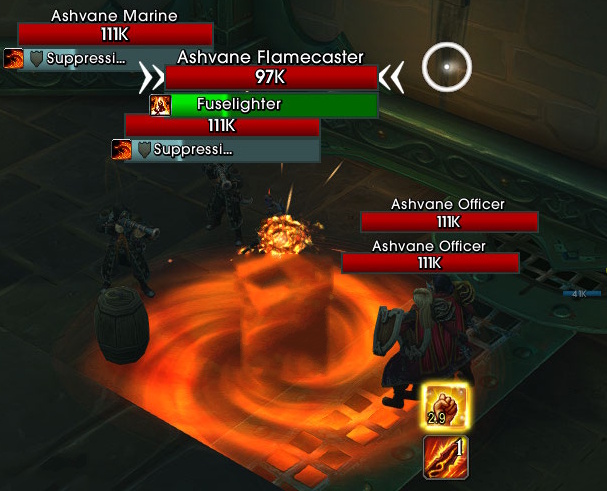
A floating icon that displays your interrupt ability and highlights with a glow animation when your target is casting an interruptible spell.
Floating Interrupt Highlight
A floating icon that displays your interrupt ability and highlights with a glow animation when your target — or your focus target, if you have one — is casting an interruptible spell.
Features
- Floating interrupt icon — Automatically detects your class/spec interrupt spell and displays it as a movable icon
- Glow highlight — Proc-style glow animation plays when your target begins an interruptible cast (can be toggled off in settings)
- Cast timer — Color-coded countdown timer on the overlay (red → yellow → white) shows remaining cast time: tenths of a second in the last 10 seconds, whole seconds before that, so even very long boss channels stay readable (can be hidden in settings)
- Smart cooldown awareness — While your interrupt is on cooldown the icon stays hidden; it lights up the instant your interrupt is ready. The global cooldown is ignored, so the icon never flickers while you cast other spells
- Almost-ready preview — During the last moments of your interrupt's cooldown the icon shows up greyed out, then fills with color and starts glowing the moment you can kick — so the cue never catches you off guard (can be toggled off in settings)
- Out-of-range warning — The icon turns red while the enemy is out of range of your interrupt, so you know to close the gap before you kick (can be toggled off in settings)
- Important cast highlight — Casts Blizzard flags as important (for example, lethal if not interrupted) get a red glow. Optionally, show the icon for important casts only
- All cast types — Tracks regular casts, channels, and empowered casts
- Focus target tracking — If you have a focus target, the addon watches your focus instead of your current target — set focus on the priority kick mob and keep fighting whatever you like. If your focus dies, tracking falls back to your target. Can be turned off with the "Ignore Focus Target" setting
- Cooldown swipe — Optional cooldown sweep animation on the icon after using your interrupt
- Masque support — Fully compatible with Masque for icon skinning
- Friendly unit filtering — The icon only appears for hostile units, never for friendly casts
- Drag to position — Unlock the frame to freely drag it anywhere on screen; lock it to hide until needed
- Profile support — Per-character profiles by default, with full AceDB support for copying and switching
How It Works
When unlocked, the icon is always visible so you can position it where you want.
When locked, the icon is completely hidden until the unit you're tracking begins casting an interruptible spell. If your interrupt is on cooldown, the icon stays hidden — no point showing what you can't use. As the cooldown runs out, the icon fades in greyed out, then colors in and starts glowing the instant your interrupt is ready. If the enemy is out of range of your interrupt, the icon turns red.
Focus target: if you set a focus, the addon tracks your focus exclusively — your current target's casts are ignored until you clear the focus. This lets you assign yourself kick duty on one enemy while attacking another. The moment you clear the focus, tracking snaps back to your target (even mid-cast). Prefer the old behavior? Enable Ignore Focus Target in the settings and the addon will always watch your current target.
The addon automatically detects which interrupt spell you have based on your class and spec, and re-detects it when you change talents or specialization. Warlock pet interrupts are fully supported: the icon follows your current pet (Spell Lock or Axe Toss) and shows nothing if your active pet has no interrupt.
Supported Interrupts
| Class | Spell |
|---|---|
| Death Knight | Mind Freeze |
| Demon Hunter | Disrupt |
| Druid | Skull Bash / Solar Beam |
| Evoker | Quell |
| Hunter | Counter Shot / Muzzle |
| Mage | Counterspell |
| Monk | Spear Hand Strike |
| Paladin | Rebuke |
| Priest | Silence |
| Rogue | Kick |
| Shaman | Wind Shear |
| Warlock | Spell Lock / Axe Toss (pet) |
| Warrior | Pummel |
Slash Commands
/fih— Open the settings panel/fih lock— Toggle frame lock/fih unlock— Unlock the frame/fih toggle— Enable or disable the addon/fih reload— Restart the addon/fih debug— Preview mode: force-shows the icon and glow so you can position and style it without a casting enemy
Settings
- Icon size, alpha, and glow animation toggle
- Hide Cast Timer — remove the cast countdown text from the icon while keeping the glow animation
- Almost-Ready Preview — toggle the greyed-out early warning during the end of your interrupt's cooldown
- Ignore Focus Target — always track your current target, even when a focus is set
- Out-of-Range Tint — turn the icon red while the enemy is out of range of your interrupt
- Highlight Important Casts — red glow for casts Blizzard flags as important
- Important Casts Only — ignore every interruptible cast Blizzard doesn't flag as important
- Border color and thickness (disabled when using a Masque skin)
- Cooldown swipe, edge glow, bling animation, and number visibility
- Frame strata and anchor point configuration
- Custom frame parent for anchoring to other UI elements
- Profiles — create, copy, and switch between profiles
Attribution
This addon was inspired by and built upon ideas from two existing addons:
- ActionBar Interrupt Highlight — Interrupt spell detection, cast tracking logic, and glow overlay animation
- Simple Assisted Combat Icon — Floating frame architecture, drag system, options panel structure, and Masque integration
Floating Interrupt Highlight Team