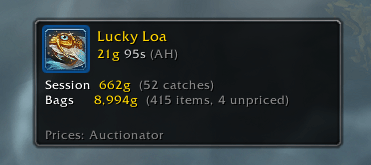
fishworth 1.png
Description
Fishworth
Know what every catch is worth.
Fishworth prices your fishing loot as you catch it, using Auctionator or TradeSkillMaster data when you have them and vendor prices when you don't. A small movable frame shows your last catch, your session total, and the value of all fishing loot in your bags.
What It Does
- Totals frame appears on your first cast and hides a couple of minutes after your last. Hover it for settings, a new session, or to close it.
- Optional chat line per catch with item links, value, and where the price came from. Off by default; turn it on in settings.
- Prices come from Auctionator first, then TSM, then the vendor. Vendor price is a floor, so an undercut fish that vendors for more shows the vendor value.
- Knows fishing loot from a built-in list covering Classic through Midnight, fish and treasures alike, plus anything it sees you catch. Only what actually lands in your bags is counted.
- Sessions are per character and start fresh after six hours away, or whenever you say.
Commands
/fw or /fishworth
| Command | What it does |
|---|---|
/fw config |
Open settings |
/fw show, /fw hide |
Show or hide the frame |
/fw reset |
Start a new session |
/fw price <item link> |
Price one item from every source |
/fw test |
Fake a catch to see it in action |
/fw status |
Detection, price sources, totals |
Settings
Game Menu > Options > AddOns > Fishworth, or /fw config. Chat line and its minimum value, chat window, frame size and hide delay, catch animations, and when a new session starts. The TSM price source appears when TradeSkillMaster is loaded; other price strings via /fw tsm <string>.
Notes
- Items you can also get elsewhere, like Shredded Bloomline from herbalism, are counted once known.
/fw forget <item link>excludes one;/fw addincludes one. - Fishworth never reads or sends chat. Fishing is detected from the game's own fishing-loot flag and your fishing channel.
- Reloading with a loot window open loses that one catch.
Installation
Drop the FishWorth folder in World of Warcraft/_retail_/Interface/AddOns/, then restart WoW or /reload.
Author
DADD10
Tight lines.
Fishworth Team