Fishmonger
- By
One-button cast and auto-apply lures! Track your catches and see what recipes they're used in!
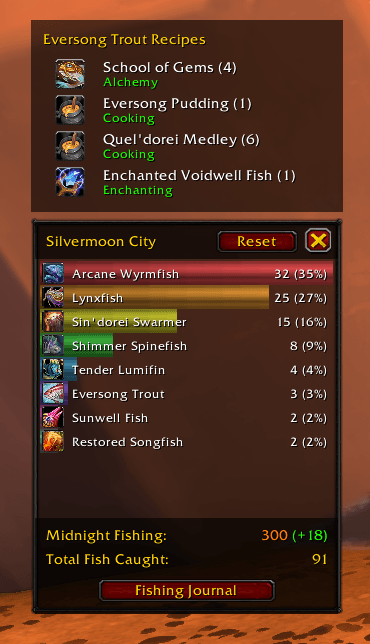
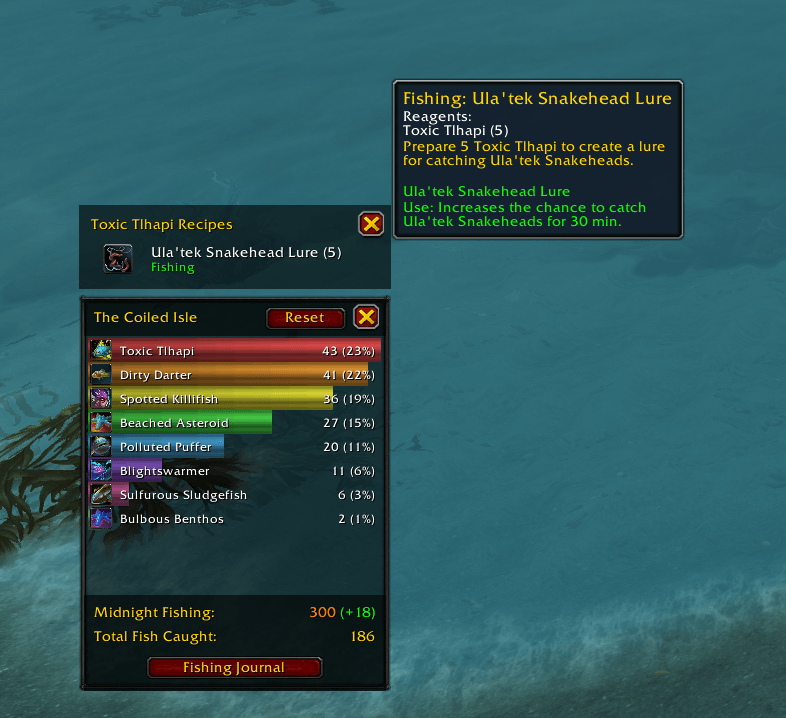
Click on the fish in the list to pin the recipe list, then hover over the recipe for more info!
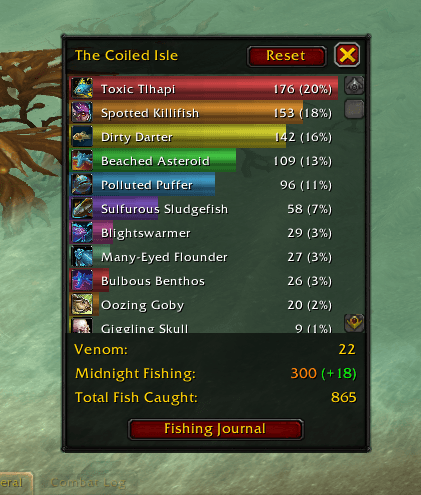

Applies to The Coiled Huntress, Underlight Angler, and Kalu'ak Mastercraft Fishing Poles
Description
Fishmonger
A WoW Retail fishing companion addon that automates the casting workflow — double right-click to fish, with optional pre-cast buff application.
Features
- Auto-Cast Fishing — Double right-click casts Fishing via a secure action button. No keybinds needed.
- With a fishing tool equipped: double right-click to cast (detected via the tool's "Fishing For Attention" equip aura)
- Without a fishing tool: Alt + double right-click to cast
- Timing window: 50ms–400ms between clicks
- Automatically blocked during combat lockdown or while the loot window is open
- Pre-Cast Buffs — Before casting Fishing, automatically applies configured enhancements in priority order:
- Cosmetic bobber (toy) — changes bobber appearance
- Oversized Bobber (toy or consumable) — makes the bobber larger/easier to see
- Raft (toy) — floats you on the water's surface (Anglers Fishing Raft or Personal Fishing Barge)
- Lure (consumable) — applies a fishing skill enchant to your fishing tool
- One item applied per trigger. Once all buffs are active, casts Fishing normally.
- Rafts only appear as options if you own the toy (the game enforces each raft's own use requirement).
- Catch Stats — A per-zone tracker that opens automatically while a fishing tool is equipped
- Auto-show and auto-hide are independent toggles: you can have it appear when you start fishing without also having it vanish when you stop, or vice versa
- Ranks the trade goods you've caught in the current zone with proportional bars
- Shows your fishing skill for the current expansion and a running total
- Shows current Venom accrued on The Coiled Huntress (only while that rod is equipped)
- Hover a fish to see which profession recipes use it, including recipes that use products obtained by salvaging it
- Click a fish to pin its recipe list; reset current-zone or all data from the panel
- Auto-Transform — Keeps the "Fishing For Attention" buff active so your rod's underwater perks (swim speed, water walking, underwater breathing) actually work
- That buff enables the rod's perks, but it often isn't applied at the moment you need it (e.g. you're already underwater, or you just dropped combat). Re-equipping the rod reliably (re)applies it.
- So when you go underwater, or are underwater and leave combat, Fishmonger briefly unequips and re-equips the rod to refresh the buff.
- Supports The Underlight Angler, The Coiled Huntress, and the Mastercraft Kalu'ak Fishing Pole
- Never swaps in combat or Mythic+; a swap that would land in combat is deferred until combat ends
- Requires at least one free bag slot; runs automatically with no setting to manage
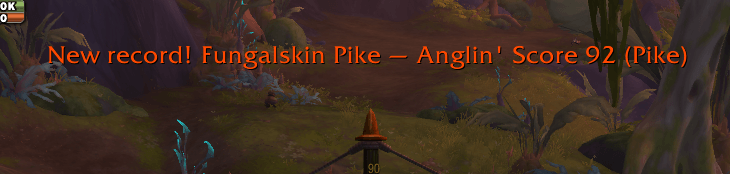
- Record Fish Announcements — Beat your best Anglin' Score on a Midnight fish and Fishmonger calls it out
- Raid-warning-style on-screen notice plus a sound, showing the fish name, new score, and catch rank
- Reads the record from the fishing journal spell (
GetSpellDescription), tracks each fish's best in saved variables, and announces only on a genuine increase - Your existing records are seeded silently at login, so the very first catch after installing can already announce a new record instead of being swallowed as a baseline
- Toggle with the "Announce Record Fish" setting (enabled by default)
- Note: WoW only exposes your record score to addons, not the score of each individual catch, so per-catch scores can't be shown
- Minimap Button — A button on the minimap edge for quick access
- Left-click toggles the Catch Stats window (opens it, or closes it if open)
- Right-click opens the settings panel
- Drag it around the minimap; the position persists across sessions
- Built on LibDBIcon, so minimap managers (e.g. SexyMap) manage its fade, dragging, and visibility like any other addon button
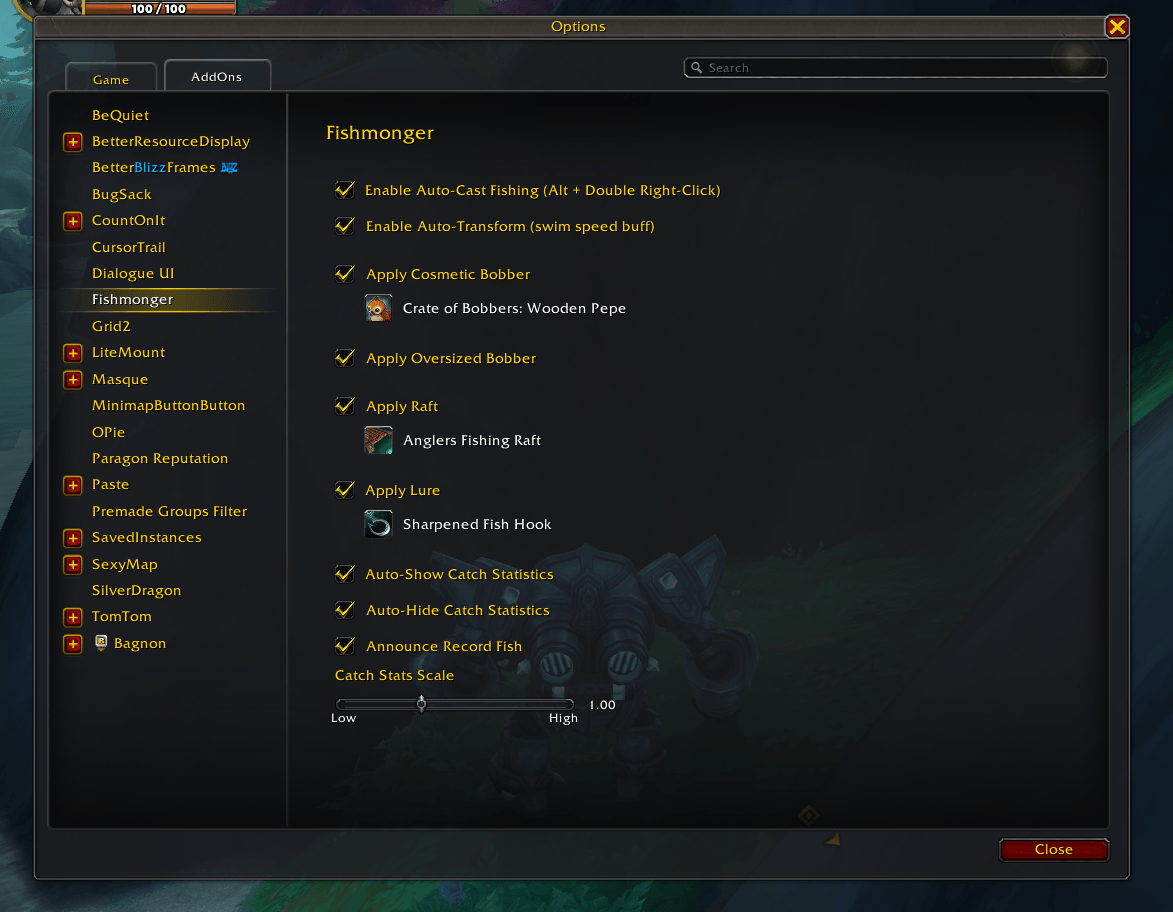
- Settings Panel — Configurable via Interface → AddOns → Fishmonger
- Organized into sections: Casting, Auto-Apply Fishing Gear, and Catch Statistics
- Casting: enable/disable Auto-Cast, plus primary and secondary key slots for the Easy Cast keybind
- Auto-Apply Fishing Gear: a checkbox per gear category with an inline dropdown to choose the specific bobber, raft, or lure
- Catch Statistics: enable/disable auto-show and auto-hide, toggle record-fish announcements, and set the stats window scale
- Auto-Transform runs automatically and has no toggle
Installation
Copy the Fishmonger folder into your WoW addons directory:
- Windows:
World of Warcraft\_retail_\Interface\AddOns\ - macOS:
World of Warcraft/_retail_/Interface/AddOns/
Then type /reload in-game.
Usage
Use /fishmonger or /fm in-game.
Available Commands
Core
/fm help— Show available commands
Debug
/fm debug loglevel <ERROR|WARNING|INFO|DEBUG>— Set log verbosity/fm debug dump— Dump saved variables (requiresDevTools_Dump)
Pre-Cast Buff Detection
The buff system checks whether each enhancement is already active before applying:
| Buff Type | Detection Method |
|---|---|
| Cosmetic bobber | C_UnitAuras.GetPlayerAuraBySpellID (spell ID from KnownItems registry) |
| Oversized Bobber | C_UnitAuras.GetPlayerAuraBySpellID(397827) |
| Raft | C_UnitAuras.GetPlayerAuraBySpellID (spell ID from KnownItems registry) |
| Lure | GetWeaponEnchantInfo() with item link parsing fallback |
The priority sequence (cosmetic → oversized → raft → lure) evaluates each slot and applies the first missing buff. If all buffs are already active, the cast proceeds directly to Fishing.
Rafts are toys, so availability is gated on PlayerHasToy(itemId) — if you own the raft, it appears as an option. The game enforces each raft's own use requirement (for example the Anglers Fishing Raft's Pandaria fishing prerequisite), so the addon doesn't attempt to re-check skill levels itself. Querying old expansion fishing skill lines directly (C_TradeSkillUI.GetProfessionInfoBySkillLineID) is unreliable for non-current lines and can produce false negatives, so toy ownership is the sole gate.
Tips
- The double-click window is intentionally tight (50–400ms) to avoid accidental casts during normal right-click interactions.
- Alt-modifier requirement when no fishing pole is equipped prevents interference with normal gameplay right-clicking.
- Pre-cast buffs are applied one per trigger — if you need all three buffs, you'll double-click three times before the actual Fishing cast happens. This is by design to avoid cooldown/GCD conflicts.
- All buff preferences persist across sessions via saved variables.
- Settings are also accessible through the Interface Options panel (no slash commands needed for configuration).
- Auto-Transform needs a free bag slot to unequip and re-equip the rod. If your bags are full, the refresh is skipped — clear a slot to let it work.
- Auto-Transform only acts on rods it knows grant the "Fishing For Attention" buff; any other equipped fishing tool is left alone.
Development
File Structure
Fishmonger.toc— Addon metadata and load orderCore.lua— Addon namespace, structured logger, event dispatcher, slash commands, saved variable initializationModules/KnownItems.lua— Static registry of fishing bobbers and lures (item IDs, spell IDs, enchant IDs)Modules/KnownRecipes.lua— Static registry mapping caught fish (and their salvage products) to the recipes that use themModules/PreCastBuffs.lua— Buff detection, inventory checks, priority sequence logicModules/AutoCast.lua— Double right-click detection, secure action button managementModules/AutoTransform.lua— Re-equips a transform-granting rod to (re)apply its "Fishing For Attention" buff while swimmingModules/CatchStats.lua— Per-zone catch tracking, stats frame, recipe hover/pin listModules/RecordFish.lua— Detects and announces new record Anglin' Scores for Midnight fishModules/Minimap.lua— Minimap button (toggle Catch Stats / open settings), via LibDataBroker + LibDBIconLibs/— Embedded libraries: LibStub, CallbackHandler-1.0, LibDataBroker-1.1, LibDBIcon-1.0Modules/ConfigUI.lua— Settings panel (checkboxes, dropdown selectors)Tests/— Self-contained test suite (runs outside WoW via plain Lua)Data/— DB2 CSV exports and SQL queries used for item/spell/recipe ID lookups (not tracked in git).kiro/— Development specs, skills, and steering docs
Architecture Notes
Auto-Cast uses a SecureActionButtonTemplate with override bindings. On first click, a timestamp is recorded. If a second click arrives within the timing window, an override binding is set on the secure button to fire the cast. A PostClick secure handler immediately clears the binding so only one cast occurs per double-click.
Pre-Cast Buffs hooks into the cast pipeline. Before the secure button fires Fishing, the module checks the priority sequence. If a buff is missing, it uses the item (toy or consumable) instead of casting Fishing. The module queries C_UnitAuras and GetWeaponEnchantInfo to determine what's already active.
Auto-Transform (re)applies the rod's "Fishing For Attention" buff, which is what actually enables the rod's underwater perks (swim speed, water walking, underwater breathing). That buff frequently isn't active when you need it, and re-equipping the rod reliably re-applies it. So on the water-entry signal (MOUNT_JOURNAL_USABILITY_CHANGED, debounced) — and again on PLAYER_REGEN_ENABLED and CHAT_MSG_LOOT while swimming without the buff — the module unequips the rod into a free bag slot and puts it back, using cursor-based inventory calls (PickupInventoryItem + C_Container.PickupContainerItem), the same unprotected mechanic as dragging an item, so no secure button is required. It remembers where the rod went and completes the re-equip on the next BAG_UPDATE (or on PLAYER_REGEN_ENABLED if the swap was deferred). All swaps are gated on InCombatLockdown() and C_ChallengeMode.IsChallengeModeActive(), since inventory moves are forbidden in combat. The set of transform rods lives in a small item-ID registry (AutoTransform.TRANSFORM_RODS), so adding a future rod is a one-line change.
Requirements
- WoW Retail (The War Within / 12.x)
- Interface version: 120100
Fishmonger Team