BetterResourceDisplay
- By
Basic improvements to the standard Blizzard Personal Resource Display like number display and customizable textures

Description
BetterResourceDisplay
Enhances the built-in Personal Resource Display (the nameplate beneath your character) with numeric text overlays, custom bar textures, and class-colored health bars.
Features
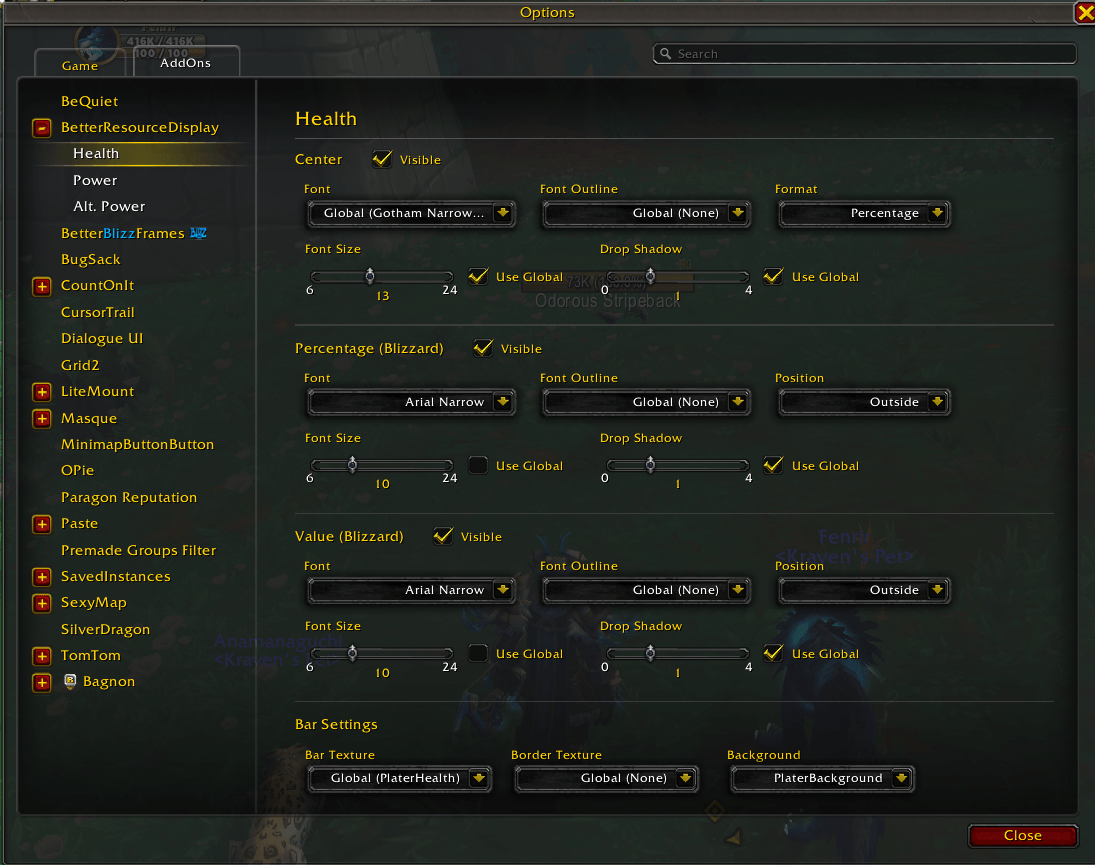
- Displays current / max health as text centered on the health bar (abbreviated WoW-style: 345.6K, 1.2M)
- Displays current / max resource (mana, energy, rage, etc.) as text centered on the resource bar
- Displays current / max alternate power on the alternate resource bar when active (hides automatically when inactive)
- White text color for readability against any bar color
- Large numbers abbreviated automatically: below 10K shown as-is, 10K+ as "X.XK", 1M+ as "X.XM"
- Text updates in real time as values change
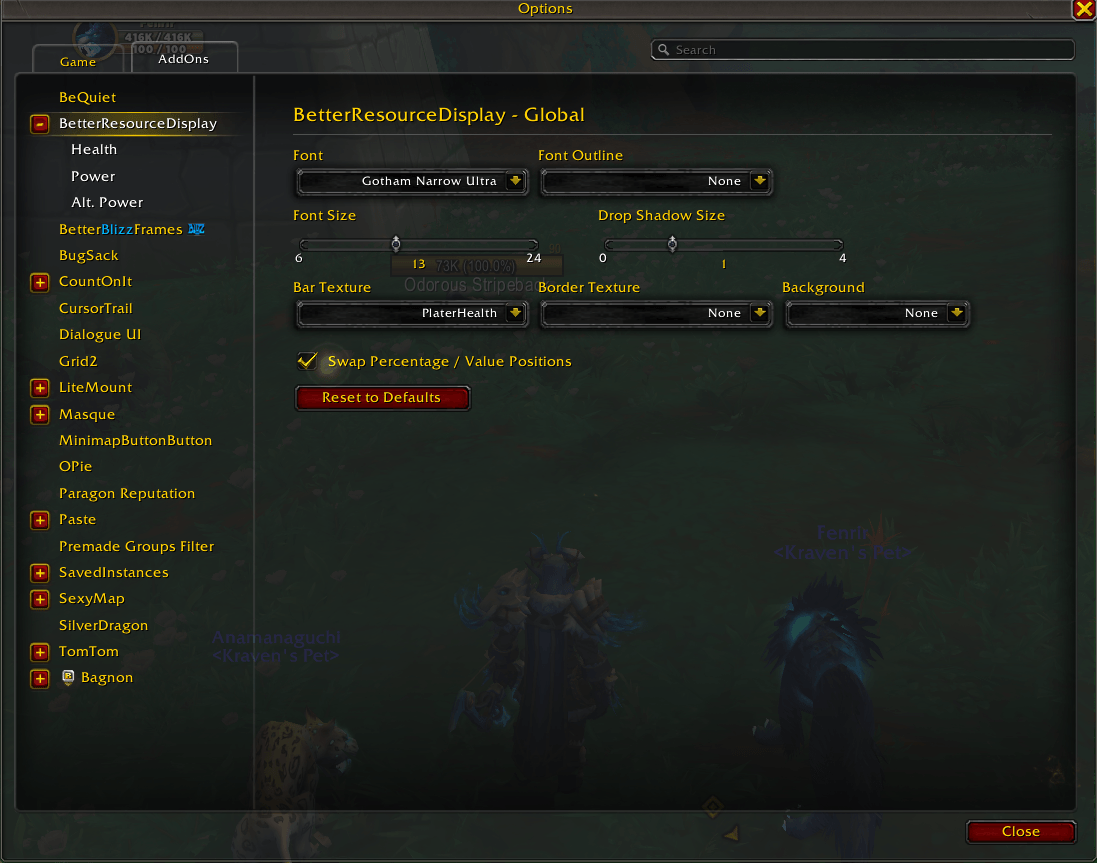
- Configurable font selection — choose from built-in WoW fonts or any font registered through LibSharedMedia-3.0
- Configurable font size (6–24pt)
- Configurable font outline style — None, Outline, Thick Outline, Monochrome, or Outline + Monochrome
- Optional class-colored health bar — colors the health bar to match your class color, restores the default color when toggled off
- Configurable bar texture — applies to health, resource, and alternate bars; supports built-in textures and LibSharedMedia-3.0 packs
- PRD width matching — optionally match the width of the Personal Resource Display to the Essential Cooldowns or Utility Cooldowns frame from Blizzard's Cooldown Manager
- All settings accessible from the WoW Interface Options panel (Game Menu → Options → AddOns → BetterResourceDisplay)
- Changes apply immediately as a live preview
- Reset to Defaults button to restore all settings
- Works out of the box with sensible defaults — no configuration required on first install
- Hook-based integration preserves all base Blizzard nameplate functionality (no taint)
- LibSharedMedia-3.0 is optional — the addon works without it, offering only built-in fonts and textures
Installation
- Download and extract the
BetterResourceDisplayfolder. - Place it in your WoW AddOns directory:
- Windows:
C:\Program Files (x86)\World of Warcraft\_retail_\Interface\AddOns\ - macOS:
/Applications/World of Warcraft/_retail_/Interface/AddOns/
- Windows:
- Restart WoW or type
/reloadin chat.
Usage
Open the settings panel from the game menu: Game Menu → Options → AddOns → BetterResourceDisplay.
All configuration is done through the settings panel — no slash commands needed.
Settings
| Setting | Control | Default |
|---|---|---|
| Font | Dropdown | Friz Quadrata |
| Font Size | Slider (6–24) | 10 |
| Font Outline | Dropdown | Outline |
| Health Format | Dropdown | Current / Max |
| Power Bar Format | Dropdown | Current / Max |
| Alt. Power Format | Dropdown | Current / Max |
| Color Health Bar by Class | Checkbox | Off |
| Bar Texture | Dropdown | Blizzard |
| Frame Width | Dropdown | Default |
Font Resolution
When you select a font, the addon stores the friendly name (e.g., "Friz Quadrata") and resolves it to a file path at render time. Resolution follows this order:
- Cache — instant return if previously resolved
- LibSharedMedia-3.0 — if installed, checks registered fonts
- Built-in font map — Friz Quadrata, Morpheus, Skurri, Arial Narrow
- Direct path — if the name contains a slash, treated as a literal file path
- Fallback — defaults to Friz Quadrata, then the hardcoded font path
Texture resolution follows the same pattern for the statusbar media type.
Built-in Fonts
- Friz Quadrata
- Morpheus
- Skurri
- Arial Narrow
Built-in Textures
- Blizzard
- Blizzard Raid Bar
- Solid
Install LibSharedMedia-3.0 and SharedMedia font/texture packs for more options.
Tips
- The Personal Resource Display must be enabled in WoW's nameplate settings for the addon to have any effect.
- Settings changes apply instantly — no reload needed.
- The addon is safe to use in combat. It only modifies addon-created FontStrings and bar textures, which are not protected operations.
- If a font or texture can't be resolved, the addon silently falls back to defaults rather than erroring.
All test files use a self-contained harness with WoW API mocks — no external test frameworks required.
The BetterResourceDisplay Team