EzWoW - Quest
- By
Quest tracker, auto accept and turn-in, party progress messages, and quest objective and turn-in marks on the world map and minimap for WoW Forever.
EzWoW - Quest
English · 한국어
All quest features in one addon for WoW Forever: a scrollable quest tracker that guides you to the nearest place to go, auto accept and turn-in, a mark on the best-selling reward, party progress messages, quest objective and turn-in spots on the World Map and minimap, and a yellow "!" over quest givers with a quest you can take now.
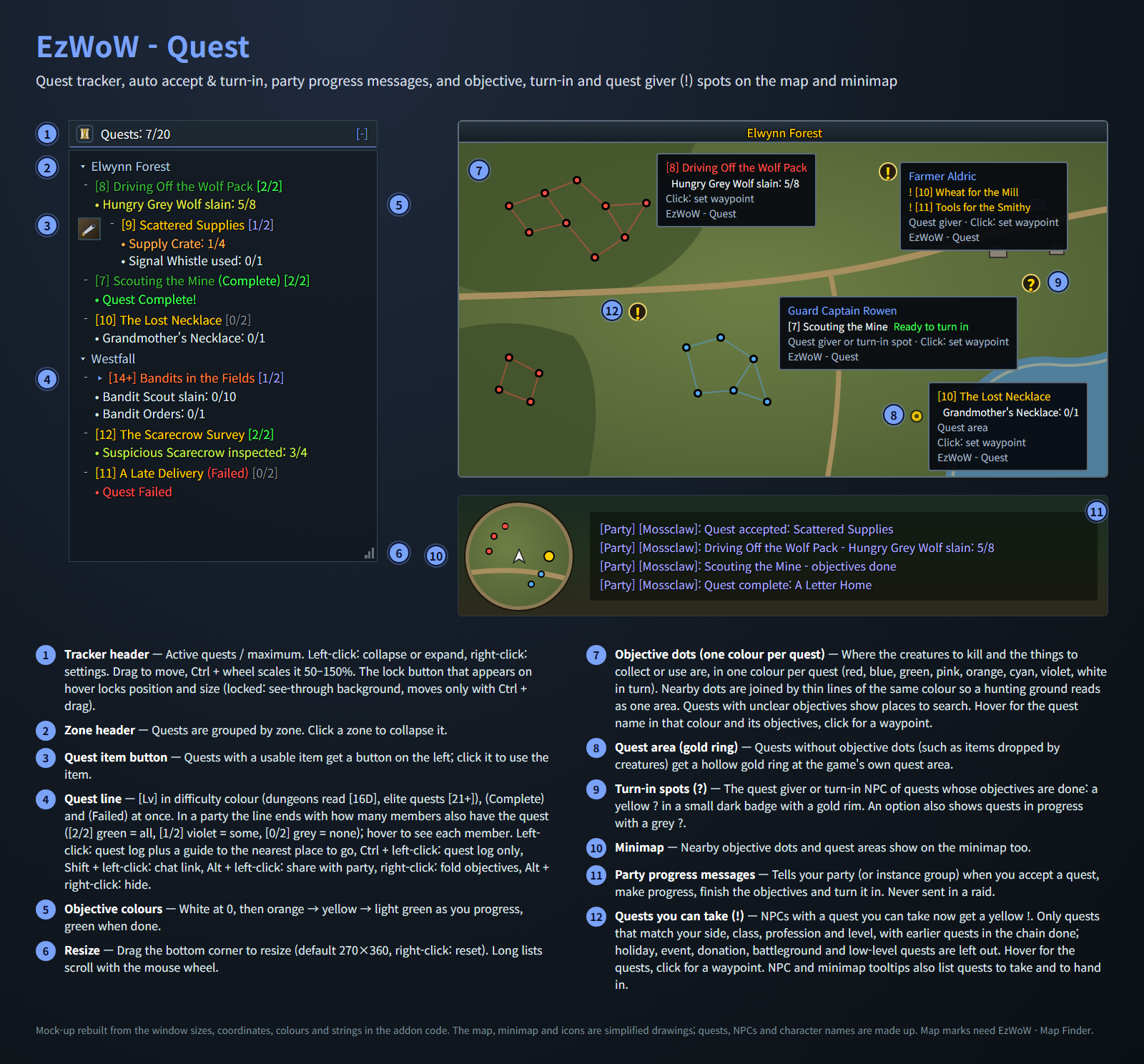
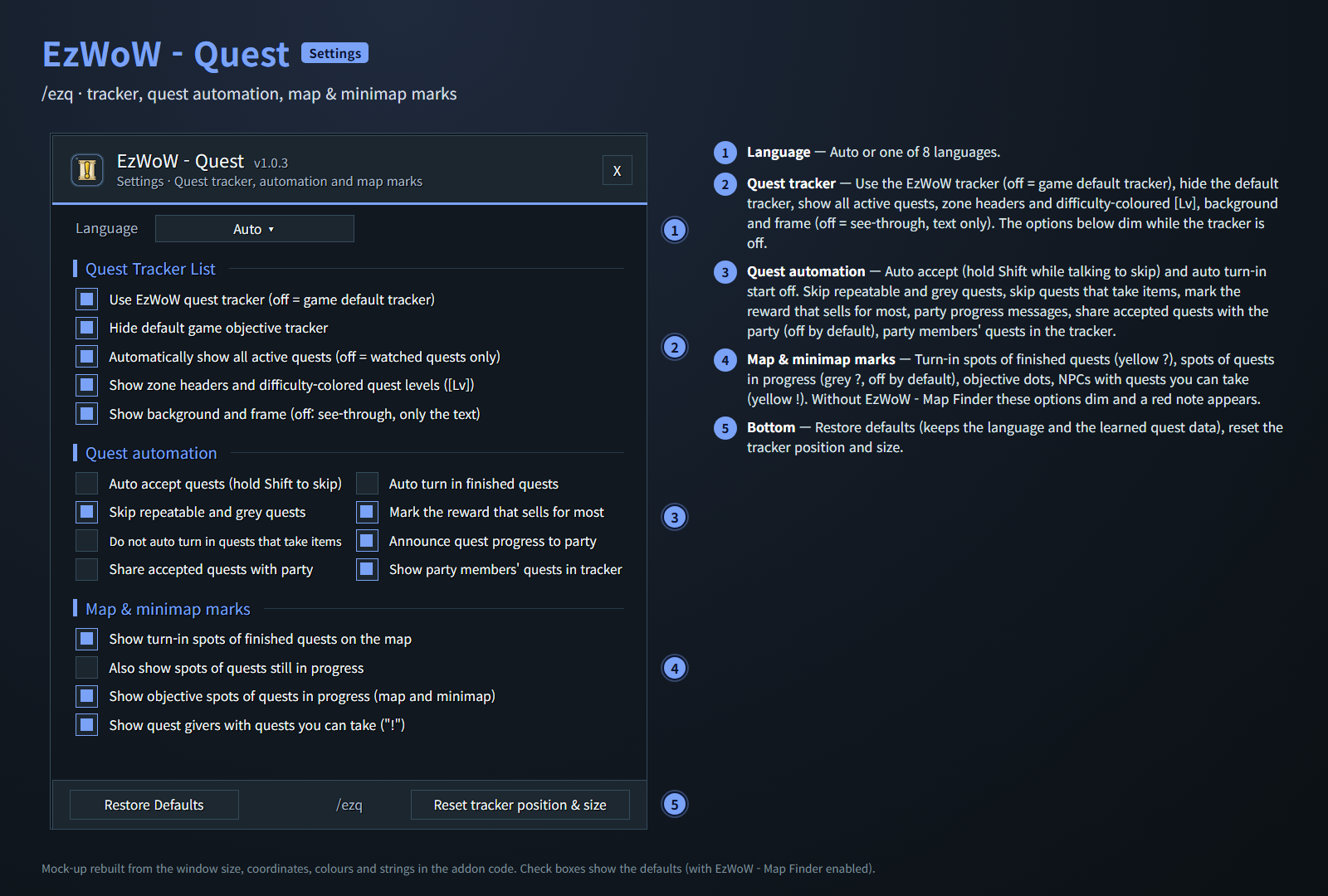
Mock-ups rebuilt from the window sizes, coordinates, colours and strings in the addon code. Quests and names are made up.
Features
Quest tracker
- Replaces the default objective tracker (can be switched back in the settings).
- Quests grouped by zone, with difficulty-coloured
[Lv](dungeons read[16D], elite quests[21+]) and(Complete)/(Failed)at once. - Objectives change colour as you progress: white → orange → yellow → green.
- Newly accepted quests are marked "NEW" until you mouse over them.
- Quests with a usable item get an item button you can click directly.
- Drag to move, Ctrl + mouse wheel to scale (50–150%), drag the bottom corner to resize, mouse wheel to scroll.
- A lock button on the header locks position and size (locked: see-through background, moves only with Ctrl + drag). The background and frame can also be turned off for a text-only list.
- Left-click a quest: quest log and a guide to the nearest place to go (chat line with coordinates and a waypoint; the turn-in spot once the objectives are done) · Ctrl + left-click: quest log only · Shift + left-click: chat link · Alt + left-click: share · right-click: fold objectives · Alt + right-click: hide.
Quest automation (off by default)
- Auto accept quests, including shared and escort quest confirmations. Hold Shift while talking to skip.
- Auto turn in finished quests. You still choose rewards yourself; quests that cost gold are never turned in.
- Options to skip repeatable and grey quests, and quests that take items.
- A gold mark on the reward that sells for most.
Party progress messages
- Tells your party (or instance group) when you accept a quest, make progress, finish the objectives and turn it in. Never sent in a raid.
Quest sharing and party status
- Alt + left-click a quest in the tracker to share it with your party.
- Optional: share a quest automatically when you accept it while in a group (off by default).
- In a party, each quest line shows how many members also have it (for example
[2/4]); hover to see who has it.
Map and minimap marks (needs EzWoW - Map Finder)
- Objective dots, one colour per quest: where the creatures to kill and the things to collect or use are. Nearby dots are joined by thin lines of the same colour, so a hunting ground reads as one area, and the quest name in the tooltip uses the same colour.
- Hollow gold ring: the game's own quest area, for quests without objective dots.
?badge: where to turn in quests whose objectives are done, a yellow?in a small dark badge with a gold rim (grey?for quests in progress, optional).- Quests with unclear objectives show places to search, such as places named in the quest text.
- Nearby dots also show on the minimap. Hover for the quest and objective, click to set a waypoint.
Quests you can take (needs EzWoW - Map Finder)
!badge on the World Map over NPCs with a quest you can take now. Hover for the NPC and its quests, click to set a waypoint.- Only quests that match your side, class, race, profession and level, with the earlier quests in the chain done. Holiday, event, donation, battleground and low-level quests are left out. Quest levels follow the WoW Forever server.
- NPC and minimap tooltips list the quests that NPC gives (quests a few levels away in grey, "from Lv.N") and your finished quests to hand in there.
- Can be turned off in the settings ("Show quest givers with quests you can take").
Learned and shared quest spots
- Remembers who gives and takes in your quests, which creatures and objects quest items come from, and where "reach" / "scout" objectives are done, and shows them on the map.
- Shares them with your party, guild and other players of this addon automatically (addon messages only, nothing appears in chat, no names are stored). Quest NPCs and creature drops from the shared channel are used once several players report the same; places (scouting spots, looted objects) are used as they arrive.
- For this the addon joins a hidden channel with a high number (10 or higher), so your own channel numbers stay the same. Players in that channel can see each other's character names in the channel list.
- Can be turned off in the settings ("Share learned quest spots with other EzWoW users").
World Map quest list
- Expand all / Collapse all and Check all / Clear all buttons next to the World Map quest list.
Working with other EzWoW addons
- The quest features of EzWoW - Frame Mover and EzWoW - Map Finder moved to this addon. While it is enabled, their quest features turn off and this addon takes over.
- Their quest settings are carried over once, on the first start.
- The map and minimap marks, the quest lists on NPC tooltips and the tracker's guide use the location data of EzWoW - Map Finder; the tracker, automation and party messages work on their own.
Gamepad
- With the gamepad UI on, EzWoW windows work with a gamepad: D-pad to move, A (✕) to press, X (□) for right-click, LB/RB to scroll, B (○) to close. A key guide in your pad's button style shows under the window.
- With no game window open, press View (Back) / Create to move to the EzWoW frames on screen. Press it again or B to go back.
- To use another button: Key Bindings > AddOns > EzWoW > "Gamepad: move to / leave the EzWoW frames" (with EzWoW-MapFinder installed).
Record sharing
- Shared by all EzWoW addons and on by default: quest NPCs, rare monster sightings, item drops and gathering spots you have seen yourself are shared with other EzWoW users.
/ezshare on/off,/ezshare channel on/off,/ezshare status
Commands
/ezqor/퀘스트— open the settings/ezq reset— reset the tracker position and size/ezq help— list the commands
Languages: English, 한국어, Deutsch, Français, Español, Русский, 简体中文, 繁體中文.
한국어
WoW Forever용 퀘스트 기능을 한곳에 모은 애드온입니다. 가장 가까운 수행 위치로 길을 안내하는 스크롤형 퀘스트 추적기, 자동 수락·완료, 판매가가 가장 높은 보상 표시, 파티 진행 알림, 월드맵과 미니맵의 퀘스트 목표·보고 위치 표시, 지금 받을 수 있는 퀘스트를 주는 NPC의 노란 "!" 표시를 제공합니다.
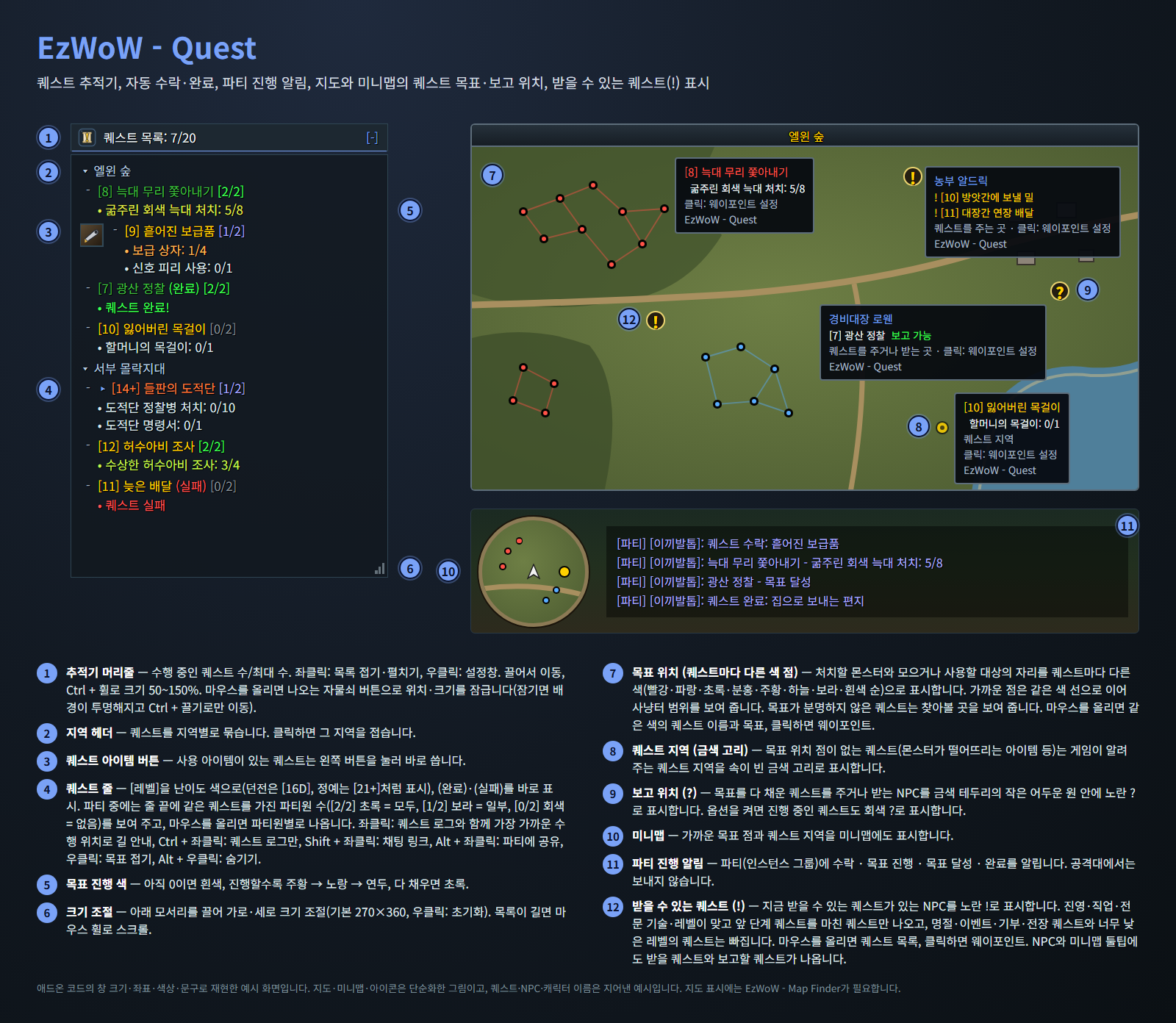
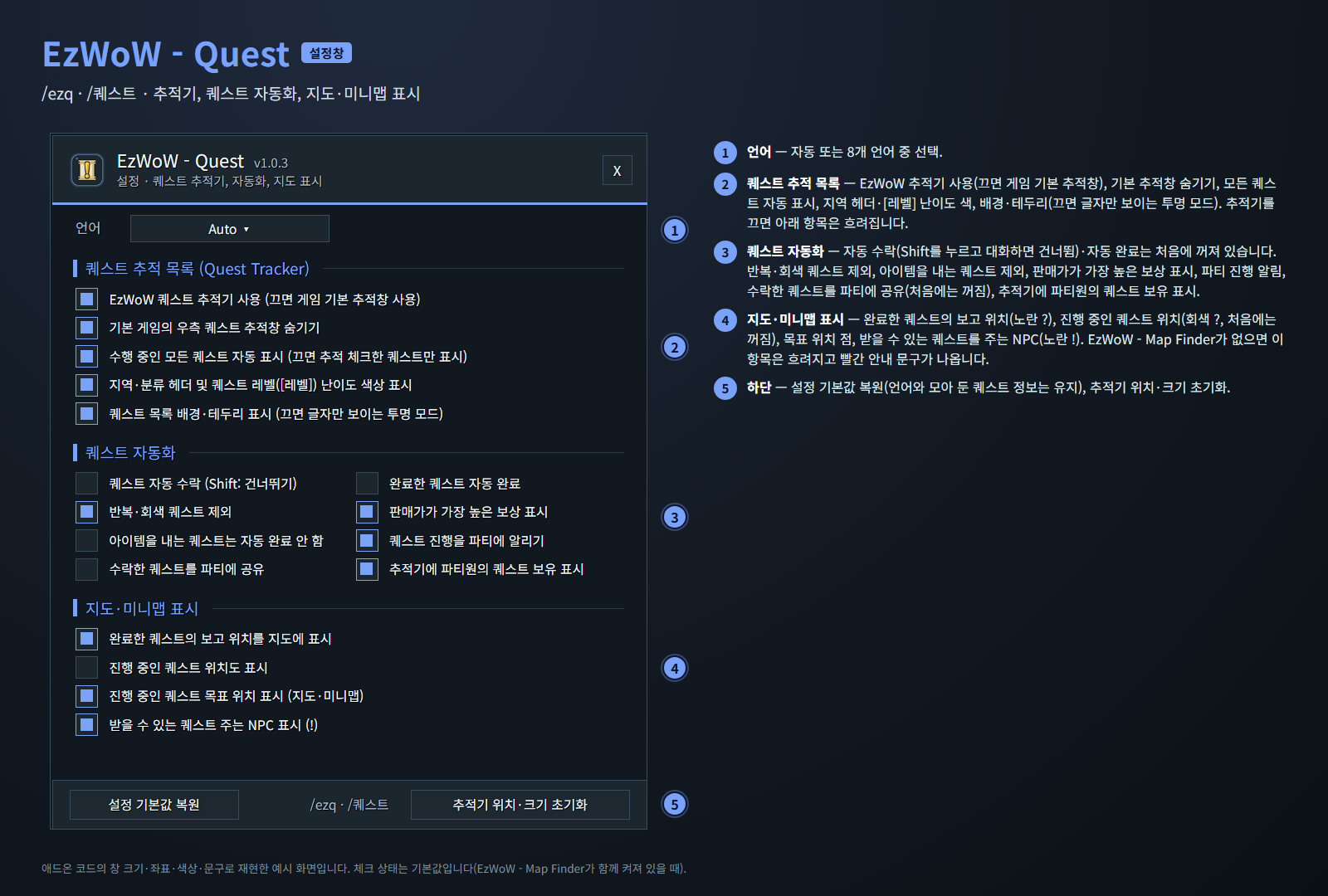
애드온 코드의 창 크기·좌표·색상·문구로 재현한 예시 화면입니다. 퀘스트와 이름은 지어낸 예시입니다.
기능
퀘스트 추적기
- 기본 퀘스트 추적창 대신 사용합니다(설정에서 기본 추적창으로 되돌릴 수 있음).
- 퀘스트를 지역별로 묶고
[레벨]을 난이도 색으로(던전은[16D], 정예는[21+]처럼),(완료)·(실패)를 바로 표시합니다. - 목표 진행에 따라 색이 바뀝니다: 흰색 → 주황 → 노랑 → 초록.
- 새로 받은 퀘스트 앞에 "NEW"가 붙고, 마우스를 올리면 사라집니다.
- 사용 아이템이 있는 퀘스트는 아이템 버튼을 눌러 바로 씁니다.
- 끌어서 이동, Ctrl + 마우스 휠로 크기(50~150%), 아래 모서리를 끌어 가로·세로 크기 조절, 마우스 휠로 스크롤.
- 머리줄의 자물쇠 버튼으로 위치·크기를 잠급니다(잠기면 배경이 투명해지고 Ctrl + 끌기로만 이동). 배경·테두리를 꺼서 글자만 보이게 할 수도 있습니다.
- 퀘스트 좌클릭: 퀘스트 로그와 함께 가장 가까운 수행 위치로 길 안내(채팅창에 좌표를 알리고 웨이포인트를 찍음, 목표를 다 채우면 보고 위치) · Ctrl + 좌클릭: 퀘스트 로그만 · Shift + 좌클릭: 채팅 링크 · Alt + 좌클릭: 공유 · 우클릭: 목표 접기 · Alt + 우클릭: 숨기기.
퀘스트 자동화 (처음에는 꺼짐)
- 퀘스트 자동 수락(공유·호위 퀘스트 확인 포함). 대화할 때 Shift를 누르고 있으면 건너뜁니다.
- 완료한 퀘스트 자동 완료. 보상은 직접 고르고, 골드를 내는 퀘스트는 완료하지 않습니다.
- 반복·회색 퀘스트, 아이템을 내는 퀘스트를 제외하는 옵션.
- 판매가가 가장 높은 보상에 금화 표시.
파티 진행 알림
- 파티(인스턴스 그룹)에 퀘스트 수락·목표 진행·목표 달성·완료를 알립니다. 공격대에서는 보내지 않습니다.
퀘스트 공유와 파티원 보유 표시
- 추적기에서 퀘스트를 Alt + 좌클릭하면 파티에 공유합니다.
- 옵션: 파티 중에 퀘스트를 수락하면 자동으로 공유합니다(처음에는 꺼짐).
- 파티 중에는 퀘스트 줄마다 같은 퀘스트를 가진 파티원 수를 보여 줍니다(예:
[2/4]). 마우스를 올리면 누가 가졌는지 나옵니다.
지도·미니맵 표시 (EzWoW - Map Finder 필요)
- 퀘스트마다 다른 색의 목표 위치 점: 처치할 몬스터와 모으거나 사용할 대상의 자리. 가까운 점은 같은 색 선으로 이어 사냥터 범위를 보여 주고, 툴팁의 퀘스트 이름도 같은 색으로 나옵니다.
- 속이 빈 금색 고리: 목표 위치 점이 없는 퀘스트의 퀘스트 지역(게임이 알려 주는 위치).
?표시: 목표를 다 채운 퀘스트의 보고 위치. 금색 테두리의 작은 어두운 원 안에 노란?(옵션을 켜면 진행 중인 퀘스트는 회색?).- 목표가 분명하지 않은 퀘스트는 퀘스트 설명에 나온 곳 등 찾아볼 곳을 보여 줍니다.
- 가까운 점은 미니맵에도 표시합니다. 마우스를 올리면 퀘스트와 목표, 클릭하면 웨이포인트.
받을 수 있는 퀘스트 (EzWoW - Map Finder 필요)
!표시: 지금 받을 수 있는 퀘스트가 있는 NPC를 세계지도에 표시합니다. 마우스를 올리면 NPC와 퀘스트 목록, 클릭하면 웨이포인트.- 진영·직업·종족·전문 기술·레벨이 맞고 앞 단계 퀘스트를 마친 퀘스트만 나옵니다. 명절·이벤트·기부·전장 퀘스트와 너무 낮은 레벨의 퀘스트는 빠집니다. 퀘스트 레벨은 WoW Forever 서버 기준입니다.
- NPC와 미니맵 툴팁에 그 NPC에게서 받을 수 있는 퀘스트(몇 레벨 뒤에 받을 퀘스트는 회색으로 "Lv.N부터")와 그 NPC에게 보고할 퀘스트가 나옵니다.
- 설정창에서 끌 수 있습니다("받을 수 있는 퀘스트 주는 NPC 표시 (!)").
알아낸 퀘스트 위치와 공유
- 퀘스트를 주고받는 NPC, 퀘스트 아이템이 나온 몬스터·오브젝트, 도착·정찰 목표를 마친 곳을 기억해서 지도에 보여 줍니다.
- 이 기록을 파티·길드와 이 애드온을 쓰는 다른 사람과 자동으로 공유합니다(애드온 메시지만 쓰고 채팅창에는 아무것도 나오지 않으며, 이름은 저장하지 않습니다). 공유 채널로 받은 퀘스트 NPC·몬스터 드롭은 여러 사람이 같은 내용을 보냈을 때 쓰고, 위치(정찰 지점, 오브젝트)는 받는 대로 씁니다.
- 이를 위해 숨은 채널에 들어갑니다. 내 채널 번호가 바뀌지 않도록 높은 번호(10번 이상)를 씁니다. 같은 채널 사람끼리는 채널 목록에서 캐릭터 이름이 보입니다.
- 설정에서 끌 수 있습니다("알아낸 퀘스트 위치를 다른 EzWoW 사용자와 공유").
세계지도 퀘스트 목록
- 세계지도 퀘스트 목록 옆에 모두 펼치기/접기, 모두 체크/해제 버튼.
다른 EzWoW 애드온과 함께 쓰기
- EzWoW - Frame Mover와 EzWoW - Map Finder의 퀘스트 기능이 이 애드온으로 옮겨 왔습니다. 이 애드온이 켜져 있으면 두 애드온의 퀘스트 기능은 꺼지고 이 애드온이 맡습니다.
- 처음 실행할 때 두 애드온의 퀘스트 설정을 한 번 가져옵니다.
- 지도·미니맵 표시, NPC 툴팁의 퀘스트 목록, 추적기의 길 안내는 EzWoW - Map Finder의 위치 정보를 씁니다. 추적기·자동화·파티 알림은 이 애드온만으로 동작합니다.
게임패드
- 게임패드 UI를 켜면 EzWoW 창을 패드로 다룰 수 있습니다. 방향키로 이동, A(✕)로 누르기, X(□)로 오른쪽 클릭, LB/RB로 스크롤, B(○)로 닫기입니다. 창 아래에 연결된 패드 모양으로 키 안내가 나옵니다.
- 블리자드 창이 열려 있지 않을 때 보기(Back) / Create 버튼을 누르면 화면의 EzWoW 프레임으로 이동합니다. 다시 누르거나 B를 누르면 돌아갑니다.
- 다른 버튼을 쓰려면: 설정 > 단축키 > 애드온 > EzWoW > "게임패드: EzWoW 창으로 이동/돌아가기" (EzWoW-MapFinder 설치 시)
기록 공유
- 모든 EzWoW 애드온이 함께 쓰며 기본으로 켜져 있습니다. 직접 확인한 퀘스트 NPC, 희귀 몬스터 목격, 아이템 드롭, 채집 위치를 다른 EzWoW 사용자와 나눕니다.
/ezshare on/off(또는/공유),/ezshare channel on/off,/ezshare status
명령어
/ezq또는/퀘스트— 설정창 열기/ezq reset(/퀘스트 초기화) — 추적기 위치·크기 초기화/ezq help(/퀘스트 도움말) — 명령어 안내
지원 언어: English, 한국어, Deutsch, Français, Español, Русский, 简体中文, 繁體中文.
Support: If you find this addon useful, you can support its development. Buy Me a Coffee ☕
후원: 애드온이 도움이 되셨다면 개발 후원으로 응원해 주세요. Buy Me a Coffee ☕
EzWoW - Quest Team