Dungeon Route Guide
- By
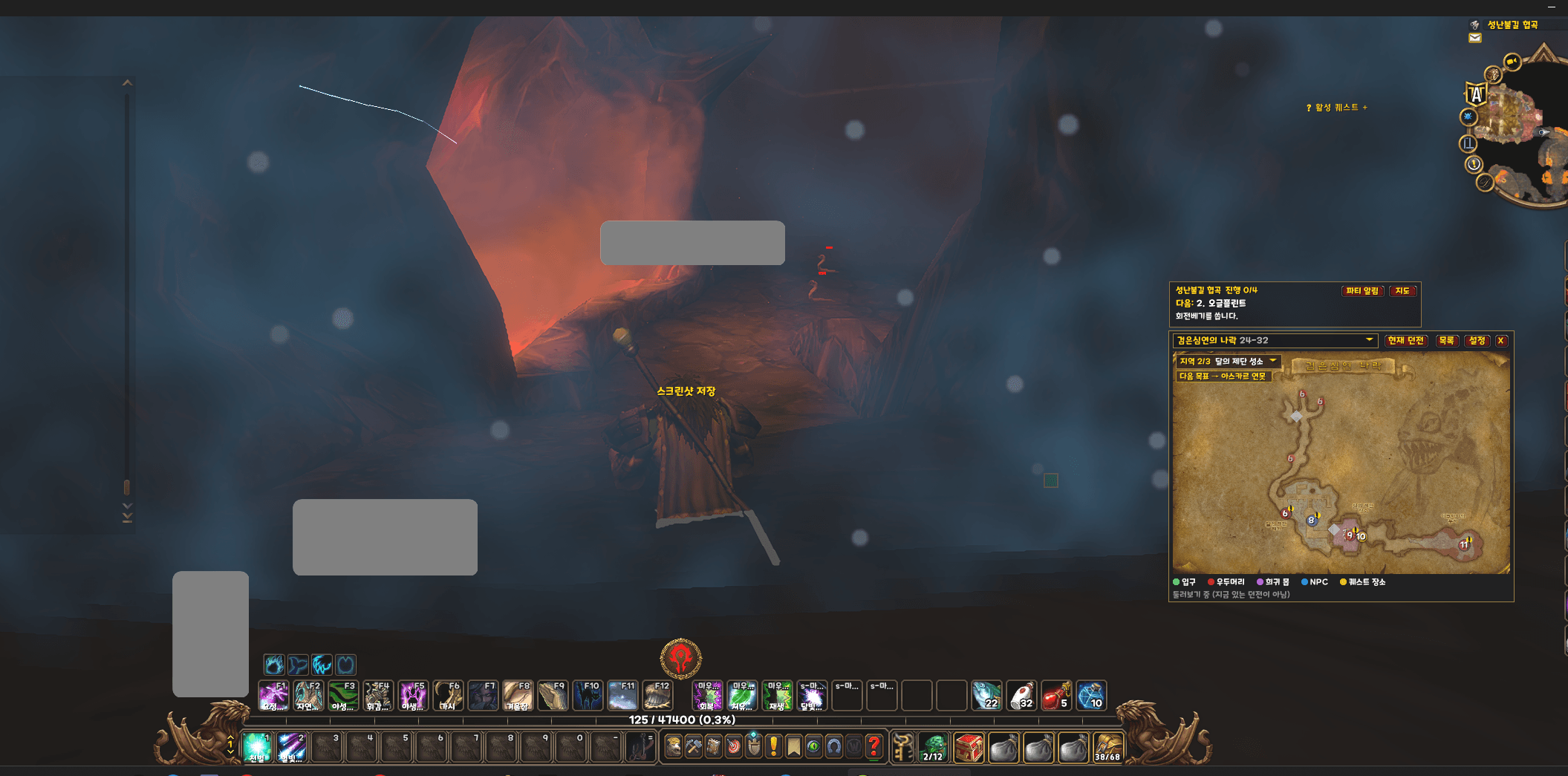
WoW Forever dungeon guide: route map with boss order, rares, NPCs and quest spots, automatic boss checks and an arrow to the entrance.
2026-10-06 02 29 15.png
2026-10-06 02 29 30.png
2026-10-06 02 26 48.png
Description
Dungeon Route Guide
A dungeon companion for WoW Forever, with dungeon maps, route guidance, boss tips, loot, and quests.
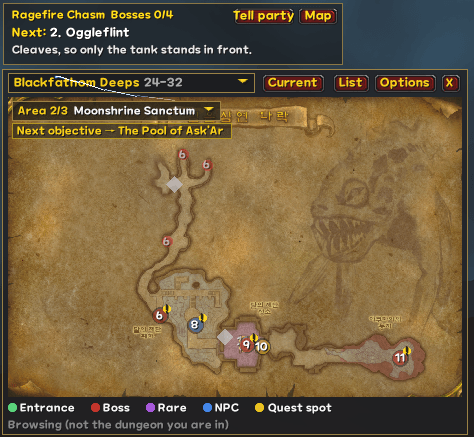
The guide opens automatically when you enter a supported dungeon and shows your next destination, from the entrance to bosses and quest locations.
Features
- 18 dungeons and 29 map areas — Supports Classic dungeons and new Forever dungeons.
- Map zoom and pan — Zoom with the mouse wheel and drag the map while zoomed in.
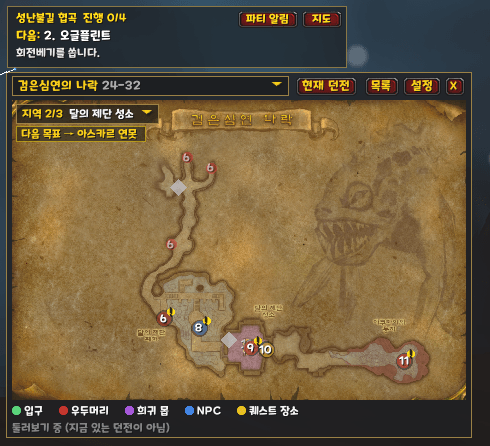
- Route markers — Displays bosses, rare enemies, NPCs, and quest locations in progression order.
- Next-objective tracking — Highlights your next destination and marks completed objectives.
- Automatic boss completion — Detects boss kills and updates your progress, with manual completion and undo controls.
- Boss tips and loot — View key abilities, strategy tips, drops, and item tooltips.
- Boss detail cards — Click a boss to view its 3D model and loot list.
- Rare alerts — On-screen warnings and sound alerts when a rare enemy is detected.
- Quest tracking — Shows completed, active, and available dungeon quests. All included quest entries have Korean names.
- Preparation tips — Check what to bring, important precautions, and entrance coordinates.
- Entrance arrow — Displays direction and distance to the dungeon entrance while outdoors.
- Scarlet Monastery wing detection — Automatically identifies Graveyard, Library, Armory, and Cathedral, with manual selection available.
- Display options — Adjustable window size, opacity, and fading during combat.
- English and Korean interface — Automatically follows your game language or can be changed in settings.
How to Use
The guide opens automatically when you enter a supported dungeon. You can also click the screen icon or type /drg to open or close it anywhere.
- Mouse wheel over the map: Zoom in or out.
- Drag the map while zoomed in: Pan around.
- Fit button: Show the entire map.
- Left-click an objective: Select it and view its details.
- Right-click an objective: Mark it complete or undo completion.
- Click a map connection marker: Open the connected area.
Commands
/drg— Open or close the guide./drg go— Start entrance guidance for the selected dungeon./drg go stop— Stop entrance guidance./drg next— Advance to the next objective./drg undo— Undo the previous completion./drg reset— Reset progress./drg hud— Show or hide the next-objective bar./drg icon— Show or hide the screen icon./drg wing library— Manually select Scarlet Monastery Library./drg wing auto— Resume automatic wing detection./drg lang— Configure the interface language./drg debug— Display dungeon detection information.
Installation and Updates
Close the game, then place the DungeonRouteGuide folder inside Interface/AddOns. For manual updates, replace the existing addon folder with the new one.
Wandering bosses and rare enemies may appear away from their marked locations. Please report issues or suggestions in the comments or on GitHub.
Minimap textures and game terrain belong to Blizzard Entertainment.
Support
If you find the addon useful, you can support its development.
Dungeon Route Guide
와우 포에버에서 던전 지도, 진행 순서, 보스 공략과 퀘스트를 한눈에 확인하는 던전 길잡이입니다.
던전에 입장하면 지도를 자동으로 표시하고, 입구부터 보스와 퀘스트 장소까지 다음에 이동할 곳을 안내합니다.
주요 기능
- 18개 던전·29개 구역 지도 — 클래식 던전과 포에버 신규 던전 지원
- 지도 확대·이동 — 마우스 휠로 확대·축소하고, 확대 상태에서 끌어서 이동
- 진행 순서 안내 — 보스·희귀 몬스터·NPC·퀘스트 장소를 표식으로 표시
- 다음 목표 표시 — 다음 목적지를 강조하고 완료한 목표에 체크 표시
- 보스 자동 체크 — 보스 처치를 감지해 진행 상황 반영, 직접 완료·취소도 가능
- 보스 공략과 전리품 — 주요 기술, 공략 팁, 드랍 아이템과 아이템 툴팁 확인
- 보스 상세 카드 — 보스를 클릭하면 3D 모델과 전리품 목록 표시
- 희귀 몬스터 알림 — 발견 시 경고와 소리로 안내
- 퀘스트 목록 — 한국어 퀘스트 이름과 완료·진행 중·미수락 상태 표시
- 입장 준비 안내 — 준비물, 주의 사항과 던전 입구 좌표 확인
- 입구 안내 화살표 — 필드에서 던전 입구까지 방향과 거리 표시
- 붉은십자군 수도원 구역 구분 — 묘지·도서관·무기고·대성당 자동 판별과 직접 선택
- 화면 설정 — 창 크기·투명도 조절, 전투 중 흐리게 표시
- 한국어·영어 지원 — 게임 언어에 따라 자동 선택하거나 설정에서 변경
사용 방법
던전에 들어가면 길잡이가 자동으로 열립니다. 화면 아이콘을 누르거나 /drg를 입력해 언제든 열고 닫을 수 있습니다.
- 지도 위에서 마우스 휠: 확대·축소
- 확대 상태에서 지도 끌기: 지도 이동
- 전체 보기 버튼: 지도 전체가 보이도록 맞춤
- 목표 클릭: 목표 선택과 상세 정보 확인
- 목표 오른쪽 클릭: 완료 표시·완료 취소
- 층 연결 표식 클릭: 연결된 구역 지도 열기
주요 명령어
/drg또는/던전길잡이— 길잡이 열기·닫기/drg go— 선택한 던전의 입구 안내 시작/drg go stop— 입구 안내 종료/drg next— 다음 목표로 이동/drg undo— 이전 진행 취소/drg reset— 진행 상황 초기화/drg hud— 다음 목표 막대 표시·숨기기/drg icon— 화면 아이콘 표시·숨기기/drg wing 도서관— 수도원 도서관 직접 선택/drg wing auto— 수도원 자동 판별로 복귀/drg lang— 표시 언어 설정/drg debug— 던전 인식 정보 확인
설치 및 업데이트
게임을 종료한 뒤 Interface/AddOns 폴더에 DungeonRouteGuide 폴더를 넣어 주세요. 수동 업데이트 시에는 기존 애드온 폴더를 새 폴더로 교체하면 됩니다.
돌아다니는 보스와 희귀 몬스터는 지도 표식과 실제 위치가 다를 수 있습니다. 오류나 개선 의견은 댓글 또는 GitHub로 알려 주세요.
미니맵 텍스처와 게임 지형의 권리는 블리자드 엔터테인먼트에 있습니다.
후원
애드온이 도움이 되셨다면 개발 후원으로 응원해 주세요.
Dungeon Route Guide Team