EzWoW - Error Catcher
English · 한국어
An error window for WoW Forever. Lua errors, blocked addon actions and warnings are collected in one place, repeated errors are grouped, and the full text (message, stack and locals) is ready to copy into a bug report. It also hides the game's floating issue reporter and the "F6" line on tooltips.
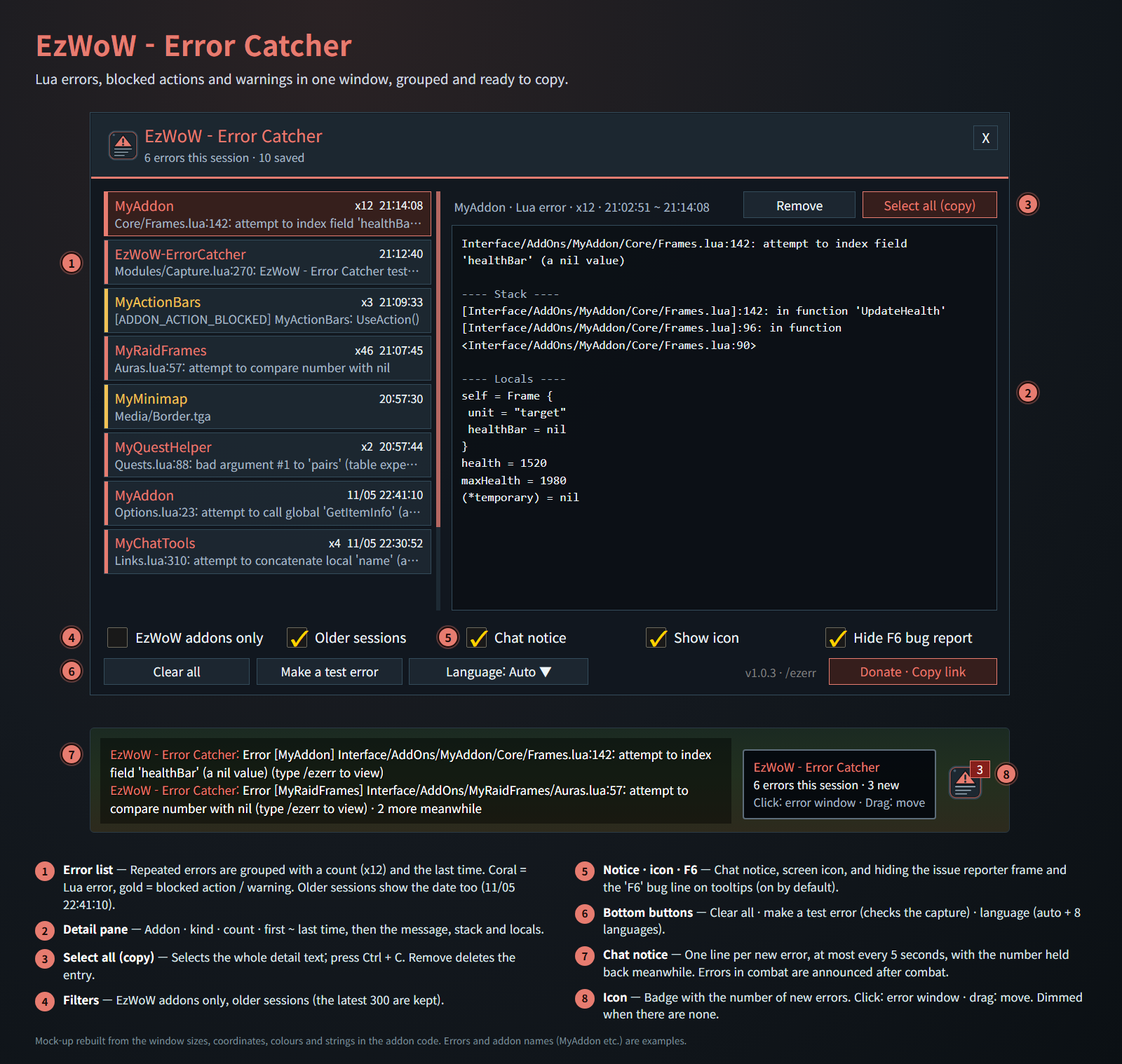
Mock-up rebuilt from the window sizes, coordinates, colours and strings in the addon code. Errors and addon names (MyAddon etc.) are examples.
Features
Error window
- Lua errors (coral), blocked addon actions and warnings (gold) in one list.
- Harmless notices about map icon right-click settings being blocked when a map is opened or moved in combat are skipped.
- Repeated errors are grouped into one row with a count (x12) and the last time; errors from older sessions show the date too.
- The detail pane shows the addon, kind, count, first and last time, then the message, the stack and the local values.
- Select all (copy), then Ctrl + C to copy everything; Remove deletes one entry, Clear all deletes them all.
- Filters: EzWoW addons only, include older sessions. The latest 300 errors are kept.
- Make a test error to check that capturing works.
Notices
- A one-line chat notice when something breaks (at most every 5 seconds, with the number held back meanwhile).
- Errors in combat are announced once combat ends, so the chat is left alone while fighting.
- A small screen icon with a badge for new errors (dimmed while there are none). Click to open the window, drag to move it.
- The window can also be opened from the game's Settings > AddOns.
Hide F6 bug report (on by default)
- Hides the game's floating issue reporter frame and the "Press F6 to submit a bug" line at the bottom of tooltips.
- Turn it off in the error window to bring them back right away.
Safe by design
- The game's own error handling keeps running; errors are only recorded on the way.
- Very long messages, stacks and locals are cut when saved so the saved data stays small.
Working with other EzWoW addons
- The issue reporter option moved here from EzWoW - Tooltip. The choice made there is carried over once on the first start.
Gamepad
- With the gamepad UI on, EzWoW windows work with a gamepad: D-pad to move, A (✕) to press, X (□) for right-click, LB/RB to scroll, B (○) to close. A key guide in your pad's button style shows under the window.
- With no game window open, press View (Back) / Create to move to the EzWoW frames on screen. Press it again or B to go back.
- To use another button: Key Bindings > AddOns > EzWoW > "Gamepad: move to / leave the EzWoW frames" (with EzWoW-MapFinder installed).
Record sharing
- Shared by all EzWoW addons and on by default: quest NPCs, rare monster sightings, item drops and gathering spots you have seen yourself are shared with other EzWoW users.
/ezshare on/off,/ezshare channel on/off,/ezshare status
Commands
/ezerr,/오류or/ezwowerrors— open the error window/ezerr test— make a test error/ezerr clear— clear all saved errors/ezerr icon— show the icon again at its default spot
Languages: English, 한국어, Deutsch, Français, Español, Русский, 简体中文, 繁體中文.
한국어
WoW Forever용 오류 창입니다. Lua 오류·애드온 동작 차단·경고를 한곳에 모으고, 같은 오류는 한 줄로 묶으며, 오류 내용·호출 순서·변수 값을 그대로 복사해 제보할 수 있습니다. 화면에 떠 있는 게임의 이슈 리포터 창과 툴팁의 'F6' 문구도 숨깁니다.
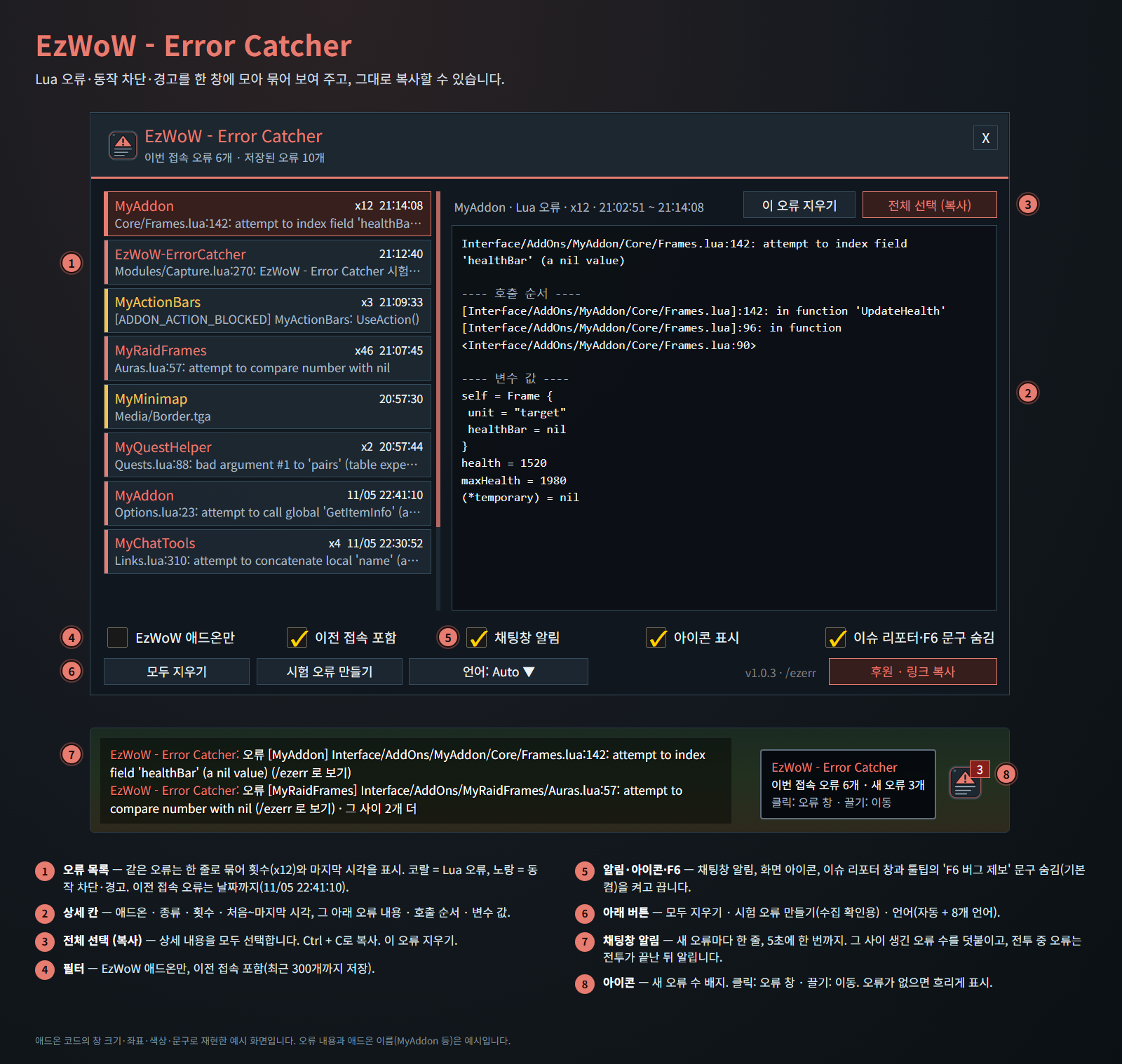
애드온 코드의 창 크기·좌표·색상·문구로 재현한 예시 화면입니다. 오류 내용과 애드온 이름(MyAddon 등)은 예시입니다.
기능
오류 창
- Lua 오류(코랄)와 애드온 동작 차단·경고(노랑)를 한 목록에 모읍니다.
- 전투 중 지도를 열거나 옮길 때 지도 아이콘의 우클릭 설정이 막혔다는 무해한 알림은 모으지 않습니다.
- 같은 오류는 한 줄로 묶어 횟수(x12)와 마지막 시각을 보여 주고, 이전 접속 오류는 날짜까지 표시합니다.
- 상세 칸에 애드온·종류·횟수·처음~마지막 시각과 오류 내용·호출 순서·변수 값이 나옵니다.
- 전체 선택 (복사) 후 Ctrl + C로 복사합니다. 이 오류 지우기로 하나, 모두 지우기로 전부 지웁니다.
- 필터: EzWoW 애드온만, 이전 접속 포함. 최근 오류 300개까지 저장합니다.
- 시험 오류 만들기로 수집이 되는지 확인할 수 있습니다.
알림
- 오류가 나면 채팅창에 한 줄 알림(5초에 한 번까지, 그 사이 생긴 수를 덧붙임).
- 전투 중에 난 오류는 채팅창을 건드리지 않도록 전투가 끝난 뒤 알립니다.
- 새 오류 수 배지가 붙은 화면 아이콘(오류가 없으면 흐리게). 클릭하면 오류 창, 끌면 이동.
- 게임 설정 > 애드온에서도 오류 창을 열 수 있습니다.
이슈 리포터·F6 문구 숨김 (기본 켬)
- 화면에 떠 있는 게임의 이슈 리포터 창과 툴팁 아래의 'F6 버그 제보' 안내 문구를 숨깁니다.
- 오류 창에서 끄면 바로 다시 보입니다.
안전한 동작
- 게임의 기본 오류 처리는 그대로 두고 그 앞에서 기록만 합니다.
- 아주 긴 오류 내용·호출 순서·변수 값은 잘라서 저장해 저장 데이터를 작게 유지합니다.
다른 EzWoW 애드온과 함께 쓰기
- 이슈 리포터 숨김 설정은 EzWoW - Tooltip에서 이 애드온으로 옮겨 왔습니다. 처음 실행할 때 Tooltip에서 고른 값을 한 번 가져옵니다.
게임패드
- 게임패드 UI를 켜면 EzWoW 창을 패드로 다룰 수 있습니다. 방향키로 이동, A(✕)로 누르기, X(□)로 오른쪽 클릭, LB/RB로 스크롤, B(○)로 닫기입니다. 창 아래에 연결된 패드 모양으로 키 안내가 나옵니다.
- 블리자드 창이 열려 있지 않을 때 보기(Back) / Create 버튼을 누르면 화면의 EzWoW 프레임으로 이동합니다. 다시 누르거나 B를 누르면 돌아갑니다.
- 다른 버튼을 쓰려면: 설정 > 단축키 > 애드온 > EzWoW > "게임패드: EzWoW 창으로 이동/돌아가기" (EzWoW-MapFinder 설치 시)
기록 공유
- 모든 EzWoW 애드온이 함께 쓰며 기본으로 켜져 있습니다. 직접 확인한 퀘스트 NPC, 희귀 몬스터 목격, 아이템 드롭, 채집 위치를 다른 EzWoW 사용자와 나눕니다.
/ezshare on/off(또는/공유),/ezshare channel on/off,/ezshare status
명령어
/ezerr,/오류또는/ezwowerrors— 오류 창 열기/ezerr test— 시험 오류 만들기/ezerr clear— 저장된 오류 모두 지우기/ezerr icon— 아이콘을 다시 켜고 처음 위치로- 하위 명령은 한국어로도 됩니다:
/오류 테스트,/오류 지우기,/오류 아이콘
지원 언어: English, 한국어, Deutsch, Français, Español, Русский, 简体中文, 繁體中文.
Support: If you find this addon useful, you can support its development. Buy Me a Coffee ☕
후원: 애드온이 도움이 되셨다면 개발 후원으로 응원해 주세요. Buy Me a Coffee ☕
EzWoW - Error Catcher Team