EzOutfitter
- By
Change your gear and your transmog outfit together with one click or key press. Built for roleplayers on WoW Forever.
WowB_cCCV0AITN7.png
WowB_7AwZY8D0WT.png
WowB_udRnPTZAY3.png
WowB_lxxdkXJAje.png
WowB_s07YweRSv6.png
Description
Change your gear and your transmog outfit together with one click or key press. Built for roleplayers on WoW Forever.
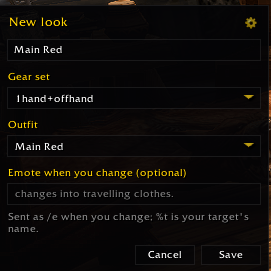
A Look combines three things:
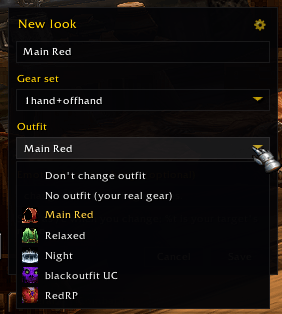
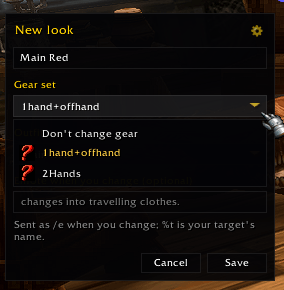
- an equipment set from the character window's equipment manager (or "don't change gear"),
- a transmog outfit (or "don't change outfit", or "no outfit" to show your real gear),
- an optional /e line sent when you change, e.g. changes into travelling clothes. (
%tis your target's name).
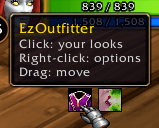
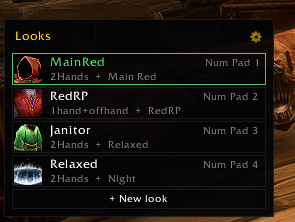
Open your Looks with the key binding, the launcher icon, /eo, or the gear button under the strip beside the character window.
- + New look starts from whatever you're wearing: your equipped set, your shown outfit, and a name taken from them.
- Click a Look to wear it. The palette closes; Shift-click keeps it open.
- Right-click edits it; Shift-right-click moves it up the list.
- The Look you're wearing has a green border.
- The gear button (or right-clicking the launcher icon) opens the options: show or hide the launcher icon and the character-window strip, and keep the palette open after changing.
Options > Keybindings > EzOutfitter has a key for the palette and one for each of your first 10 Looks, named after them ("Look 2: Travelling"). They follow the order of the list.
| Command | Does |
|---|---|
/eo |
Open or close your Looks |
/eo new |
Make a Look from what you're wearing |
/eo icon |
Show or hide the launcher icon |
/eo reset |
Reset the icon and palette positions |
- Changing outfit casts a short spell with a cooldown, so it needs a real click or key press. That's why Looks are buttons and key bindings rather than something that fires on its own.
- While that cooldown runs, Looks that change your outfit show it on their icon and in their tooltip. Clicking one then changes nothing (not even the gear) and tells you how many seconds are left.
- An outfit with situations (entering a city, combat, ...) can be switched by the game after a Look puts it on, and EzOutfitter can't stop that. To keep a Look's outfit on, turn off that outfit's situations at a transmogrifier.
- Your own macros can't wear a Look (
/clickon EzOutfitter's buttons does nothing from a macro). Use the palette, the strip or a key binding. - Most gear can't be swapped in combat, so the palette and the strip close when combat starts and come back after.
- Looks are saved per character, like equipment sets and outfits.
EzOutfitter Team