EzEmote
- By
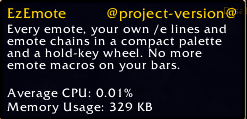
Every emote, your own /e lines and emote chains, without a single emote macro on your action bars. Built for roleplayers on WoW Forever.
WowB_NtubALwkgk.png
WowB_rCURqpHJ9l.png
JPEGView_8qoNuHvBpM.png
WowB_I1xJYqCNoV.png
Description
Every emote, your own /e lines and emote chains, without a single emote macro on your action bars. Built for roleplayers on WoW Forever.
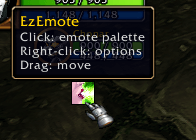
Open it with its key binding, the launcher icon or /eze.
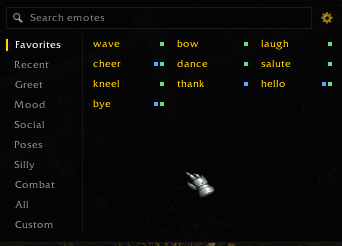
- Type to search, then press Enter to do the top match. Esc clears the search, then closes the palette.
- Tabs: Favorites, Recent, Greet, Mood, Social, Poses, Silly, Combat, All, Custom.
- Click an emote to do it (aimed at your target, like typing
/wave). The palette closes; Shift-click keeps it open. - Right-click adds or removes a favorite (gold name). Alt-click in Favorites moves one earlier.
- Markers: green = animation, blue = voice line, purple = chain.
- The gear (or right-clicking the icon) opens options: show/hide the icon, keep the palette open, type-to-search, chain step delay.
- Drag the palette or the icon by any empty spot to move them. Drag the palette's bottom-right corner to resize it: a bigger palette shows more columns and rows of emotes.
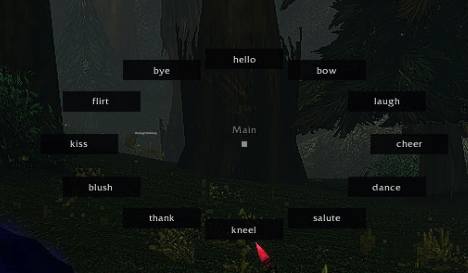
You get four wheels, each with its own key binding under Options > Keybindings > EzEmote (listed by name, e.g. "Emote wheel 2: Mood"). Hold a wheel's key, point at an emote and release.
They start as Main (your first eight favorites), Mood, Poses and Combat. Set them up in the wheel editor (/eze wheels, or Edit wheels in the options):
- Pick a wheel from the tabs on top, rename it in the box below.
- - / + sets how many slots it has, 4 to 12 (8 to start). A wheel with more slots is wider on screen. Shrinking hides the extra slots but keeps their emotes for when you grow it again.
- Click a slot, then pick any emote or custom item from the palette (search and tabs work as usual; Esc cancels).
- Right-click a slot to clear it, drag one slot onto another to swap them. The slot tooltips repeat this.
- Slots keep their spot, so an emote is always in the same direction. Pointing at an empty slot does nothing.
In the Custom tab, + New opens the editor. One step per line, for example a chain named arrive:
/wave
looks around the room.
wait 3
/sit
/emotelines do that emote; add a name to aim it at someone:/bow Alice.- Any other line is sent as
/etext (/e textand/me textwork too).%tbecomes your target's name. - Emotes are 2 seconds apart (change it in options); a
wait 3line sets the gap before the next emote to 3 seconds instead. - One line is a plain custom emote; several make a chain. Ctrl-click a custom item to edit it.
- One press plays the whole chain. The game only lets addons send chat text from a click or key press, never on a delay, so every text line goes out the moment you press; only emotes can be timed.
arriveabove waves and looks around the room right away, then sits 3 seconds later. - So keep text lines at the top of the chain, before any
waitor second emote. Text written after them would still go out on the press, earlier than written; the editor warns you in amber when that happens. To pause between two lines of text, make them two custom emotes and press twice.
| Command | Does |
|---|---|
/eze |
Open or close the palette |
/eze <name> |
Do an emote (/eze wave) or a custom item (/eze arrive), handy in macros |
/eze wheels |
Set up your four wheels |
/eze icon |
Show or hide the launcher icon |
/eze stop |
Stop a running chain |
/eze reset |
Reset the icon and palette positions and the palette size |
EzEmote Team