EzOOC
- By
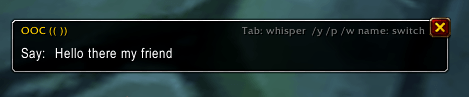
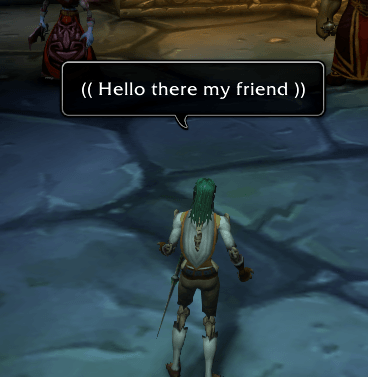
EzOOC makes out-of-character chat a one-key thing. Press your key, type, hit Enter: the line goes out in double brackets, in the right place.
Wow_NvF2b0HtDv.png
Wow_Nnl4yL7EHJ.png
Wow_G65hQCpwnU.png
Description
EzOOC
Step out of character for a second. Then step right back in.
You're deep in a scene at the inn. Your character is mid-toast, the bard is mid-song, and then someone across the room types ((brb, dog is eating my headphones)). You want to answer. You also want to type ((, )), pick the right channel, spell their surname, and not mess up your next line of dialogue. By the time you're done, they're back.
EzOOC makes out-of-character chat a one-key thing. Press your key, type, hit Enter: the line goes out in double brackets, in the right place. When someone else speaks OOC, a little [Reply] shows up after their line. Click it and you're already answering them, in the channel they used.
You type: brb, getting coffee Everyone sees: (( brb, getting coffee ))
Bob Smith says: ((is this the tavern night event?)) [Reply] click, type "yep, grab a seat" You say: (( yep, grab a seat ))
Nobody else needs the addon. To them, it's just you typing very tidy brackets.
The box
Bind a key under Options > Keybindings > EzOOC (or type /ooc box). A small chat-style box opens; whatever you type goes out wrapped in (( )).
- The channel sits at the start of the line, like in chat:
Say:,Party:,Tell Jaina Proudmoore:. It stays there until you change it. - Switch the way you already do in chat: start the line with
/p,/g,/y,/r,/eor/w name. - No surnames to remember.
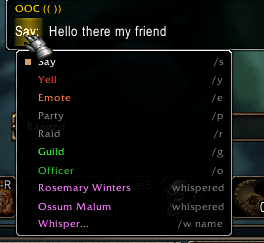
/w jainafills in "Proudmoore" if she's your target, spoke OOC lately, whispered with you, or is in your group. Tab cycles through those people. - Click the channel for a list of every channel and everyone you can whisper.
- Up and Down bring back your earlier lines, channel and all.
- Click anywhere else to walk around; the box stays open. Escape closes it.
- Brackets you type yourself aren't doubled.
((lol))still goes out as(( lol )).
Answering
Anyone's line with (( in it, starting with OOC: or OOC -, or tagged [OOC], counts as out of character. For each one, EzOOC:
- adds a [Reply] link after it in your chat. Click it and the box opens on their channel: say for say, party for party, a whisper back for a whisper. The box title shows who you're answering ("OOC: answering Bob (say)").
- remembers them for a couple of minutes. Press your box key and it opens on them by itself, as long as you haven't said anything OOC since.
- lists the last five OOC speakers at the top of the channel list, so you can answer an older one too.
Want to answer without opening anything? /oocr yep, grab a seat replies to the last person straight away. Prefer to keep the OOC chatter private? /ooc answer whisper always answers in a whisper, wherever they said it.
Long lines
A message can only be 255 characters long. Go past that and EzOOC cuts it between words, each piece in its own brackets. In say, yell and emotes the game only lets an addon send one message per key press, so the first piece goes right away and the box waits for you: press Enter for each piece that's left (or /ooc more), or Escape to drop them. Party, raid, guild and whispers get every piece at once.
Small things
(( like this ))or((like this)): your choice, with a Preview button to see which you like.- Turn off the [Reply] links, or the box opening on whoever spoke last, if you'd rather not have them.
- Item links stay whole when a long line is cut.
- It only ever sends something when you press a key or type a command. It never speaks by itself.
- WoW Forever and Classic Era, from one download.
Commands
/ooc or /ezooc
| Command | Does |
|---|---|
/ooc <text> |
Say (( <text> )) |
/ooc p / y / g / o / r / e <text> |
Party, yell, guild, officer, raid or emote it |
/ooc w <name> <text> |
Whisper it (a first name is enough for people the box knows) |
/oocr <text> |
Answer the last person who spoke OOC (/ooc reply works too; without text it opens the box on them) |
/ooc more |
Say the next piece of a long line |
/ooc answer same / whisper |
Answer where they said it, or always in a whisper |
/ooc link [on/off] |
The [Reply] links |
/ooc follow [on/off] |
The box opening on whoever spoke OOC last |
/ooc spaces [on/off] |
(( like this )) or ((like this)) |
/ooc box |
Open the box |
/ooc config |
The options (Esc > Options > AddOns > EzOOC) |
Tell us what you think!
Does your guild write OOC some other way: single brackets, //, {{ }}? Is there a channel you wish it could answer in? Leave a comment or open an issue on GitHub and it might be in the next update.
EzOOC Team