EzNotebook
- By
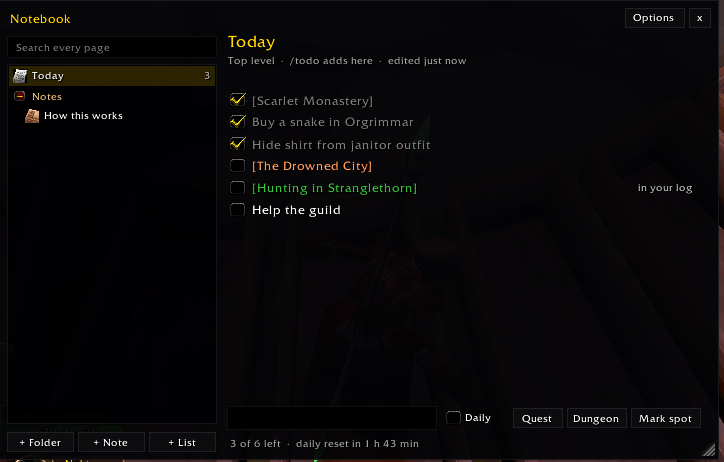
EzNotebook is a notebook inside the game: notes and todo lists in folders, with real quest, item and dungeon links. Tasks with a link tick themselves while you play.
Wow_gJ65D47A9J.png
Wow_7pS35aeEBR.png
Wow_KrpRfL4fnw.png
Description
EzNotebook
A notebook for your adventures, where the todo list ticks itself.
You logged out last night with a plan: finish the Hillsbrad quests, farm 20 Silk Cloth for bandages, run Shadowfang Keep with the guild, then ding 30. Today you log in and the plan is gone. Was it 20 silk or 40? Did you turn in that quest already? Somewhere in Ashenvale there was a cave with a rare spawn, and you can't remember where.
EzNotebook is a notebook inside the game: notes and todo lists in folders, with real quest, item and dungeon links. Tasks with a link tick themselves while you play.
Notes and lists, in folders
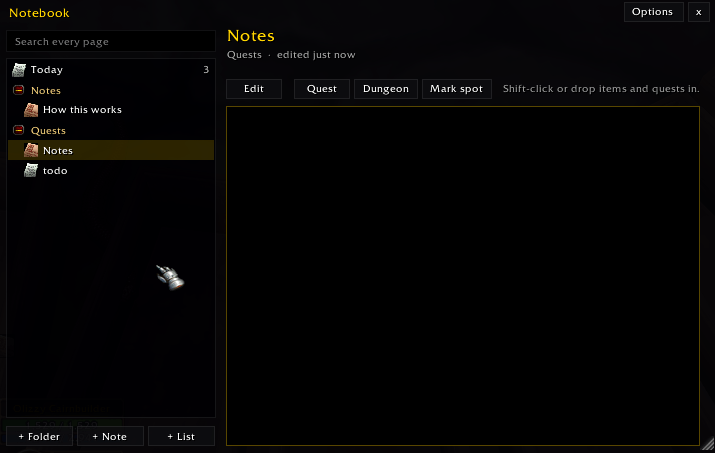
- Folders inside folders, each with its own colour. Move pages, folders and tasks up or down from their right-click menu.
- Notes: click the page and write. Links you put in stay clickable when you read it back.
- Todo lists: type a task, press Enter. Tick it by hand, or let it tick itself.
- Search every page from the box at the top.
- Pin a list to the screen and tick tasks while you play, with the notebook closed.
- Right-click any folder, page or task for its options.
Tasks that tick themselves
Put a link in a task and EzNotebook watches for it:
| Task | Ticks when |
|---|---|
| a quest | you turn it in (or it's already done) |
| a dungeon or raid | you leave it alive with a boss down |
| a dungeon boss | that boss dies |
| an item with a number: "20 [Silk Cloth]" | your bags and bank hold that many |
| "Reach level 30" | you get there |
Adding links is easy: while you type, Shift-click a quest, an item or a spell, or drag an item onto the box. The Quest and Dungeon buttons pick one from your quest log or a dungeon list. A small chat line tells you when a task ticks itself (/nb notify off to turn it off).
Daily tasks
Right-click a task to make it daily: it unchecks itself at the daily reset, ready for tomorrow. Done one-time tasks clear away at the reset, so your list stays short. A list can keep them instead, if you like to see what you've done.
Mark spot
Found a good herb route, a hidden cave, the rare that spawns behind the mill? Mark spot saves where you stand as a link in your note or task. Click it later and a pin goes on your map to lead you back. (Classic Era doesn't let addons put pins on the map, so you get the zone and coordinates in chat instead.)
All your characters, or just one
Your notebook is shared by all your characters: plan your alt's leveling from your main. Any folder or page can be kept for one character only, and a list can let each character tick its own (handy for "Turn in the cloth quest" on every alt).
Always at hand
/todo <task>adds a task to your Today list without opening anything./nbopens the notebook. Two key bindings: open the notebook, and add a task to Today.- A minimap button, an icon above the chat, and the addon drawer in WoW Forever. Click opens the notebook, right-click adds a task. Each can be hidden from the window's Options menu.
- WoW Forever and Classic Era, from one download.
Commands
/nb or /notebook
| Command | Does |
|---|---|
/nb |
Open or close the notebook |
/todo <task> |
Add a task to your Today list (/todo alone opens it) |
/nb new note\|list\|folder <name> |
Make one |
/nb find <words> |
Search every page |
/nb pin |
Pin the open list to the screen (again to unpin) |
/nb notify [on\|off] |
The chat line when a task ticks itself |
/nb icon\|minimap\|drawer [on\|off] |
Show or hide the icon above the chat, the minimap button, the drawer entry |
/nb reset |
Put the window, icon and pin back in place |
/nb help |
List the commands in chat |
More from the EzAddons family
- EzDemonTrainer: what each of your demons has learned, and which grimoire to buy next.
- EzAcquaintances: a contact book for the people you meet. You write who they are.
- EzPersistence: save and restore your macros, bindings, action bars, settings and layouts.
- EzSort: a bag and bank sort button, with slash commands and keybinds.
Every one of them is free and stands on its own.
Join us on Discord
Come say hi: join the EzAddons Discord.
- Hear about new versions first (pick the addons you care about and get pinged when they update).
- Suggest a new kind of task that should tick itself.
- Report bugs, and help test what's coming next.
Tell us what you think!
A task that didn't tick? A link that won't go in? Drop it in the Discord, leave a comment, or open an issue on GitHub and it might be in the next update.
EzNotebook Team