EzFishing Forever
- By
One key to cast, the same key to hook. A fishing helper for WoW Forever. Bind one key: press it to cast, press it again when the bobber splashes.
WowB_oIxCB17Arn.png
WowB_lXSAMm7H2N.png
WowB_ksckRp6ew8.png
Description
One key to cast, the same key to hook.
A fishing helper for WoW Forever. Bind one key: press it to cast, press it again when the bobber splashes. EzFishing turns the sound up so you hear the splash, handles lures and your fishing pole, and keeps a log of what you caught, all from a small HUD bar.
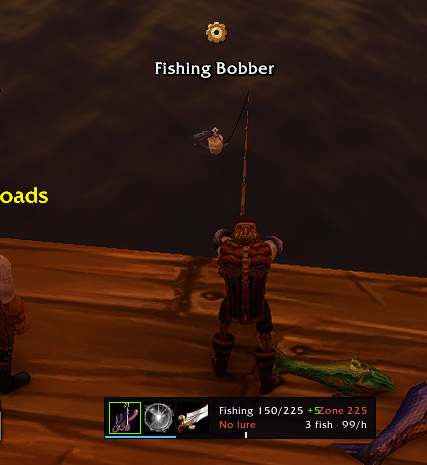
- Cast / Hook key. One binding casts Fishing. While the bobber is out, the same key becomes Interact and loots the bobber through soft targeting, so you don't have to click it.
- Double right-click in the world to cast (pole equipped). While fishing, a double right-click hooks the bobber.
- Fishing sound preset. While you're fishing, music and ambience are off and sound effects are at max. Your settings come back when you stop (after the idle timeout, in combat, or when the pole comes off).
- Auto-loot while fishing and a bobber icon above the bobber.
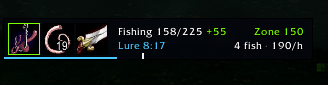
- Lures. A lure button applies the best lure in your bags. It shows the time left and warns you when it runs out. The Cast key can also apply a lure on its own.
- Pole swap. Equip the best pole in your bags and swap back to your weapons with the button, a key, when combat starts, or when you're done. The Cast key equips the pole if you forgot.
- Catch log. Catches per session, per zone and all time, catches per hour, getaways, typical bite time, and fishing skill-ups.
- Zone hint. Shows the skill you need for no getaways in this zone: green means you're fine, yellow is close, red means fish will get away.
- Compact HUD. By default it only shows while fishing or holding a pole. Hover it for stats.
- No auto-cast and no auto-reel. Casting and interacting both need a real key press. The game blocks addons from doing either by themselves, and doing it with outside tools is botting.
- No bite detection. The game doesn't tell addons when a fish bites. The sound preset and the "typical bite" marker on the cast bar are the next best thing.
| Command | |
|---|---|
/ezf config |
Open the options |
/ezf show / hide / auto |
HUD always shown, hidden, or only while fishing |
/ezf lock / unlock |
Lock the HUD (shift-drag always moves it) |
/ezf reset |
Reset the HUD position |
/ezf pole |
Swap pole and weapons |
/ezf stats |
Print catch stats |
/ezf clear |
Clear this character's catch stats |
/ezf zone |
Show which zone name and skill requirement are used |
/ezf debug |
Show interact settings and what the interact key would hit |
- The Cast key hooks the bobber through the game's soft-target interact. When the bobber isn't soft-targeted, the game interacts with your current target instead ("too far to interact"). The Cast button border turns green once the bobber is picked up. If it never does, clear your target and turn on Options > Controls > Enable Interact Key.
- The zone table uses classic skill values and English zone names, so zone hints only work on the enUS client.
- Bindings can't change in combat. If combat starts mid-cast, EzFishing clears them on the way in and puts everything back afterwards.
EzFishing Forever Team