Expdometer
- By
See where your XP comes from (kills, quests, exploration) with a live XP/hr gauge, time-to-level, and dungeon vs open-world rates.
Screenshot 2026-10-03 195535.png
Screenshot 2026-10-05 095554.png

Screenshot 2026-10-13 194130.png
Description
Expedometer
Know exactly where your experience comes from — and how fast you're earning it.
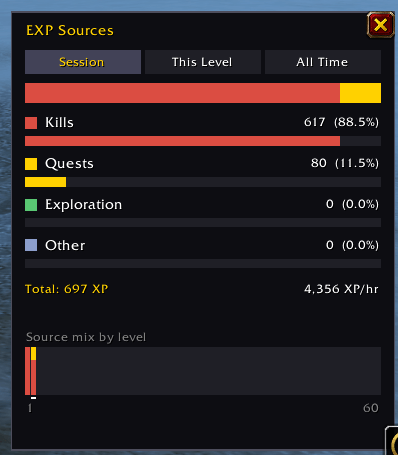
Expedometer tracks every point of XP you earn and sorts it by source: kills, quests, exploration and everything else. A live, speedometer-style widget shows your XP per hour as you level, along with time to level and how dungeons compare to questing in the open world.
✨ Features
📊 XP source breakdown
- Every XP gain is sorted into Kills, Quests, Exploration or Other
- Rested bonus is tracked separately so you can see how much of your kill XP came from being rested
- Switch between Session, This Level and All Time views
- A per-level chart shows how your mix of sources changed from level 1 to now. Hover any level for the exact numbers
⏱️ XP per hour
- Overall XP/hr for the session, the current level, or your whole levelling journey
- Dungeons vs Open World: see what share of your XP came from each, and the XP/hr rate for each one
- Rates are based on time logged in, so they show your real levelling pace, breaks and all
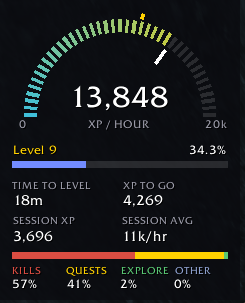
🏎️ On-screen gauge widget
A compact HUD you can leave up while you level:
- Speedometer gauge showing your XP/hr over the last 10 minutes, with a gold marker for your session average
- The gauge scales itself to your best pace of the session
- Level progress bar with rested XP shown
- Time to level, XP to go, session XP and session average at a glance
- Source mix bar with a percentage for each source
- Drag to move, lock it in place, and resize it from 50% to 200% with a slider
🗺️ Minimap button
- Left-click to open the full breakdown window
- Right-click to show or hide the widget
- Hover for a quick session summary and your current rate
- Drag it anywhere around the minimap edge
💬 Slash commands
| Command | What it does |
|---|---|
/exp or /expedometer |
Open or close the details window |
/exp widget |
Show or hide the on-screen widget |
/exp lock |
Lock or unlock the widget's position |
/exp scale 0.8 |
Set the widget size (0.5 to 2) |
/exp minimap |
Show or hide the minimap button |
/exp print |
Print your breakdown and rates to chat |
/exp reset |
Start a new session |
/exp reset all |
Clear all saved data for this character |
🔍 How it works
Expedometer watches your XP bar directly, so every point you gain is counted. Each gain is then matched to the game message that came with it, such as a mob kill, a quest turn-in or a newly discovered zone, to work out where it came from. Anything that can't be matched, like XP from a source the game doesn't announce, goes into Other, so your totals always add up.
XP earned inside a dungeon or raid counts toward Dungeons; everything else counts as Open World.
📝 Good to know
- Data is saved per character and survives reloads and logouts
- A new session starts each time you log in. A
/reloadkeeps your current session going - Only XP earned while Expedometer is installed is tracked. It can't look back at levels you've already done
- Time stops counting once you reach max level, so it won't drag down your all-time rate
🎮 Compatibility
Built for World of Warcraft: Forever.
Expdometer Team