EpicTip - Midnight Edition
- By
Epic Tip – Midnight safe tooltip addon, mount info, stats, and a customizable cursor
EpicTip - Enhanced Tooltips for World of Warcraft
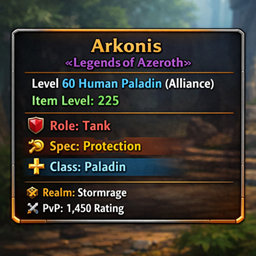
EpicTip is a feature-rich tooltip enhancement addon for World of Warcraft that transforms the default tooltips into informative, customizable information panels. EpicTip provides extensive player, item, and world information without compromising game performance.
Key Features
Player Information
- Item Level Display: Shows average item level for any player character
- Specialisation & Role: Displays current specialisation and role information
- Class & Role Icons: Visual indicators for quick identification
- Guild Information: Shows guild name and rank
- Target Tracking: Displays what a player is currently targeting
Competitive Statistics
- Mythic+ Ratings: Current season score and highest key completed
- PvP Ratings: Arena and battleground ratings across all brackets
- Detailed Statistics: Completion ratios and success rates for Mythic+ content
World Content Enhancements
- Mount Information: Detailed data on mounts including name, source, and collection status
- NPC Information: Enhanced tooltips for non-player characters
- Boss Data: Information about raid bosses and their mechanics
Visual Customisation
- Background Styling: Custom colours, transparency, and reaction-based colouring
- Border Customisation: Adjustable width, colour, and class-based colouring
- Font Selection: Over 45 font options with size and style controls
- Text Filtering: Options to hide specific tooltip elements
- Tooltip Positioning: Multiple anchoring options including mouse-following mode
Performance Features
- Modular Design: Only load features you use to save memory
- Smart Caching: Efficient data storage with automatic cleanup
- Combat Optimisation: Reduces processing during combat for better performance
- Memory Management: Frame pooling and object reuse to minimise garbage collection
Cursor Effects
- Cursor Glow: Customisable glow effects that follow your cursor
- Tail Effects: Trailing animations with multiple effect styles
- Pulse Animation: Pulsing size effects for dynamic visuals
- Combat Visibility: Options to show/hide effects based on combat state
Configuration
EpicTip features an intuitive tabbed configuration interface accessible through:
- /et config - Open the configuration panel
- /et options - Alternative command to open configuration
The configuration is organised into logical sections:
- General: Core settings including enable/disable toggle and tooltip scale
- Player Info: Controls for player-specific information display
- Appearance: Visual customisation options for backgrounds, borders, and fonts
- Features: Advanced functionality toggles for Mythic+, PvP, and world content
- Cursor: Complete cursor glow effect configuration
Slash Commands
- /et config - Open configuration panel
- /et debug - Toggle debug mode for troubleshooting
- /et anchor - Toggle tooltip positioning mode
- /et enable/disable - Enable or disable the addon
- /et status - Show current addon status
- /et test - Test tooltip on current target or mouseover
- /et reload - Reload the user interface
For cursor glow effects:
- /et glow enable/disable/toggle - Control cursor glow functionality
- /et glow test - Diagnostics for cursor glow effects
EpicTip - Midnight Edition Team


Owner