EnjoyPvPTracker
- By
Honor and conquest caps for your whole warband, the weekly PvP quests you forgot to pick up, the Solo Shuffle and Blitz MMR the game never shows you, a movable queue timer, and alerts before honor goes to waste.
Screenshot 2026-09-01 114129.png
Screenshot 2026-09-01 114312.png
Screenshot 2026-09-01 114135.png
Screenshot 2026-09-01 114141.png
Screenshot 2026-09-01 114149.png
Screenshot 2026-09-01 114155.png
Description
EnjoyPvPTracker
Honor and conquest caps for every character on your warband, the weekly PvP quests you forgot to pick up, Solo Shuffle and Blitz MMR history, a movable queue timer, and a warning before the honor you earn stops counting.
Open it and your whole roster is there. No logging through five alts on reset day to work out who still owes conquest.
Caps
Every PvP character you own in one list, with honor and conquest measured against their caps.
CHARACTER           HONOR              CONQUEST           LAST SEEN
Priest              14,850 / 15,000    1,350 / 1,750      just now
Death Knight        15,000 / 15,000    1,750 / 1,750      2h ago
Monk                 4,210 / 15,000      500 / 1,750      3d ago
Shaman                 980 / 15,000        0 / 1,750      12d ago
Amber is close to the ceiling, red is capped. Greyed-out rows have not been played since the last weekly reset, so you know the numbers are old rather than zero.
Weeklies
The weekly PvP quests are worth a pile of honor and conquest, they are handed out by a quest board most people walk straight past, and the game never once reminds you they exist. Miss the pickup on Tuesday and the whole week's worth is gone.
Every tracked weekly, what it is doing, and how far along it is:
2 of 4 picked up
the rest are waiting at the PvP quest board                        REMIND ME

Sparks of War          not picked up                                  [ on  ]
Random Battlegrounds   1,163 / 1,500 honor earned in Random BGs       [ on  ]
Solo Shuffle           6 / 12 Solo Shuffle rounds                     [ on  ]
Epic Battlegrounds     ready to hand in                               [ on  ]
Rated Arena            not offered this week                          [ on  ]
Arena Skirmishes       not offered here                               [ off ]

OTHER CHARACTERS
Death Knight           3 / 4 picked up
Monk                   0 / 4 picked up
Progress comes straight off the quest objective, so you see 6 of 12 rounds or 1,163 of 1,500 honor rather than a checkbox that only flips at the end.
It knows what your character is actually offered
The board does not offer every weekly to every character, and a reminder for a quest that is not there is worse than no reminder at all. So the addon only counts a quest once it has proof it is on offer: you have it in your log, you have handed it in, or the quest board listed it while you were standing at it.
- not picked up - on offer right now, go and get it
- not offered this week - the board was read and this one was not on it
- not offered here - never been offered to this character, so it stays quiet
Walk past the PvP quest board once and the whole tab is exact. Nothing to configure.
Reminders
A switch per quest on the right. Turn on the ones you care about, mute the ones you never do, and the rest of the addon respects it - the tally, the toast and the other-character list all count only what you asked for.
When something you watch is still sitting on the board, you get a toast on login:
2 WEEKLY QUESTS NOT PICKED UP
Random Battlegrounds, Rated Arena
It holds off while you are in combat or inside a battleground or arena, and there is a slider for how often it repeats, from once to every four hours.
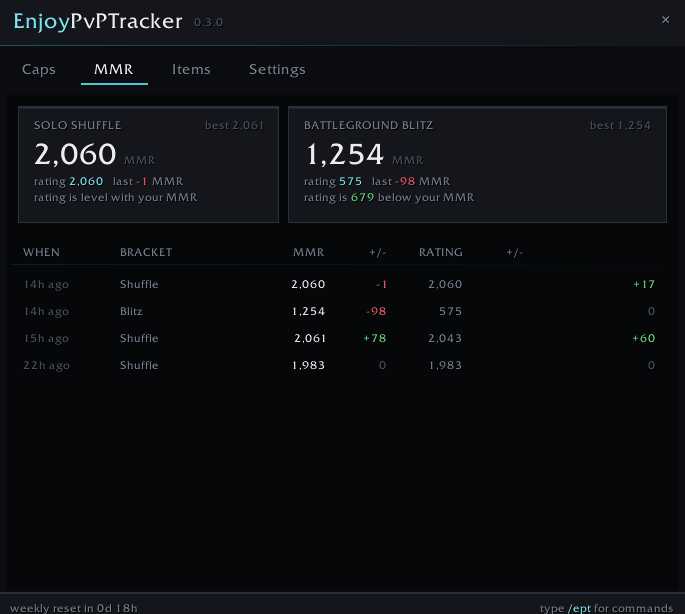
MMR
The game shows you a rating. It does not show you the matchmaking rating behind it, and it never shows you what either of them did over your last twenty games.
The MMR tab reads both straight off the end-of-match scoreboard for Solo Shuffle and Battleground Blitz, and keeps them.
A card per bracket with your current MMR, your rating, your best, and the gap between the two:
SOLO SHUFFLE                           BATTLEGROUND BLITZ
2,061  MMR              best 2,088     1,642  MMR              best 1,704
rating 2,043   last +18 MMR            rating 1,610   last -21 MMR
rating is 18 below your MMR            rating is 32 below your MMR
Rating below MMR means the system thinks you are underrated and the wins are worth more. Above it means the opposite. That single line tells you whether it is worth queueing another one tonight.
Underneath, both brackets merged into one history, newest first:
WHEN       BRACKET     MMR      +/-    RATING     +/-
just now   Shuffle     2,061    +18     2,043     +24
2h ago     Shuffle     2,043    -12     2,019     -16
2h ago     Blitz       1,642    -21     1,610     -18
Up to 100 matches per bracket, per character, kept across sessions.
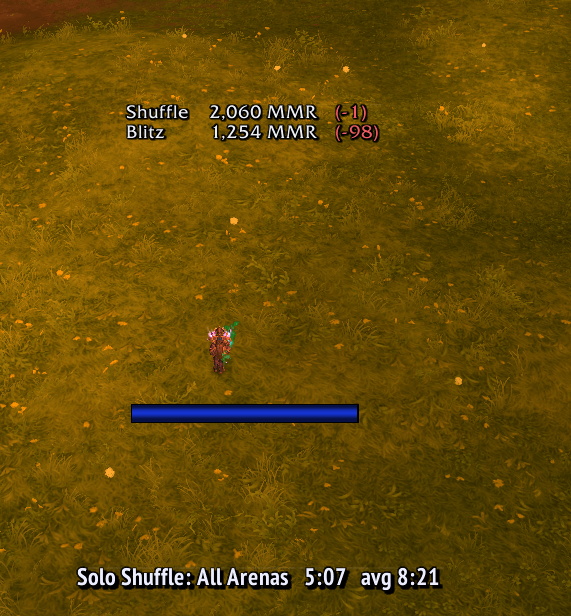
MMR display
An optional readout on screen, off until you turn it on with /ept mmr show.
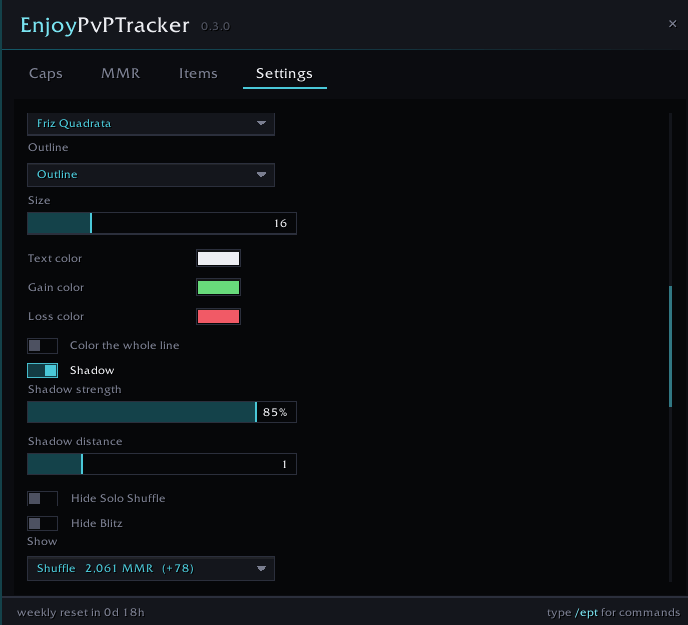
Shuffle 2,061 MMR (+78) CR 2,043Three layouts - full, full with current rating, or just the change on its own. Gain and loss get their own colours, or colour the whole line with them. Font, size, outline, alignment and shadow are configurable, either bracket can be hidden, and it can fade itself out again a set number of seconds after a match instead of sitting there permanently.
Moving things around
Nothing sits where I decided it should sit. Every piece of this addon goes where you want it, and stays there through reloads and logouts.
The window - drag it by the top bar, any time. There is a scale slider in Settings if it is too big or too small for your resolution.
The queue timer and the MMR display are locked by default, so you never shove one across the screen by accident while you are clicking something behind it. Two ways to move them:
- Shift-drag, any time. Hold Shift and every locked readout lights up with a border so you can see exactly what you are grabbing. Drag it, let go of Shift, done. No commands, no unlocking, works mid-queue.
- Unlock mode.
/ept unlockfor the queue timer,/ept mmr unlockfor the MMR display. The frame lights up and fills itself with sample data, so you can place it properly even when you are not queued and have not played a rated match today./ept lockand/ept mmr lockput them back down.
Neither one can be dragged off the edge of the screen, and /ept resetpos or /ept mmr resetpos drops it back to its default spot if you lose it.
The minimap button - drag it around the minimap ring to any angle you like. It stays there.
Alerts
Honor has a ceiling, and everything you earn past it is gone with no message from the game. You get a toast and a sound at 90% of the cap, again when you hit it, and a reminder every ten minutes for as long as you keep earning into a full bar. Conquest has its own alert, and so do the weekly quests still waiting on the board.
Every alert can be switched off on its own. The warning threshold, both repeat intervals and the sound are all yours to set. Five sounds to pick from: Raid Warning, Ready Check, Queue Pop, Alarm Clock, Quest Done.
Queue timer
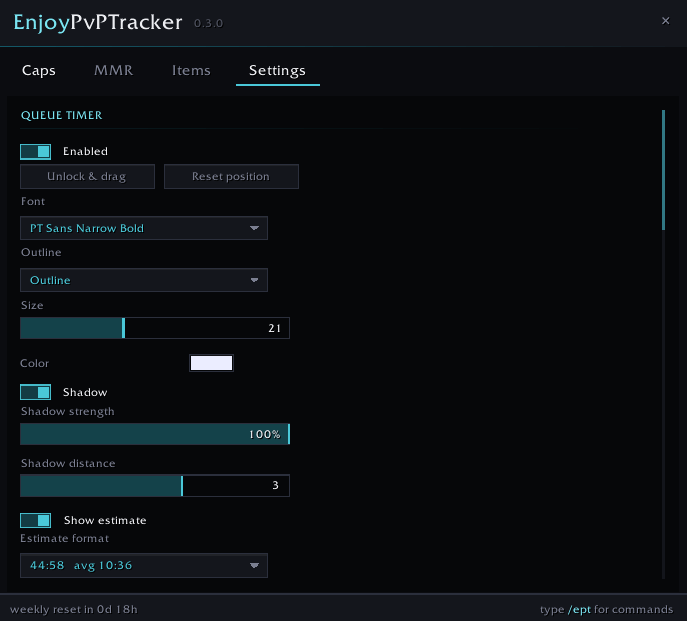
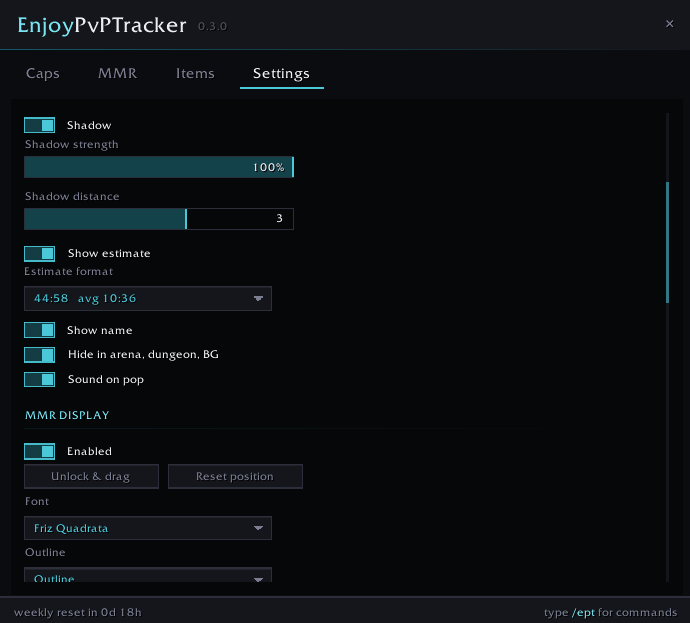
Map name, time queued and estimated wait, for every PvP queue there is - Random and Epic Battlegrounds, Brawls, Rated Arena, Solo Shuffle and Blitz. It hides itself when you zone into an arena or a dungeon.
Font, size, outline, colour and shadow are all configurable, and there is a sound on pop.
Features
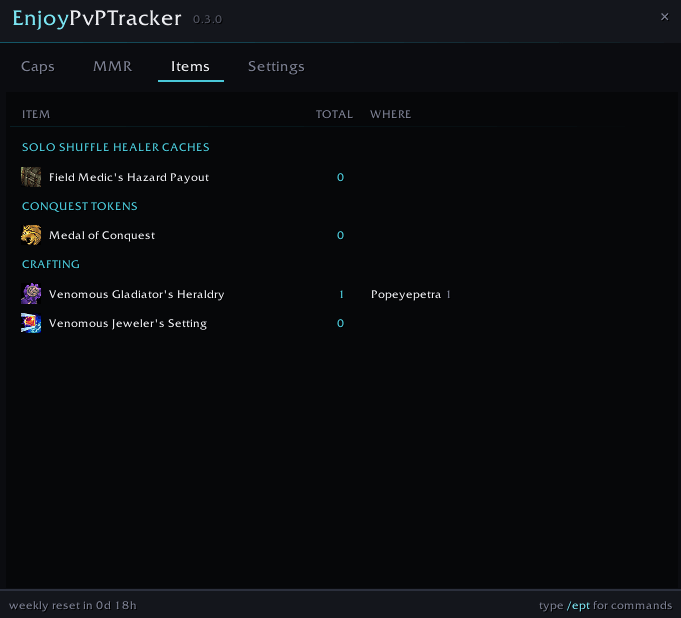
Reward items - conquest tokens, Solo Shuffle healer caches and PvP crafting mats, counted across your bags on every character and the warband bank, next to the currency you have already earned. Track anything else by shift-clicking its link after /ept track.
No alt clutter - a character joins the list only once it has earned conquest, so bank alts stay out of it.
Custom fonts - LibSharedMedia fonts for the queue timer, the MMR display and the window.
Commands
| Command | Effect |
|---|---|
/ept |
open or close the window |
/ept weeklies |
open the weekly PvP quest tab |
/ept weeklies check |
remind me now what is missing |
/ept weeklies scan |
what the tracker knows about every weekly |
/ept weeklies forget |
relearn which weeklies this character is offered |
/ept mmr |
open the MMR tab |
/ept mmr show |
toggle the MMR display on screen |
/ept mmr unlock |
unlock the MMR display to move it |
/ept mmr lock |
lock it back down |
/ept mmr resetpos |
reset it to its default spot |
/ept mmr debug |
what the scoreboard reported last match |
/ept mmr wipe |
clear MMR history on this character |
/ept unlock |
unlock the queue timer to move it |
/ept lock |
lock it back down |
/ept resetpos |
reset the timer to its default spot |
/ept test |
preview the cap alert |
/ept scan |
list everything in your bags with its item id |
/ept track <id> |
track an item, or shift-click its link |
/ept untrack <id> |
stop tracking one |
/ept reset |
wipe all settings and saved characters |
Three limitations worth knowing
Characters appear after one login. There is no API that lets an addon read another character's currencies, so each character has to record itself. After that first login it stays current on its own.
MMR history starts the day you install. The game keeps no record an addon can read, so history is built one match at a time from the scoreboard as you play. Solo Shuffle and Blitz only - those are the brackets where the game puts your MMR on the end-of-match scoreboard at all.
A weekly stays quiet until it has been offered once. Nothing in the API says "this quest is available to you right now", so a quest that has never been in your log and has never been on the board while you were standing at it sits at not offered here instead of nagging you about something that is not there. One walk past the PvP quest board on a fresh character is all it takes.
Feedback
Bug reports and feature requests are welcome in the comments. If a cap number looks wrong, tell me what the game is showing you and I will take a look. Same for MMR - /ept mmr debug prints exactly what the scoreboard handed over, and pasting that into a comment tells me everything I need. For a weekly that looks wrong, /ept weeklies scan prints every quest id, every status and where the addon got its information from.
My other addons
There are a lot of them, and not all of them are for retail. The full list is on my author page:
Everything I have published on CurseForge
Support
This addon is free and always will be. I build and maintain it in my spare time.
If it helps you, consider buying me a coffee. Every contribution - no matter how small - buys more time for updates, new features and keeping things working after each patch.
Links
- Twitch: twitch.tv/peterdigitalgg
- GitHub: github.com/valuecoding
Found a bug or got feedback? Use the comments section here on CurseForge.
EnjoyPvPTracker Team