Enhanced CDM
- By
Enhances the Cooldown Manager with multi-row icon grids, bar layouts, keybind overlays, stack text customization, and per-bar color gradients
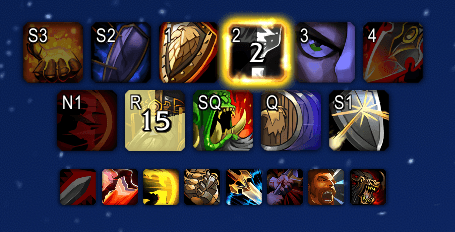
Cooldowns.png
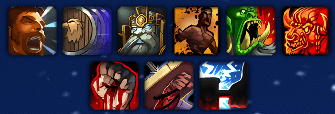
Buffs.png

Bars.png
Bars Colors.png
Description
Make Blizzard's Cooldown Manager actually work the way you want.
WoW's built-in Cooldown Manager is powerful but limited - your tracked buffs stack in a single row, there's no way to see keybinds on your cooldowns, and bar layouts are rigid. Enhanced CDM fixes all of that, with every setting built right into Edit Mode so it feels like a native part of the game.
No extra frames. No bloat. Just a better CDM.
Cooldowns
See your keybinds directly on your Essential and Utility cooldown icons so you always know which button to press.
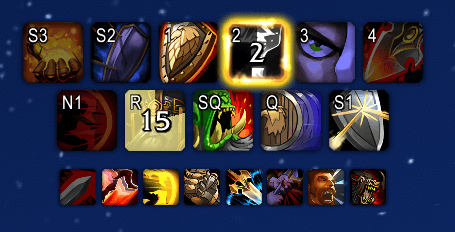
- Independent settings — Configure Essential and Utility cooldowns separately, each with their own show/hide, position, font size, and text format
- Compact text — Modifier keys shortened (SHIFT → S, CTRL → C, ALT → A) with an optional full-text mode
- 9-position anchor — Place the keybind text at any corner, edge, or center of the icon
- Fine-tune offsets — Pixel-level horizontal and vertical adjustments for precise placement
- Stack text — Customize charge count font size, position, and offsets independently per viewer
- Auto-updates — Text refreshes automatically when you change keybinds, move spells, or switch specs
Tracked Buffs
Arrange your tracked buff icons in a multi-row grid instead of one long line.
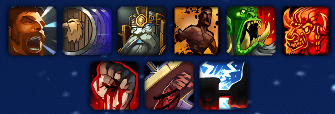
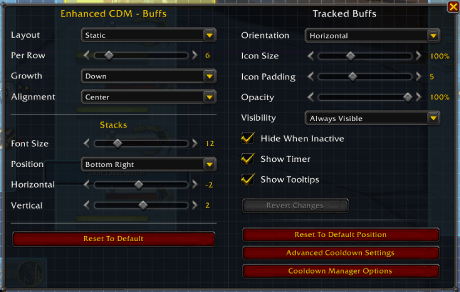
- Icons per row — Set anywhere from 1 to 40
- Growth direction — Grid grows up or down from the anchor
- Row alignment — Left, center, or right for incomplete rows
- Layout mode — Static (keeps gaps for missing buffs) or Dynamic (packs tightly)
- Stack text — Customize font size, position, and offsets for charge counts
Tracked Bars
Switch your cooldown bars between vertical (single column) and horizontal (multi-row grid) orientation.

- Bars per row — Configurable in horizontal mode
- Static or Dynamic layout — Same behavior as icons
- Alignment — Down/Up in vertical, Left/Center/Right in horizontal
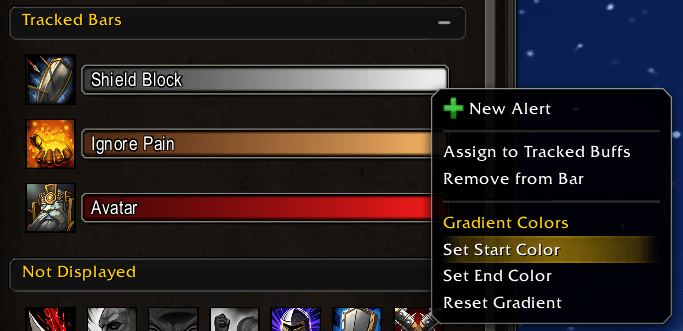
- Per-bar color gradients — Set custom start and end colors on individual bars via right-click or slash commands
Edit Mode Integration
Every setting lives inside Blizzard's Edit Mode or Cooldown Settings, no additional windows or complex interfaces.
Slash Commands
Type /ecdm to see all available commands and current settings. Examples:
/ecdm rows 5- Set icons to 5 per row/ecdm grow up- Grid grows upward/ecdm align center- Center incomplete rows/ecdm essential show- Show keybind text on Essential cooldowns/ecdm bars orientation horizontal- Switch bars to horizontal layout
Enhanced CDM Team