Ember: Camping Companion
- By
A warm, quiet companion for Warcraft Forever campfires: camp buffs, sharing your fire, map pins for nearby fires, and easy icebreakers for everyone around it.
Description
Ember: Camping Companion
A warm, quiet companion for Warcraft Forever campfires. Ember shows what your camp is giving you, helps you share your fire with the zone, puts fires other players share on your map, and gives everyone around the fire an easy way to start talking.
Ember stays out of your way. It speaks up when you reach a fire, opens when you sit down to warm up, and goes quiet again when you move on.
Arriving at a fire
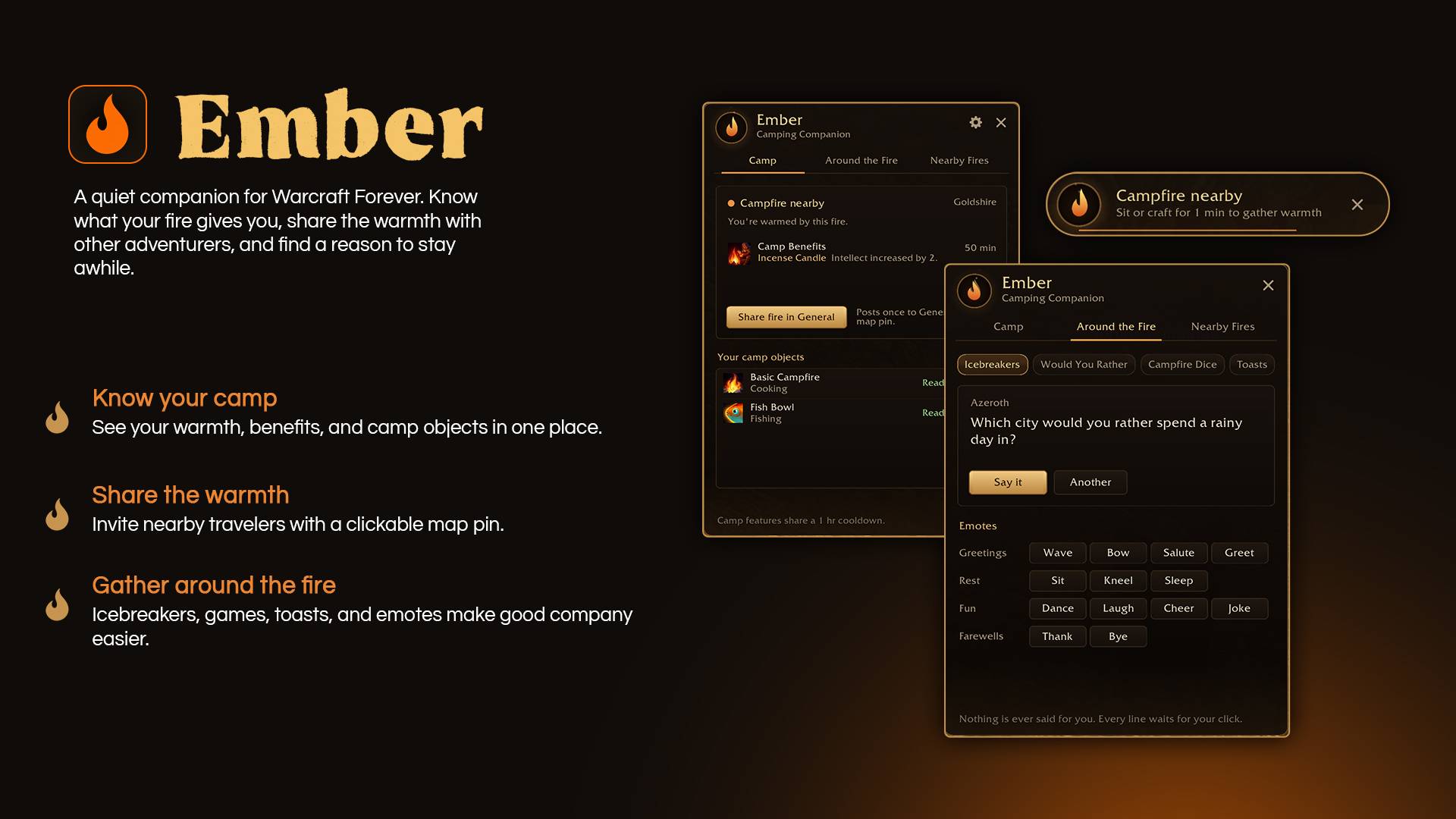
When you walk up to a campfire, a small notice rises in at the top of your screen: Campfire nearby — sit or craft for 1 min to gather warmth. It stays for a few seconds, then fades away. Hover it to keep it, click it to open Ember, or press ✕ to dismiss it.
Sit down (or craft) and Ember fades in on its own as your warmth begins, once per fire. Close it and it stays closed until you reach the next one.
Camp
Everything about the fire you're sitting at, read straight from the game:
- Your warmth, with a bar that fills over the minute it takes.
- Camp Benefits, with time left and every object the fire is giving you, such as Camp Chair: critical strike chance increased by 2% or Fish Bowl: all stats increased by 8%.
- Your camp objects: the camp recipes you've learned, with whether each is ready in your bags, cooling down, craftable, or missing materials. Hover one to see the materials you have and need. Only recipes you've already learned are ever shown.
Share your fire
One click posts your camp to the zone's General channel, with the game's own clickable map pin:
A warm campfire burns near Goldshire. All travelers welcome! Camp: Camp Chair, Faction Banner. [Map Pin Location]
- The objects listed are the ones your own Camp Benefits names, so the message is always accurate.
- Players without Ember can click the map pin too.
- It only ever posts when you press the button, and waits five minutes before you can share again.
Nearby Fires
When anyone shares a campfire in General with a map pin, Ember pins it on your world map for 10 minutes and lists it in the Nearby Fires tab:
- Hover a pin for the place, who shared it, what's at the camp and how long it has left.
- Click a pin, or Set waypoint in the list, to head there.
- Pins fade as their time runs down, then disappear.
Ember only shows fires that were actually shared in a chat you received. It never searches the world for fires, never keeps a list of past campsites, and forgets everything when you log out.
Around the Fire
Strangers often end up sharing a fire in silence. Around the Fire gives anyone an easy way to break it, without roleplay or awkward introductions:
- Icebreakers: 96 questions about adventures, Azeroth, and the people sitting right there.
- Would You Rather: 90 choices. Would you rather be stuck in a tavern with a bard who knows one song, or a gnome explaining his newest invention?
- Campfire Dice: 100 small games played with a normal /roll, so everyone can join.
- Toasts: 90 of them. To curiosity, which got us into this, and luck, which got us out.
- Emotes: greetings, rest, fun and farewells, using the game's own emotes.
Press Say it to share a line in /say, or Another for a new one. Ember deals a fresh line every time you open it and remembers where it left off, so you won't see the same line twice for a long while: open Ember three times a day for a month and every line will be new.
Nothing is ever said for you. Every line waits for your click.
Settings
Click the gear in Ember's header, or find Ember under Options → AddOns:
- Arrival notice on or off, and how long it stays (5, 7, 10 or 15 seconds)
- Whether Ember opens when your warmth begins
- Shared fires on the world map
- The minimap button
- Animations
- Window size (80% to 130%)
- Reset the window and notice positions
Commands
| Command | |
|---|---|
/ember |
Open or close Ember |
/ember settings |
Open the settings |
/ember test |
Preview the arrival notice |
/ember testpin |
Preview a map pin at your position (only you see it) |
/ember debug |
Show what the game reports for your Camp Benefits |
/camping works too.
Good to know
- Nothing happens on its own. Ember never posts, rolls or emotes unless you press a button.
- Nothing pops up in combat. The notice and the window wait until you're out of the fight.
- Nothing is spoiled. Ember only shows recipes you've learned and fires players have shared.
- No other addons needed. Ember is completely standalone.
Compatibility
Built for Warcraft Forever (Interface 16001), tested on build 1.60.1.70450. Camp object names are currently read from English clients; other languages are welcome. Translations can be added in Locale.lua and Content.lua.
Feedback
Found a bug, have an idea, or wrote a toast the fire deserves? Leave a comment or open an issue on this page. Ember is new, and your feedback shapes what comes next.
Ember: Camping Companion Team