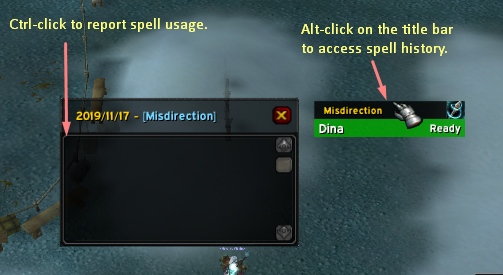
If you alt click on the spell name you will access to the spell's usage history that you can report to the group using ctrl+click on a single log.
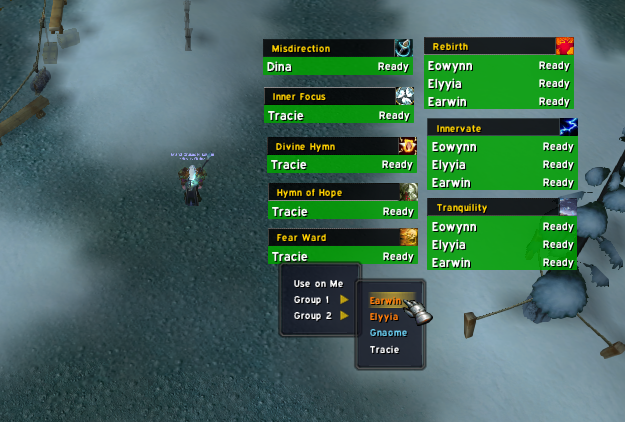
Ready spells are green with Ready next to them. Spells on cooldown will be red with the timer next to them. You see on this image spells I chose to track for demonstration purposes only.
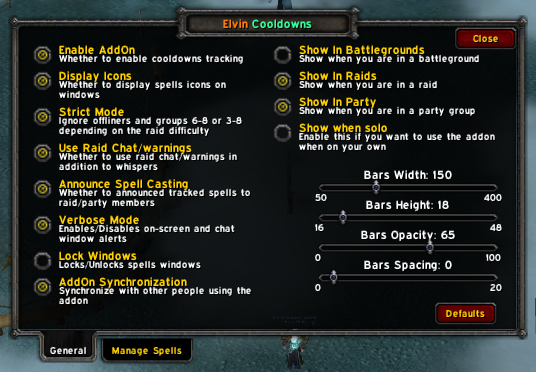
You can access this by typing "/elvin". Here you can alter addon's behavior to what suits you and you can even change the size and addon's usage too.
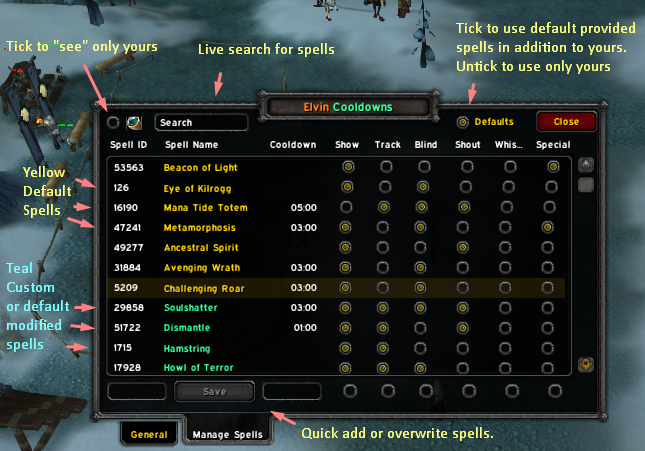
The addon allows you add as many spells as you want or simply use default provided ones. A modified provided spell (yellow) will be copied to your custom list (teal). You can filter, search or edit, delete or overwrite. Play with tou see.
Description
Inspired from Rebirther, this addon was mainly made for a friend of mine but I wanted to share it with you because at some point it can be handy.
What is it?
If you are not familiar with Rebirther, just take a look at it to know more about it. Unlike it, this addon gives you the possibility to track any spells you want, some of them or all of them. If comes with a lot of cooldowns that you can choose to track or not, show or not but it gives you the possibility to track spells you choose (more of this explained on the configuration image #2)
What is the difference between "Show" and "Track"?
Basically, if a spell is not tracked it won't be shown even if the "Show" check button is ticked. The addon needs to track it to be able to display it. This way, when you choose to show its frame you will have its usage history as well as its cooldown.
Terms Explanation:
• Spell ID: It is obviously the spell ID. The addon will ignore if it cannot find the spell. • Cooldown: it is shown as clock time but when you want to add your custom spells make sure to type in the cooldown in seconds. • Show: To choose whether to display the spell frame or not. • Track: It is simply to allow the addon to track the spell or not. Notice that if this is unticked and you choose to show the frame it won't be shown because the addon is not set to track the spell. • Blind: A blind spell is a spell that has no specific target or it is a spell that the player can only cast on himself/herself or on a group of player. Take example of Divine Hymn, Hymn of Hope, Tranquility, Metamorphisis, Heroism/Bloodlust ...etc • Shout / Whisper: The first is used to choose whether to tell group members about the spell you are casting (or casted) and the second is to whether whisper your target about the spell your casted on him/her. • Special: Special spells are spells that are only obtained if certain talents are picked or are related to certain professions. Take example of Death Knigh's Hysteria, Warlock's Metamorphosis, Mage's Focus Magic or Jeeves ... etc
Clicks:
Clicking on a player's name from a spell frame will pop up a menu for you with raid group so you can choose to tell the player on whom to cast that spell. Holding "ctrl' before clicking it will quickly tell the player to use the spell on you or to use it immediatly if it is a blind spell (see above). If you alt-click the spell's name (which is the black title bar) you will access the spell usage history so you can keep track of what was used, by whom, on whom and at what time. Within the log window, if you ctrl-click a single lot it will report it to raid/party group.
Except for the configuration frame that allows you to change options and manage spells there is no other GUI. You can find more commands if you type "/elvin help"
Elvin Cooldowns Team


Owner