EasyPoisons
Smart poison applicator for TBC Anniversary Rogues — apply any poison to either weapon with a single click using modifier keys, with automatic material purchasing from vendors.
ep.png
ep1.png
ep2.png
Description
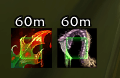
Easy Poisons is a lightweight addon for Rogue players on WoW TBC Anniversary that replaces the old WeakAura-based poison applicator with a fully native, click-to-apply system. It displays two icons on your screen — one for your Main Hand, one for your Off Hand — that you click to instantly apply the configured poison to the corresponding weapon.
How it works
Two small icons appear on your screen. Each one is a smart button that applies a different poison depending on which modifier key you hold before clicking:
- Click — applies your default poison
- Shift + Click — applies a second poison
- Ctrl + Click — applies a third poison
- Alt + Click — applies a fourth poison
- Shift + Ctrl + Click — applies a fifth poison
When you hover over a button, the icon dynamically previews which poison would be applied given your current modifier keys. When a poison is already applied to a weapon, the icon displays the active poison's icon along with its remaining duration (in minutes) and charge count.
The border color changes to warn you when a poison is running low: orange under 10 minutes, red under 5 minutes.
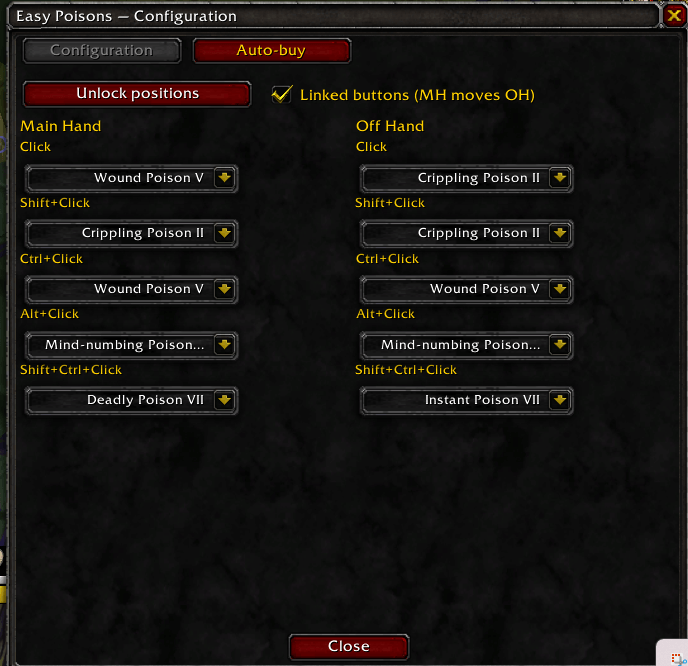
Configuration panel — /ep
The configuration window has two tabs:
Configuration tab
- Set which poison is applied for each modifier combination, independently for Main Hand and Off Hand, using dropdown menus.
- Unlock positions button: drag the two poison buttons anywhere on your screen, then lock them back in place. Positions are saved between sessions.
- Linked buttons option: when enabled, moving the Main Hand button automatically repositions the Off Hand button right next to it. When disabled, both buttons can be moved freely and independently.
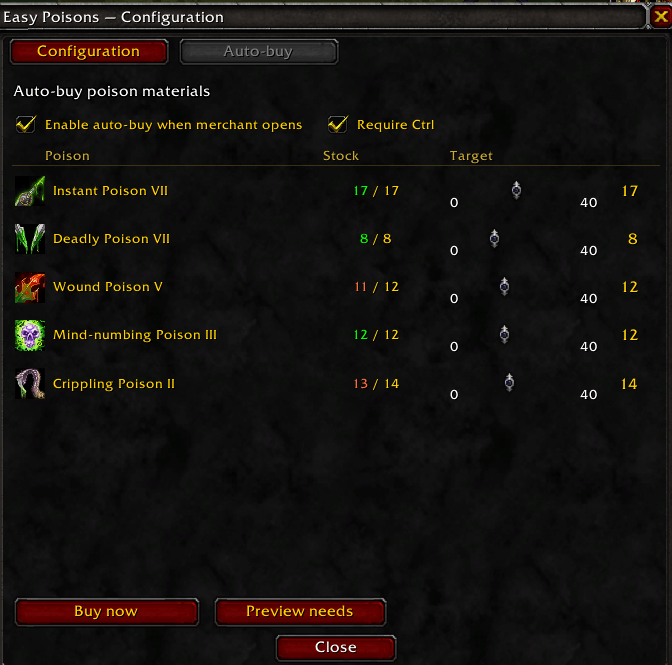
Auto-buy tab
- Set a target stock quantity (0–40) for each poison using sliders. When you open a poison vendor, the addon automatically calculates which crafting materials are missing and purchases exactly what is needed.
- Enable auto-buy checkbox: toggles automatic purchasing when a merchant opens.
- Require Ctrl checkbox: when enabled, you must hold Ctrl at the moment the merchant window opens to trigger the purchase — useful to avoid accidental buying.
- Buy now button: immediately purchases missing materials from the currently open merchant, without needing to reopen it.
- Preview needs button: prints a summary in chat of all materials that would be purchased, so you can verify before buying.
- The stock column updates in real time while the panel is open.
Slash commands
/ep— open the configuration window/epmove— unlock button positions for dragging/eplock— lock button positions/epscan— list all poisons found in your bags with their exact names/epdebug— display the current macro being executed by each button
Language support
The addon automatically detects your client language and uses the correct poison names. Currently supports French (frFR) and English (all other locales). If you switch client language, the configuration resets automatically to the correct defaults for the new locale.
Requirements
- Class: Rogue only (the buttons are hidden for all other classes)
- Game version: WoW TBC Anniversary (Interface 20504+)
EasyPoisons Team