EasyDelves
- By
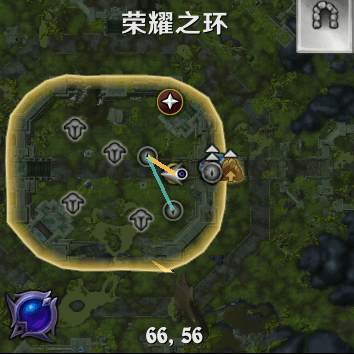
EasyDelves is a compact companion leveling helper for Delves. It shows minimap route feature、your companion's level and experience progress, helps you track the real leveling rate, and makes repeated Delve runs easier.
ScreenShot_2026-08-18_160507_115.png
ScreenShot_2026-08-18_160441_355.png
Description
EasyDelves is a compact companion leveling helper for Delves. It shows your companion's level and experience progress, helps you track the real leveling rate, and makes repeated Delve runs easier.
The interface supports Simplified Chinese, Traditional Chinese, and English. It follows the language selected by the WoW client and falls back to English for other client languages.
Required Add-ons
- SilverDragon: Finds and marks collectible targets on the minimap.
- SilverDragon_RangeExtender: Makes SilverDragon's Delve markers available to the route feature.
- FarmHud: Shows the minimap route on a fullscreen map while you are inside a Delve.
The companion experience panel can be used on its own. The minimap route feature requires the add-ons listed above. Make sure SilverDragon and FarmHud are loaded before entering a Delve.
Features
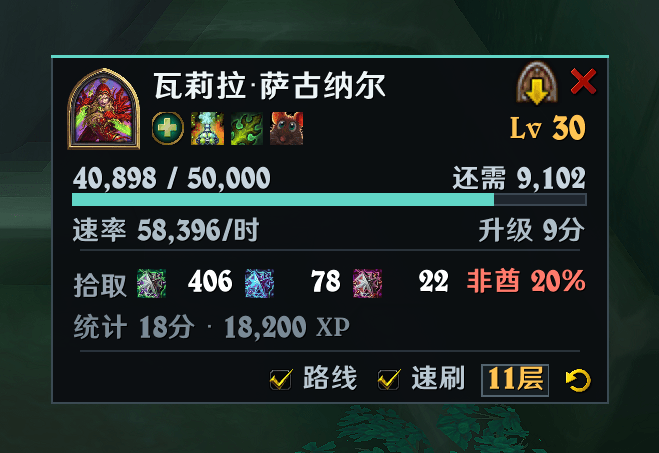
- Shows the companion portrait, name, level, role, and configuration icons.
- Shows current experience, experience needed for the next level, and a progress bar.
- Estimates experience per hour and time to the next level from real companion experience gains.
- Tracks the lifetime pickup count of the three companion experience items.
- Provides an “Leave Delve” button for quickly leaving the current Delve.
- Provides a default-on “Speed Run” option and a Delve tier selector for quickly entering a normal Delve.
- Reads SilverDragon markers and draws a simple route; the route updates when targets are picked up.
- The window can be dragged, and its position is saved automatically.
Installation
- Put the
EasyDelvesfolder inWorld of Warcraft/_retail_/Interface/AddOns/. - To use routes, also install and enable
SilverDragon,SilverDragon_RangeExtender, andFarmHud. - Log in and confirm the related add-ons are enabled in the AddOns list.
How to Use
After entering a Delve, EasyDelves shows the companion's current leveling information. Pickup totals update automatically. The experience rate and time estimate become more accurate as the companion receives real experience during the run.
“Speed Run” is enabled by default and starts at the highest tier. Click the tier button to choose a target from tier 1 to tier 11. Turn it off to use the game's normal difficulty selection flow.
When routes are enabled, targets discovered by SilverDragon are connected by a reference route starting from your current position. With FarmHud fullscreen mode, the route is shown on the fullscreen map. The route is for navigation only; it does not move, loot, or fight for your character.
Commands
/edor/easydelves: Show or hide the window./ed show: Show the window./ed hide: Hide the window./ed toggle: Toggle window visibility./ed reset: Reset experience-rate tracking without clearing pickup totals./ed route: Toggle the Delve route.
You can also click the EasyDelves minimap icon to open the window or its menu.
Notes
EasyDelves does not automate combat, looting, or character movement. Entering and leaving a Delve, along with other character actions, still requires the player to initiate them.
EasyDelves Team