Dungeon Assistant
- By
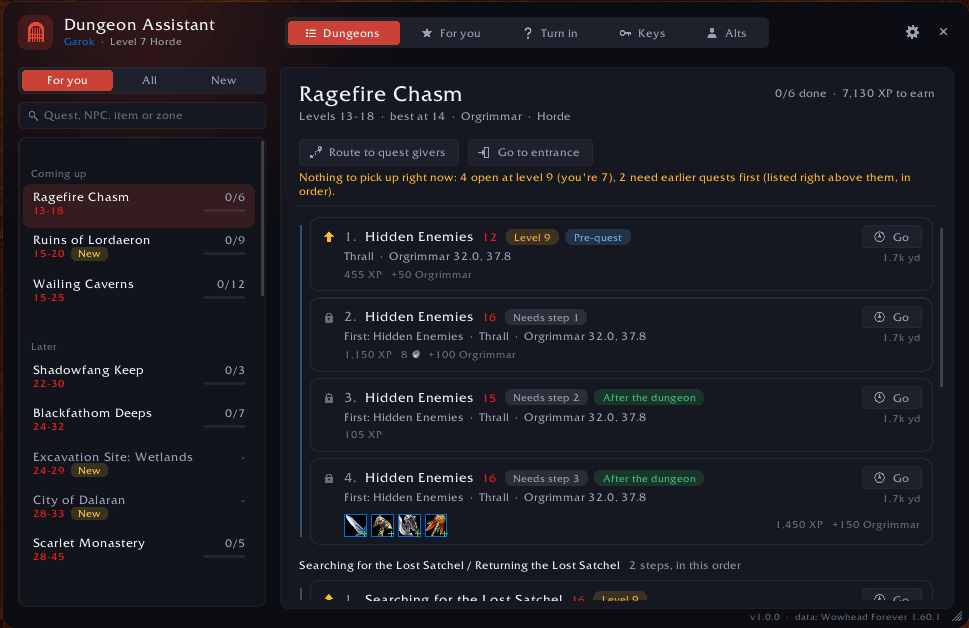
Every dungeon quest in one window: who gives it and where, pre-quests in the right order, rewards, and an arrow that walks you there.
DungeonAssistant-main.png
Description
Dungeon Assistant
Every dungeon quest in WoW: Forever, in one modern window. See who gives each quest, where they stand, what the quest needs, what it rewards, and the order to do them in. An arrow walks you to every quest giver, by flight path, boat or zeppelin when it's far, and a tracker follows your progress inside the dungeon.
Type /da or click the gate on your minimap.
Dungeons
- Every dungeon, old and new. This includes the 9 new Forever dungeons: The Hall of Thanes, Ruins of Lordaeron, Excavation Site, City of Dalaran, The Drowned City, Krol'dok Stronghold, Alcaz Prison, Blackmaw Hold and Shaper's Terrace.
- 326 quests, built from Wowhead's Forever data. Forever changed the rewards of many dungeon quests, so the addon uses Forever's quests, not Classic's.
- The list is sorted for you: right for your level, coming up, later, and done. Level ranges use the game's quest colours.
- Quests in the order you do them. A quest that belongs to a chain shows with its whole chain, numbered and joined by a line:
- the pre-quests first
- then the dungeon quest
- then the steps that follow it (the last steps often give the best rewards)
- chains that start with a pre-quest come first, because that's where you begin
- quests without a line can be done in any order
- Each step is marked "Pre-quest", "After the dungeon" or "Optional" (a quest that only leads you there and can be skipped). Steps in another dungeon say which one, like "Pre-quest (in RFK)".
- A locked step says which step it waits for: "Needs step 3".
- Some steps come in versions, one per class (like Lord Valthalak's Amulet). They show "(1 of 3)": the quest giver offers the one that's yours.
- Steps you've already done drop out of the list.
- Clear status:
- a lock means the quest needs an earlier quest
- an arrow pointing up means it only needs a higher level
- "Pick up Rig Wars first" means a quest only needs another one picked up, not finished
- Quest cards show:
- who gives the quest, in which zone and at which spot
- your status: ready to pick up, in your log (with live progress), ready to hand in, done, or locked (and what's missing)
- a "Go" button, with how far it is under it (or which continent)
- the rewards, with item tooltips
- XP, money and reputation
- Your rewards are checked: rewards your class can't use are greyed out, and a green plus marks items with a higher item level than what you wear. The game's own tooltip decides.
- Quest chains: click a card to see the whole chain, with the steps you've done.
- Bosses of every dungeon are listed in order, with the quests that need each one.
- Keys: each dungeon shows the keys it needs, and whether you have them.
- Search by quest, NPC, item or zone.
Navigation
- Route to quest givers: the arrow walks you to every quest giver of a dungeon, nearest first. It moves on to the next stop by itself when you pick up the quests there, and includes the first step of chains you haven't started.
- Everything here: one route for every dungeon quest you can pick up and every finished quest you can hand in, in the zone or city you're in (for example, everything in Orgrimmar). Grey quests are left out.
- Go to entrance: the arrow points to the dungeon entrance.
- Turn-in route: the arrow walks you to every finished quest's turn-in.
- The arrow:
- shows the distance and time left
- turns green when you face the right way, yellow to the side and red behind you
- says when you have arrived
- Flights: when the target is far away, the arrow first leads you to the flight master and tells you where to fly. It only uses flight paths you know: open any flight master once and the addon learns them.
- Boats and zeppelins: when the target is on another continent, or on Teldrassil, the arrow leads you to the right dock or zeppelin tower and says where to go. This includes Forever's new routes: Stormwind Harbor, Southshore, Gadgetzan to the Riverglades, and the Valanaar Skydocks.
- Line on the minimap: a dotted line from you towards where the arrow points.
- /way:
/way 50 40or/way Orgrimmar 50.5 40.2 Thrallputs the arrow on a spot, like TomTom. If TomTom is installed, use/daway. - Corpse run: die in a dungeon, and after you release, the arrow points back to its entrance.
- Map pins on the world map and the minimap show:
- entrances
- quest givers you can visit now
- turn-ins
- your route
- Optional: also place the game's own waypoint and on-screen marker.
Inside the dungeon
- A tracker shows:
- your quests for the dungeon you're in, with progress bars
- how many in your group have each quest
- the bosses in order, how many are down, and which one is next (bosses your quests need are marked)
- Dungeon routes, for the tank. Neither Wowhead nor the game has boss positions inside Forever's dungeons, so the addon learns the way:
- while you play, it records where you walk and where each boss dies
- it keeps the run that got furthest
- next time, it draws that run on the dungeon map (M): a dotted path and the bosses, numbered in kill order
- the arrow follows the route to the next boss
- it shares the route with group members who have the addon, so a tank who has never been there gets it from someone who has
- Hand-in reminder: leave with finished quests, and the addon offers the turn-in route.
Group
- See who has each quest. The game tells us for everyone in the group. Members with the addon also share which quests they've finished.
- Share one quest or all of them with one click.
More
- For you: the best dungeons for your level right now, the quests you can pick up nearby, and the "Everything here" route.
- Town notice: come into a town or city, and a small notice says how many dungeon quests you can pick up or hand in there. It has a button for the route.
- Keys: the dungeon keys, what they open, how to get them, and which of your characters has them.
- Alts: every character's progress in every dungeon.
- Tooltips:
- quest givers show their dungeon quests
- enemies show which of your quests need them
- rewards say which quest gives them
- Learns from your game: Forever is still in beta, and Wowhead doesn't show everything yet. When you pick up a quest whose giver Wowhead doesn't place, the addon remembers where it was. It also remembers the entrance of any dungeon you walk into.
Window
- Any size: drag the bottom-right corner, or use Settings > Window size.
- Key bindings for the window, the next stop, "Everything here" and removing the arrow: Options > Keybindings > AddOns > Dungeon Assistant.
- Small animations: windows fade in and out, and progress bars fill up smoothly. You can turn them off.
Honest data
- Quest givers, coordinates, levels, chains, goals and rewards come from Wowhead's WoW: Forever database (patch 1.60.1).
- Pre-quests come from Wowhead's quest series and its "Every Dungeon Quest" guide. Where those stop short, the links come from what Wowhead's quest pages and comments say. Every dungeon was checked step by step, for both factions.
- Quests that start from an item show which item, from Wowhead's item pages ("This Item Begins a Quest", and who drops it).
- A boss is only linked to a quest when that boss is where the item comes from. Items that drop from every mob, like the Dire Maul librams, aren't tied to single bosses.
- Entrances come from the game's own map when it has them, from where you walked in, or from Wowhead. For seven of the new Forever dungeons, Wowhead only shows where the dungeon is on its Forever world map, so the arrow says the spot is close to the entrance.
- Boats and zeppelins come from Wowhead's WoW: Forever world map. Flight paths come from the game. Dungeon routes come only from runs in your game and your group's.
- When Wowhead doesn't have something yet, the addon says so instead of guessing. For example, Wowhead doesn't list the quests of seven new dungeons yet: pick one up in game and it shows up.
Commands
/daopens or closes the window/da nextopens "For you": what to do next/da herestarts the route for everything here/way [zone] x y [name](or/daway) puts the arrow on a spot;/way clearremoves it/da route <dungeon>starts a pick-up route/da turninstarts a turn-in route/da entrance <dungeon>points the arrow to an entrance/da clearremoves the arrow/da arrowand/da hudshow or hide the arrow or the tracker/da resetmoves the windows back to the middle of the screen/da donateshows the donation link
Support
Made by Shadowblade. Enjoying Dungeon Assistant? Support it with a donation - thank you!
The Dungeon Assistant Team