Driev's Essentials - Core
- By
A Classic Era toolkit with features that I find essential for specifically warrior raiding.
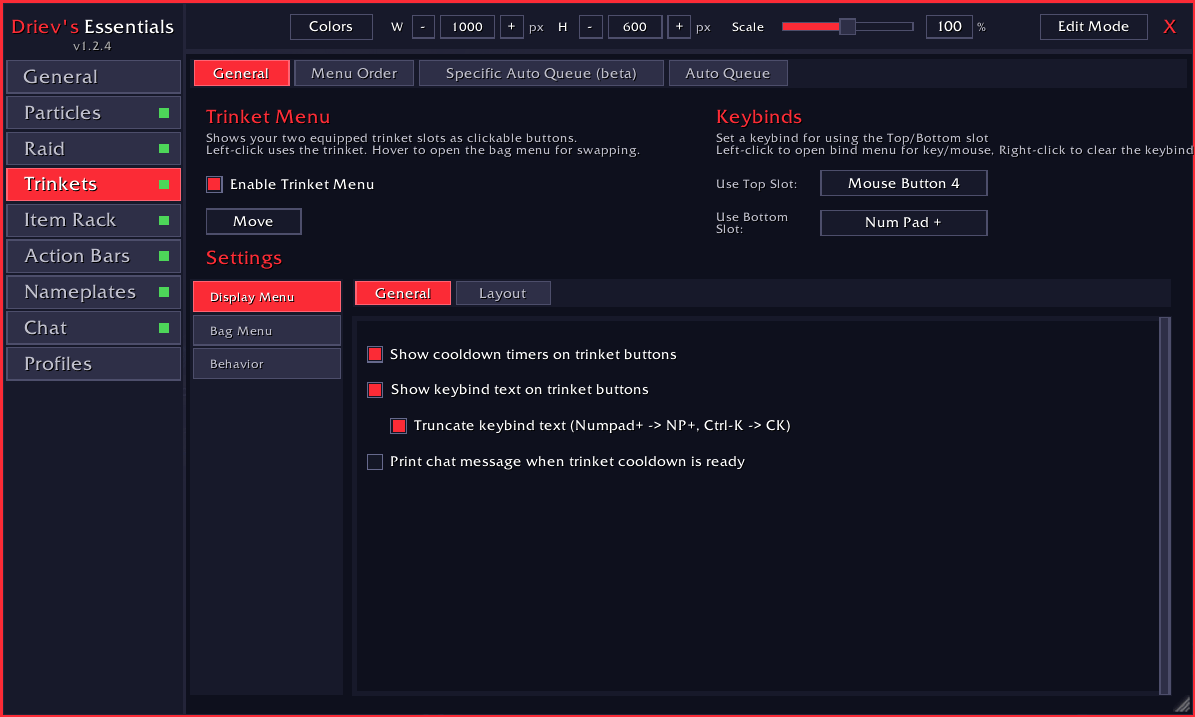
General look of the addon
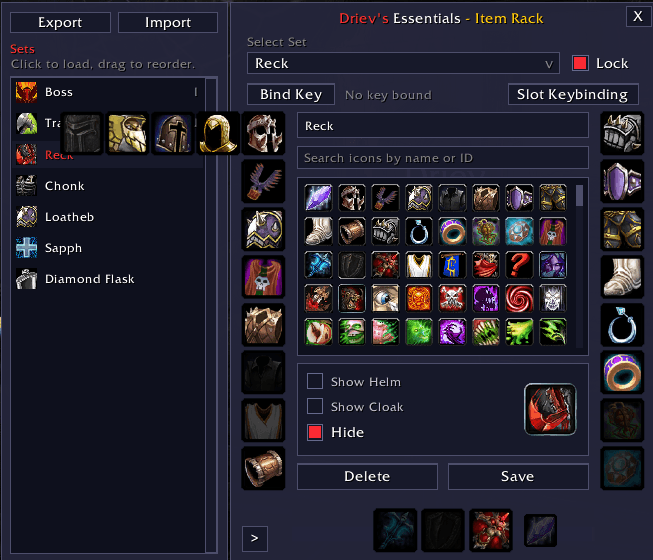
The sets manager of the itemrack feature
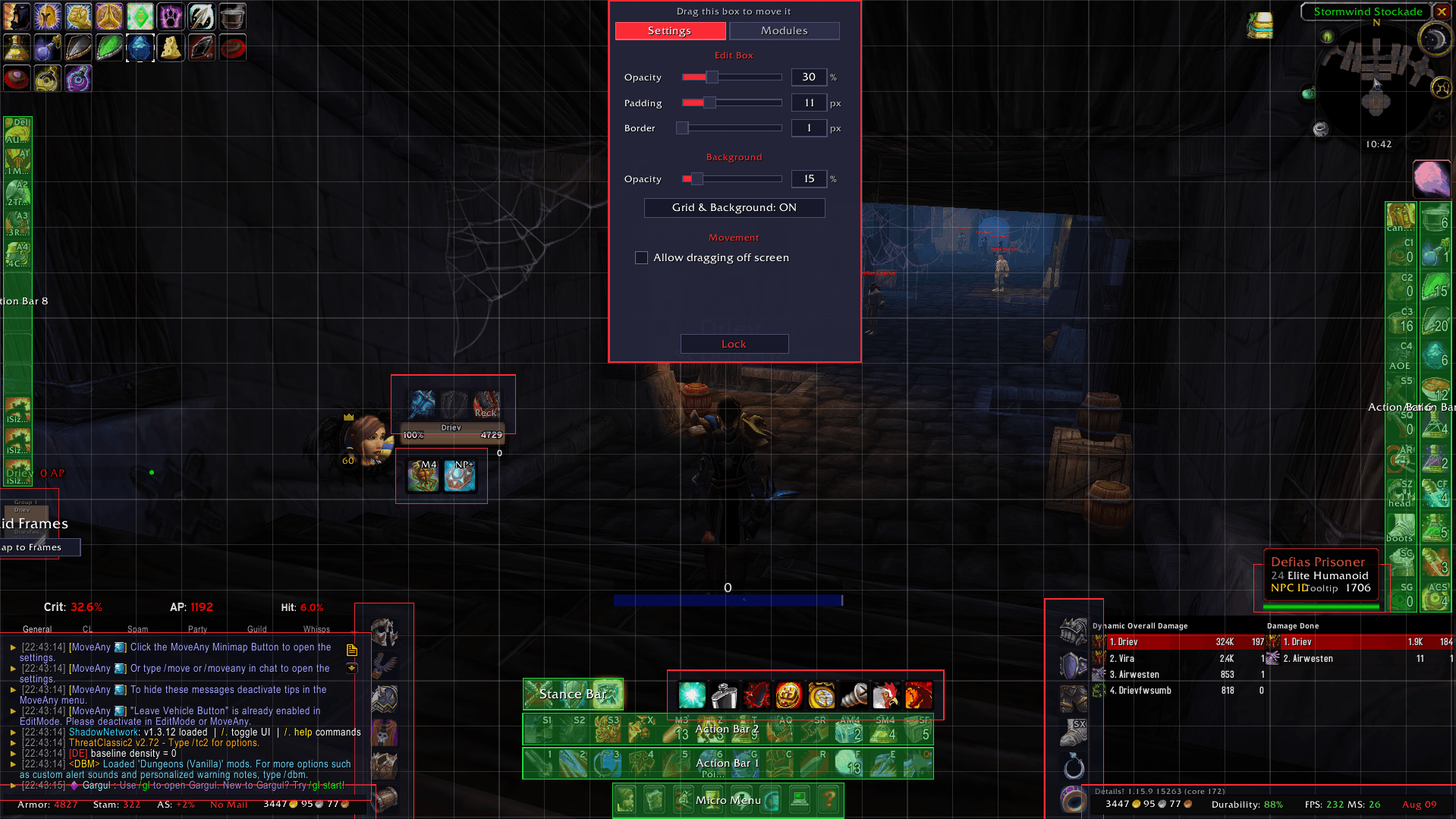
The edit mode that comes with the addon
Description
Driev's Essentials
A module-based quality-of-life addon for World of Warcraft: Classic Era
Everything I consider essential for playing and raiding - familiar features, rebuilt with the customization & features I always felt was missing.


Classic Era 1.15.x · No dependencies · Raid FPS BOOST via particle control
What's in the box
Driev's Essentials is one core addon plus optional modules. Modules included in this Core addon are the following.
| Module | What it does |
|---|---|
| DrievsEssentials | Core - settings UI, profiles, Move Mode, TTK, raid frames, tooltips, aura duration engine |
| DrievsEssentials_Particles | Per-encounter spell particle density control - real FPS back in 40-man raids |
| DrievsEssentials_Trinkets | Trinket display, orderable bag menu, soft queue and per-boss auto-queue |
| DrievsEssentials_ItemRack | Full gear-set manager with slot menus and movable item buttons |
| DrievsEssentials_SwingTimer | Mainhand / offhand swing bars with Heroic Strike & Cleave queue colouring |
Every module lists DrievsEssentials as a dependency, so the core folder is the only one that isn't optional.
Particles - the FPS feature nothing else does
Spell particles are one of the biggest framerate killers in a 40-man raid. Particles turns them off the moment you enter a raid, and back on for the exact bosses where you need to see the mechanics - frames on trash, clarity on bosses, zero manual toggling.
It's not just FPS: with the particle spam gone you can actually see the boss and your own position, so you can position yourself properly more easily, especially helpful on trash pulls.
- Per-raid, per-boss checkboxes - you pick which encounters get particles back.
- Linger timers - keep them on for a few seconds after a kill (Viscidus slime, Ouro residue).
- Class filter and adjustable encounter density.
Core Features
One Settings Window
A clean, dark, sidebar-driven config panel - every module registers its own tab, complete with a live status dot showing what's enabled at a glance. Panels build lazily on first click, so opening the window never hitches.
Open it with /driev, /dv, /dre, or the minimap button.
Profiles
- Create, clone, switch and delete unlimited profiles, each holding a complete copy of every setting and every saved frame position.
- Profiles are assigned per character - your raiding warrior and your alt keep entirely separate setups.
- Export any profile to a shareable string, import one from a friend.
Time-To-Kill
A clean, configurable TTK estimate for your current target, with a boss-only mode for raid nights. Broadcasts updates through WeakAuras if installed, or its own lightweight callback for other addons to hook.
Raid Cleanup
Optionally hide friendly player / pet / guardian / totem nameplate text while inside a raid instance, and silence chat bubbles - for a clean screen during progression.
Tooltip Skin
A tooltip rework that recolours Blizzard's tooltip rather than replacing it, so it reverts perfectly when toggled off:
- Class-coloured names and difficulty-coloured level lines
- Class / reaction-coloured borders, or a fixed custom colour
- Health values drawn on the bar, with an outlined health bar
- Optional realm stripping and cursor-follow anchoring
- A movable anchor so the tooltip lives wherever you want it
Aura Duration Engine
A built-in replacement for LibClassicDurations. Classic Era only reports durations for your own auras - this engine reconstructs the rest from combat log data, covering player spells, NPC abilities and diminishing returns brackets, and exposes them to the rest of the suite.
Trinkets
- Displays both worn trinkets with live cooldown swipes, keybind text and click feedback - styled to match the classic Blizzard action button, and fully Masque-compatible.
- Hover to open a bag menu of your remaining trinkets for instant manual swapping.
Alt+Clickhides a trinket from the list;Alt+Hoverthe display brings hidden ones back.- Dock the bag menu to any side or corner of the display, or place it freely.
- Auto Queue - set a priority order per trinket slot and let the addon swap in the next available trinket automatically. Fully combat-safe, and smart enough never to swap a trinket away before it's been used and its buff has expired.
Soft Queue - line up your next trinket mid-fight
Nothing else does this. Hold a modifier and click any trinket in the bag menu to soft-queue it: instead of swapping now, it waits for the trinket you're wearing to be used and its buff to expire, then swaps itself in the moment that's safe. A gold badge on the display shows what's waiting.
You can pop your on-use, keep the full buff duration, and have the next trinket land the instant it stops mattering - no timers to watch, no macro spam, no risk of cutting your own proc short. Click the same trinket again to un-queue it.
Menu Order - your bag menu, your order
The bag menu doesn't have to follow bag order. Turn on Menu Order and arrange every trinket you own into an explicit list, so the ones you actually swap to sit closest to the display and never move when your bags shuffle. Hidden trinkets always sort to the end.
Specific Auto Queue (beta)
Per-encounter trinket presets. For any boss, pick a Main trinket per slot and a Soft follow-up, then choose exactly when it fires:
- In Combat - once you're in the encounter and in combat, with an optional safeguard delay so a brief pull doesn't trigger a swap.
- Encounter Start - the moment the encounter begins, for when you want the set on before your first global.
- Boss at 75 / 50 / 35 / 20% - health-threshold swaps for execute-phase trinkets.
- Encounter End - swap back automatically after the kill or wipe.
Set it once per boss and your trinkets handle themselves for the whole raid.
Item Rack
A faithful, modernised gear-set manager built on this addon's profile and settings conventions.
- Build and save equipment sets, swap them in one click.
- Character-sheet slot menus - click any equipment slot to see and equip every alternative in your bags.
- Movable item buttons, groupable into clusters with their own scale, spacing, alpha and docking.
- Per-set slot conditionals - override individual slots per set, including weapon temp-enchant awareness (tooltips name the actual enchant, e.g. Sharpen Blade V).
- Bindable keys per button, and Masque support.
- Sets are stored per character (gear is character-specific) and move between characters via export/import.
Swing Timer
- Separate mainhand and offhand bars that fill from your last swing to your next.
- A smooth spark that actually tracks the fill - redrawn every frame, no stepping or wobble.
- Queue colouring - the bar recolours the moment Heroic Strike or Cleave is queued, so you always know what your next swing is doing.
- Handles swing-resetting casts and ranged shoots correctly, with an editable reset-spell list.
- Fully skinnable: bar texture, colours, size, spark, and independently justified label text.
Slash Commands
Every module registers its commands into one place - run /driev help for the complete, live list.
| Command | Description |
|---|---|
/driev · /dv · /dre |
Open the settings window |
/driev help |
List every registered command |
/driev debug on · /driev debug off |
Start / stop logging API events to SavedVariables |
/driev debug print |
Dump the saved log to chat |
/dedur status |
Duration engine: rule count, tracked units, registered readers |
/dedur unit |
Every aura the duration engine sees on your target |
/dedur dr |
Diminishing returns brackets on your target |
Installation
- Download the latest release.
- Extract the folders you want into
World of Warcraft\_classic_era_\Interface\AddOns\. - Keep DrievsEssentials - every other folder depends on it.
- Launch the game and type
/driev.
Optional integrations: Masque · WeakAuras · ElvUI - all detected automatically, none required. The suite runs completely standalone.
Questions, bug reports or feature requests?

If Driev's Essentials made your raid nights better, any support is hugely appreciated.

Made for Classic Era by Driev
Driev's Essentials - Core Team