DoorStep
- By
Manages and organizes player house tours with queue tracking, group coordination, and automated tour controls.
Main.png
Description
🏡 DoorStep v5.0.0
The Ultimate Player Housing Tour Manager
Big tours. Small UI. Maximum house envy.
Your group came to admire incredible homes, discover clever builds, and ask, "HOW did you make that?" Not spend half the evening asking whose house is next.
DoorStep turns housing-tour chaos into an organized community event, with a synchronized tour queue, automatic house information, neighborhood Endeavor tracking, and controls that let you lead your way.
Casual neighborhood crawl? Full raid of enthusiastic decorators? Bring the group. DoorStep brings the organization. 🎉
NEW IN 5.0: A completely modular interface. All the tour power, without a giant window photobombing someone's masterpiece.
🚀 NEW: LESS WINDOW. MORE WINDOW-SHOPPING.
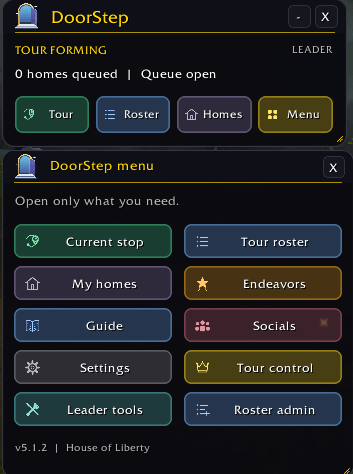
Meet the DoorStep Hub, your compact launchpad for everything tour-related. Open what you need, close what you don't, and stop making your screen do unpaid administrative work.
- 🧭 Current Stop: Who you're visiting, where they live, their house note, available Endeavor progress, and a visit button. Found your decorating courage? Click Want to Add Your Home? to open My Homes.
- 📋 Tour Roster: A separate, resizable roster with search, All / Queued / Mine filters, individual home entries, and leader queue-management tools.
- 🏠 My Homes: Your Alliance and Horde tour entries, with separate notes and simple Add, Update, and Remove controls.
- 🌟 Endeavors: See available neighborhood Endeavor information for your group's homes, including homes that are not in the tour.
- 🎯 Tour Control: The leader's compact command center, with the current stop, countdown, queue status, and a primary button that changes to the next appropriate action.
Move windows independently, adjust their scale, and keep your preferred layout. Collapse the Hub and Tour Control for an even smaller footprint. Themes, optional edge snapping, and reduced-motion settings let DoorStep fit your setup.
Close the Hub and Tour Control hides with it. The tour and countdown keep running. Other open modules can stay right where you left them.
Your view belongs to the house. Not the addon. ✨
🏠 TWO HOMES. TWO NOTES. ZERO IDENTITY CRISES.
Alliance home is a cozy cottage? Horde home is a suspiciously elaborate maze? Give each one its own moment in the spotlight.
Open My Homes, add an optional note beside the correct faction, and click Add home. DoorStep looks up the neighborhood and plot automatically when WoW makes that information available. Both homes can join the same tour, each with its own queue entry and note.
Already queued? Update note changes your description without creating another entry.
Having a last-minute "please ignore the unfinished basement" moment? Click the red Remove Home button and confirm Yes. Only that home leaves the queue. Your other home, saved notes, and Endeavor information stay intact. Remove both separately when you'd rather just enjoy the tour.
Showing a home is optional. Appreciating everyone else's decorating obsession is the main event. 😄
🌟 NEW: ENDEAVOR INFO, WITHOUT THE ROLL CALL
No sharing command. No collection button. No "everyone please submit your information" speech.
The leader's DoorStep automatically checks group members' available Alliance and Horde homes, including members without DoorStep and homes that are not queued for the tour.
Results appear as they're collected, with separate faction entries, Endeavor names, available milestone progress, and last-checked information. New arrivals are picked up automatically, and collection continues even when the tour queue is locked.
Hunting for a neighborhood with a particular Endeavor vendor? Open Endeavors and see what's available. Friends without the addon can use #V to receive a private summary, too.
Less paperwork. More vendor expeditions. 🛍
Endeavor information depends on what WoW makes available. Loading or unavailable results are identified rather than filled in with guessed progress.
🚪 RIGHT-CLICK YOUR WAY TO THE NEXT DOORSTEP
Spot an interesting Endeavor? Want to visit a group member who isn't showing a home on the tour?
Right-click their name in the Roster, or their entry in Endeavors, to open Blizzard's native player menu. Choose View Houses, when available, and select the home you want to visit.
No tour entry required. Use the roster's All filter to find group members who haven't submitted a home.
These menus are available out of combat and respect Blizzard's normal house-access rules.
🤖 PLAYER CONTROLLED TOUR: YOU HOST. DOORSTEP DRIVES.
You organized the event. You deserve to actually look at the houses.
Enable Player Controlled Tour in Leader Tools and let DoorStep handle the announcements and countdowns:
- ✅ Announces the next queued home and starts its timer after a 15-second transition.
- ✅ Advances automatically when the countdown finishes. Empty queue? It waits for another home instead of demanding a reset.
- ✅ Reposts joining instructions every three minutes and re-announces the current stop while a countdown is running.
Lock the queue, end the tour, or take manual control whenever needed. You remain the host, not a passenger locked out of the controls.
Hands-free tour management. Not automatic teleporting. Players still choose and visit homes themselves. DoorStep handles the herding, not the walking. 👣
⏳ YOUR TOUR. YOUR TEMPO.
Not every tour needs the same rhythm. DoorStep lets you choose:
⏳ Timed tours: Use a synchronized countdown, with the compact controller guiding you through the next action.
☕ Untimed tours: Turn off Use a countdown and advance whenever the group is ready. Sometimes the tiny custom-built kitchen deserves another minute.
🌍 Free visits: Enable FFA for open exploring without guided progression.
Run a tight schedule or let everyone wander. There is no decorating speed limit.
💬 NO ADDON? YOU'RE STILL INVITED.
The Party or Raid leader runs DoorStep. Other members can participate through group chat without installing it, while addon users get the synchronized windows and interactive controls.
Want your home on the tour? Type @Visit A for Alliance or @Visit H for Horde in group chat. Add a note after the command for a little extra personality:
@Visit A The Goonies adventure house
@Visit H A maze. The exit is technically somewhere.
Need a private update? Type one of these in party or raid chat:
- 🏠 #C: Which house are we visiting?
- 📋 #Q: Where am I in the queue?
- ⏳ #T: How much time is left?
- 🌟 #V: Send me the available group Endeavor summary.
DoorStep replies by whisper, keeping the group chat available for important things like "I need that rug."
You can also whisper #V directly to the leader.
🎉 READY TO OPEN SOME DOORS?
Type /ds or click the minimap button to open DoorStep.
Start with My Homes to submit a stop, Tour to follow the current home, or Roster to see the queue. Leading the group? Open Tools from Tour Control, choose your tour style, and get the house party moving.
🚪 PART OF THE DOOR FAMILY
DoorStep is part of House of Liberty's growing Door family of addons:
🔔 DoorBell: Bring your home to life with a customizable doorbell that greets visitors. Because a proper entrance deserves a little fanfare.
📹 DoorCam: Log and receive alerts when players enter your house while you're away. Keep tabs on who's dropping by.
💬 DoorSpeak: Give your outgoing chat some personality with L33T, Glam, Brainrot, UwU, Pirate, Shakespearean Speak, and more. Why speak normally when ye could speak like a pirate?
Find the Door family and community links under Menu > Socials. Yes, we gave the button a little sparkle. It wanted to dress for the occasion. ✨
🏡 Your homes deserve an audience. Your screen deserves some breathing room. DoorStep brings both.
DoorStep Team